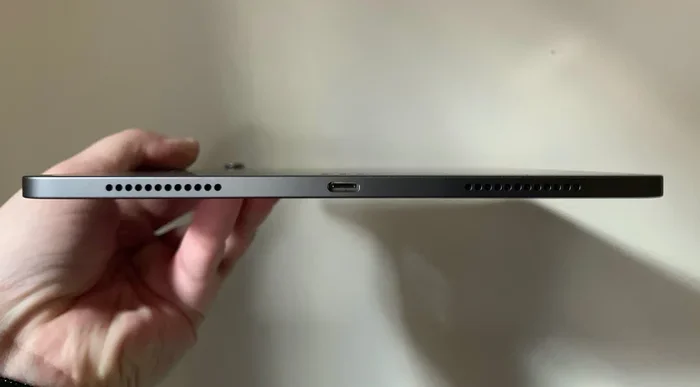
Featured image for iPad Air USB-C port close-up
Image source: cdn.arstechnica.net
Yes, the iPad Air does have USB-C — but only on certain models. Starting with the 4th generation iPad Air released in 2020, Apple switched from the Lightning connector to USB-C, making it easier to connect modern accessories and charge faster. Older iPad Air models still use Lightning, so it’s important to check your specific model. USB-C on the iPad Air supports data transfer, charging, and connecting to external displays, cameras, and storage devices.
Imagine this: you walk into a coffee shop, pull out your iPad Air, and realize you forgot the charger. You glance around — there’s a MacBook on the next table, a guy gaming on a Nintendo Switch, and someone charging an Android phone. You ask, “Hey, does anyone have a USB-C cable I could borrow?” That simple question wouldn’t have worked a decade ago, but today, USB-C is everywhere. And if you have an iPad Air made in the last few years, you’re part of that universal club.
But here’s the thing — not every iPad Air has USB-C. Some older models still use Apple’s old Lightning port, and that can cause confusion, especially if you bought one used or received it as a gift. Knowing whether your iPad Air has USB-C matters a lot because it affects how you charge it, what accessories work with it, and how fast you can move files around.
In this guide, we’ll break down exactly which iPad Air models have USB-C, what that means for you, and how to get the most out of it. Think of this as your friendly cheat sheet to all things iPad Air and USB-C — no tech jargon, no confusing acronyms, just straight answers.
Key Takeaways
- iPad Air 4th Gen and newer have USB-C: Apple made the switch in October 2020, and every iPad Air since then uses USB-C instead of Lightning.
- Older iPad Air models use Lightning: The 1st through 3rd generation iPad Air (2013–2019) all have the older Lightning port.
- USB-C offers faster charging: With the right power adapter, USB-C iPad Air models can charge up to 30% faster than older Lightning versions.
- Data transfer speeds vary: The iPad Air uses USB 3.1 Gen 2, offering speeds up to 10 Gbps on most models — that’s fast enough to transfer a full HD movie in seconds.
- You can connect more accessories: USB-C opens the door to external monitors, SD card readers, MIDI keyboards, and even some AirPods charging cases.
- One cable for many devices: If you own a modern MacBook, Android phone, or Nintendo Switch, you can use the same USB-C cable across all your gadgets.
- Not all USB-C cables are equal: For the best speeds, you’ll want a USB-C cable rated for 10 Gbps or higher, also called USB 3.1 Gen 2 cables.
📑 Table of Contents
- Which iPad Air Models Have USB-C?
- Why Did Apple Switch to USB-C on the iPad Air?
- What Can You Do with USB-C on the iPad Air?
- Are All USB-C Cables the Same?
- USB-C vs Lightning: What’s the Real Difference?
- Common Questions About iPad Air and USB-C
- Practical Tips to Get the Most Out of USB-C on Your iPad Air
- The Future of iPad Air and USB-C
- Final Thoughts: Should You Care About USB-C on the iPad Air?
Which iPad Air Models Have USB-C?
Let’s get straight to the point: the iPad Air switched to USB-C starting with the 4th generation model, released in October 2020. Every iPad Air made since then includes a USB-C port instead of the older Lightning connector. That means the 4th gen, 5th gen (M1, 2022), and 6th gen (M2, 2024) iPad Air all feature USB-C.
If you have an older iPad Air — specifically the 1st, 2nd, or 3rd generation — you’re stuck with Lightning. These models were released between 2013 and 2019 and use Apple’s proprietary 8-pin Lightning port that you’ll recognize from older iPhones.
Quick Reference: iPad Air Generations and Ports
- iPad Air 1st Gen (2013): Lightning port
- iPad Air 2 (2014): Lightning port
- iPad Air 3rd Gen (2019): Lightning port
- iPad Air 4th Gen (2020): USB-C
- iPad Air 5th Gen (2022): USB-C
- iPad Air 6th Gen (M2, 2024): USB-C
Not sure which model you have? It’s easy to check. Just look at the back of your iPad Air — the model number is printed in tiny text near the bottom. You can also go to Settings > General > About on your iPad to see the model name. If it says anything from “iPad Air 4” to “iPad Air 6” or “iPad Air (M2),” you’ve got USB-C.
How to Tell Just by Looking at the Port
Here’s a super simple trick. Look at the charging port on the bottom of your iPad. If it’s a small, rounded rectangle with two sides curved in (like a tiny pill shape), that’s Lightning. If it’s a longer, oval-shaped port with smooth, rounded edges, that’s USB-C. Think of Lightning as a skinny pill and USB-C as a fat pill. Easy, right?
Why Did Apple Switch to USB-C on the iPad Air?
Apple didn’t make the switch to USB-C just because it was trendy. There were some real, practical reasons behind the change. The biggest one? The European Union passed a law in 2022 requiring all smartphones, tablets, and many other devices to use USB-C by the end of 2024. This was meant to cut down on electronic waste and make life easier for consumers who were tired of owning 10 different chargers for 10 different devices.
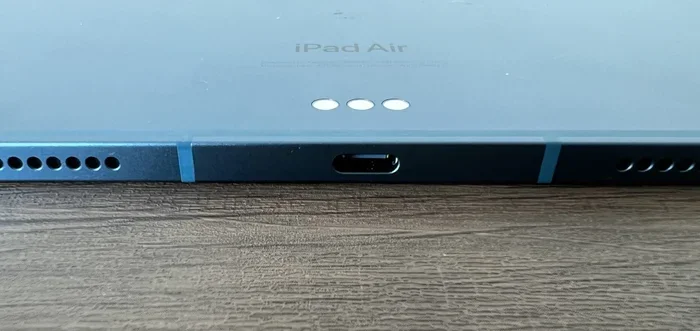
Visual guide about iPad Air USB-C port close-up
Image source: cdn.arstechnica.net
But Apple actually made the move on the iPad Air back in 2020 — two years before the EU law kicked in. Why so early? Because iPad Air users were already clamoring for it. Creative professionals, students, and business users wanted faster data transfer, the ability to plug into bigger screens, and a way to use the same cables they already owned for their laptops.
The Real-World Perks of USB-C
Picture this: you’re a photographer who just shot 200 pictures on a weekend trip. With a Lightning iPad Air, you’d need an adapter to plug in an SD card reader. With a USB-C iPad Air, you just plug in a USB-C SD card reader directly — no adapter needed. Done. Photos loaded in seconds.
Or imagine you’re a music student. You want to plug a MIDI keyboard into your iPad to practice piano. With USB-C, you just plug it in and play. With Lightning, you’d need a special adapter and a lot of patience.
Did You Know? According to a 2022 report by the European Commission, the average consumer owns around three different charging cables. The EU estimated that switching to a universal charger would save consumers up to 250 million euros per year in unnecessary cable purchases. That’s a lot of money — and a lot of e-waste kept out of landfills.
Apple’s Bigger Plan
Apple has been moving its entire product line toward USB-C over the past few years. MacBooks have used USB-C (or Thunderbolt) for years. iPads gradually made the switch. And as of late 2024, even iPhones finally adopted USB-C with the iPhone 15 lineup. So the iPad Air was actually ahead of the curve — a bit of a trendsetter, if you will.
What Can You Do with USB-C on the iPad Air?
Okay, so your iPad Air has USB-C — now what? A lot, actually. USB-C isn’t just a charging port. It’s more like a Swiss Army knife. Let me walk you through the cool stuff you can do.
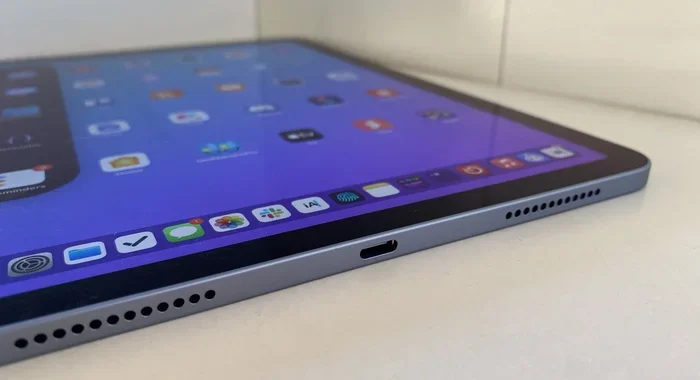
Visual guide about iPad Air USB-C port close-up
Image source: cdn.macstories.net
1. Charge Faster
USB-C supports something called USB Power Delivery (USB-PD), which is a fancy way of saying it can charge faster than old USB or Lightning ports. The iPad Air comes with a 20W USB-C charger in the box, but you can use a higher-wattage charger (like the one from your MacBook) to charge it even faster.
Here’s an analogy: imagine filling up a swimming pool with a garden hose versus a fire hose. The old Lightning charger is the garden hose — it works, but it takes a while. The USB-C charger is the fire hose — it fills up way quicker. If you upgrade to a 30W or 65W USB-C charger, you can charge your iPad Air from 0 to 50% in about 30 minutes. Pretty sweet, right?
2. Transfer Files at Lightning Speeds
The iPad Air uses USB 3.1 Gen 2 technology, which supports data transfer speeds of up to 10 gigabits per second (Gbps). To put that in real-world terms, that’s fast enough to transfer a 5GB file (roughly a full HD movie) in about 4 seconds. Compare that to Lightning, which tops out at about 480 megabits per second (Mbps) — that’s roughly 20 times slower.
So if you’re a videographer shooting in 4K, or a designer moving huge Photoshop files, USB-C saves you a lot of waiting around. It also makes backing up your iPad to an external SSD super practical.
3. Connect to External Displays
One of the coolest things about USB-C on the iPad Air is the ability to plug into an external display. Using a USB-C to HDMI adapter or a USB-C hub, you can mirror your iPad screen onto a TV or monitor, or extend your workspace with a second screen.
This is huge for presentations, watching movies, or doing creative work on a bigger canvas. Just imagine giving a slideshow at work — no more squinting at a tiny iPad screen across a conference table.
4. Plug in More Accessories
USB-C opens up a whole world of accessories that didn’t work (or required annoying adapters) with Lightning. Here are just a few you can now use directly:
- External SSDs and hard drives for extra storage
- USB-C hubs for connecting multiple devices at once
- SD and microSD card readers for photographers and videographers
- MIDI keyboards and audio interfaces for musicians
- Ethernet adapters for stable wired internet
- Game controllers for a console-like gaming experience
It’s like going from a single-purpose tool to a multi-tool. USB-C is the Swiss Army knife of ports.
5. Charge Other Devices
Here’s a neat trick: with USB-C, your iPad Air can actually charge other gadgets. Need to top off your AirPods, Apple Pencil, or even a friend’s iPhone? Just plug in a USB-C cable and your iPad becomes a power bank. It’s not going to charge a MacBook, but for small accessories, it’s a lifesaver.
Did You Know? The iPad Air (M2, 2024) can output video to an external display at up to 6K resolution. That means you can use it as a legit workstation setup when paired with a high-end monitor. Not bad for a “tablet,” huh?
Are All USB-C Cables the Same?
This is where a lot of people get tripped up. Just because a cable has a USB-C connector on the end doesn’t mean it’s the same as every other USB-C cable. Think of it like this: all cars have wheels, but not all cars drive the same way. Some are fast, some are slow, some are gas, some are electric.
USB-C cables come in different “speeds” — what the tech world calls USB standards. Here’s the quick breakdown:
- USB 2.0: Speeds up to 480 Mbps. Fine for charging, slow for data.
- USB 3.0 / 3.1 Gen 1: Speeds up to 5 Gbps. A solid middle-ground option.
- USB 3.1 Gen 2: Speeds up to 10 Gbps. This is what the iPad Air supports — the fast one.
- USB 3.2 / USB4: Speeds up to 20 Gbps or 40 Gbps. Overkill for the iPad Air but great for future-proofing.
For the best experience with your iPad Air, look for a USB-C cable that’s rated for 10 Gbps or higher. These are sometimes labeled “USB 3.1 Gen 2” or “SuperSpeed+ 10Gbps.” They’ll have those sweet, fast data transfer speeds and support high-wattage charging.
The Cheap Cable Trap
Here’s a real-world tip from someone who learned the hard way: not all cheap USB-C cables are safe. Some off-brand cables can damage your devices, charge slowly, or even overheat. Stick with reputable brands like Apple, Anker, Belkin, or Ugreen. A good USB-C cable usually runs between $10 and $25, and it’s worth the investment.
What About Charging Only?
If you only need a cable for charging and don’t care about fast data transfer, a basic USB-C cable will work just fine. Many people have two cables — a cheap one for the nightstand and a faster one for the desk where they transfer files.
USB-C vs Lightning: What’s the Real Difference?
You might be wondering why this whole USB-C thing even matters. Lightning worked fine for years, right? Well, yes and no. Let me explain the real differences in plain English.
Physical Design
Lightning is Apple’s proprietary connector — meaning only Apple (and licensed partners) can make it. It’s small and reversible, which was cool when it launched in 2012. USB-C is also reversible, but it’s slightly bigger and used by hundreds of manufacturers worldwide.
Speed
USB-C supports faster charging (up to 100W in theory, though the iPad Air maxes out at around 30W) and much faster data transfer (up to 10 Gbps on iPad Air, vs. 480 Mbps on Lightning). That’s a 20x difference in data speed.
Versatility
USB-C can do many things: charge, transfer data, output video, connect to accessories, and more. Lightning is mostly limited to charging and basic data transfer, requiring adapters for anything fancy.
Compatibility
USB-C is universal — you can find it on Android phones, Windows laptops, MacBooks, Nintendo Switch, Steam Deck, headphones, and more. Lightning is Apple-only. If you have a mix of Apple and non-Apple devices, USB-C makes life so much easier.
Did You Know? When Apple first introduced Lightning in 2012, it replaced the old 30-pin dock connector that had been around since 2003. People were upset then, too. Change is hard, but it usually works out for the better.
Common Questions About iPad Air and USB-C
Even with all that info, you might still have some lingering questions. Let me tackle the ones I hear most often.
Does the iPad Air Come with a USB-C Cable?
Yes. Every iPad Air sold since 2020 has included a USB-C charging cable and a 20W USB-C power adapter in the box. So if you’re buying a new iPad Air today, you’re all set to use USB-C right out of the gate.
Can I Use My MacBook Charger with My iPad Air?
Absolutely. MacBook chargers (especially the newer USB-C ones) work great with the iPad Air. In fact, using a higher-wattage MacBook charger (like a 61W or 96W model) can charge your iPad Air faster than the included 20W adapter. The iPad will only draw as much power as it needs, so there’s no risk of overcharging.
Can I Use AirPods with a USB-C iPad Air?
Yes, but with a small twist. If you have AirPods with a Lightning charging case (like AirPods 2nd or 3rd gen), you can’t plug them directly into the iPad Air’s USB-C port. But the iPad can still connect to AirPods wirelessly via Bluetooth. If you have the AirPods Pro 2 (USB-C version) or AirPods 4, those cases have USB-C ports and can be charged with the same cable as your iPad.
Does USB-C on the iPad Air Support Thunderbolt?
No, the iPad Air uses standard USB-C, not Thunderbolt. That said, it still supports USB 3.1 Gen 2 speeds, which is plenty fast for most people. The iPad Pro is the only iPad line that supports Thunderbolt, which offers even faster speeds (up to 40 Gbps).
Can I Charge My iPhone with My iPad Air?
Yes! If you have an iPhone 15 or newer (which uses USB-C), you can plug a USB-C cable from your iPhone into your iPad Air, and the iPad will charge your phone. It’s not going to charge super fast, but it’s a handy trick in a pinch. If you have an older iPhone with Lightning, you’ll need a USB-C to Lightning cable.
Practical Tips to Get the Most Out of USB-C on Your iPad Air
Now that you know the basics, let me share some real-world tips that will make your life easier.
Tip 1: Buy a USB-C Hub
A good USB-C hub turns your iPad Air into a mini workstation. Look for one with HDMI, USB-A, SD card slot, and Ethernet. Brands like Anker, HyperDrive, and Satechi make excellent hubs specifically designed for iPads. Prices range from $30 to $80, and it’s a game-changer for productivity.
Tip 2: Label Your Cables
If you have multiple USB-C cables — one for fast charging, one for data, one for travel — grab a label maker or some tape and a marker. Trust me, future-you will thank present-you when you’re not fumbling through a drawer full of identical-looking cables.
Tip 3: Invest in a Quality Charger
The included 20W charger works fine, but if you want faster charging, grab a 30W or 45W USB-C charger. They’re not too expensive — Anker and Ugreen both make reliable options for around $25 to $40.
Tip 4: Keep a Spare Cable at Work
There’s nothing worse than realizing you left your charger at home. Keep a USB-C cable and charger at your desk, your nightstand, and your travel bag. That way, you’re never scrambling to find one.
Tip 5: Use AirDrop for Quick Transfers
Even though USB-C is fast, sometimes AirDrop is even faster — especially for smaller files. If you’re transferring photos or documents between Apple devices, AirDrop uses Wi-Fi speeds, which can be quicker than plugging in a cable. Save the USB-C cable for big files like videos and full device backups.
The Future of iPad Air and USB-C
So what’s next? Will Apple ditch USB-C for something else? Probably not anytime soon. USB-C is now the universal standard, and even Apple has fully embraced it across nearly all its product lines.
In fact, the iPad Air’s adoption of USB-C back in 2020 was a hint of where Apple was headed. Two years later, the iPhone finally followed. As of 2024, the only Apple product without USB-C is the entry-level iPad (which Apple updated to USB-C in 2022 as well — so technically, all iPads are USB-C now).
Did You Know? According to Statista, more than 80% of smartphones shipped globally in 2023 used USB-C as their charging port. By 2025, that number is expected to reach nearly 100% in Europe and continue growing worldwide.
The future is USB-C, and your iPad Air is ready for it. As new accessories and faster USB-C standards roll out, your iPad Air will be able to take advantage of them — making it a future-proof investment.
Final Thoughts: Should You Care About USB-C on the iPad Air?
Absolutely. USB-C isn’t just a tech buzzword — it’s a real, practical upgrade that makes the iPad Air more useful, more versatile, and more future-ready. Whether you’re charging faster, transferring huge files, connecting to a big screen, or just using one cable across all your devices, USB-C makes life easier.
If you’re shopping for a new iPad Air, rest easy knowing every model sold today comes with USB-C. And if you’re holding onto an older iPad Air with Lightning, it might be worth considering an upgrade — especially if you use accessories like external storage, MIDI keyboards, or external displays.
So the next time you’re at that coffee shop and someone asks, “Hey, does anyone have a USB-C cable?” — you can confidently pull yours out and say, “Yep, I’ve got one. iPad Air life.”
Stay curious, stay connected, and enjoy your iPad Air.