Featured image for AirPods noise cancellation demonstration
Image source: tycoonstory.com
AirPods do not cancel noise for other people nearby. Their noise-cancelling technology (Active Noise Cancellation) is designed only for the person wearing them, blocking outside sounds from reaching your ears. People around you may still hear audio leaking from your AirPods, especially at higher volumes, because sound waves travel outward from the speaker drivers just like any other headphone.
Key Takeaways
- Personal-Only Feature: AirPods noise cancellation works solely for the wearer’s ears, not for bystanders or people nearby.
- ANC vs. Noise Leakage: Active Noise Cancellation (ANC) uses microphones to detect outside sounds, but it does not prevent your audio from being heard by others.
- Sound Leakage Is Real: At higher volumes, people near you can hear faint sounds coming from your AirPods, especially in quiet environments.
- Transparency Mode Is the Opposite: This mode lets outside sound in for you, meaning others hear your audio more clearly since you’re not isolated.
- Fit Matters: A tight seal from the right ear tip size significantly reduces sound leakage, benefiting both you and those around you.
- Etiquette Counts: Even though AirPods don’t cancel noise for others, being mindful of volume in shared spaces keeps your listening considerate.
- Misconception Common: Many people assume noise-cancelling means “silent for everyone,” but it’s really just “silent for the listener.”
📑 Table of Contents
- Understanding AirPods Noise Cancellation: What It Really Does
- Why People Around You Can Still Hear Your AirPods
- How Sound Leakage Works (And Why It Happens)
- AirPods Models and Their Noise-Leakage Profiles
- Common Misconceptions About AirPods Noise Cancellation
- How to Minimize Sound Leakage (Tips and Tricks)
- The Social Etiquette of AirPods Use
- The Technology Behind AirPods ANC: A Deeper Look
- Final Verdict: Do AirPods Cancel Noise for Others?
Understanding AirPods Noise Cancellation: What It Really Does
Imagine wearing a magic bubble around your ears. Everything outside that bubble fades away, and you hear only your music, podcast, or call. That’s what Active Noise Cancellation (ANC) feels like when you pop in your AirPods Pro or AirPods Max. But here’s the thing many people get wrong: that bubble exists only for you. It doesn’t wrap around the people sitting next to you on the bus, your coworker at the desk beside yours, or your partner lying in bed.
So, do AirPods cancel noise for others? The short, clear answer is no. AirPods are designed to cancel noise for the wearer only. The technology works by using tiny microphones on the outside of the earbuds to detect ambient sounds, like the hum of an air conditioner, the chatter in a coffee shop, or the roar of an airplane engine. Then, the AirPods generate an “anti-noise” signal that’s the exact opposite waveform of the detected sound. When these two waves meet, they cancel each other out, leaving you with a blissfully quiet listening experience.
Did you know that the human ear can detect sounds as quiet as 0 decibels, and the average busy street clocks in around 70-85 decibels? AirPods ANC can reduce that by about 20-30 decibels, which is a massive difference in perceived loudness. But again, this reduction only happens inside your ear canal. To everyone else, you’re just a person wearing small white (or colorful) earbuds, and if your music is loud enough, they might hear a faint tinny sound leaking out.
What “Noise Cancellation” Actually Means
The word “cancellation” is a bit of a marketing marvel. It doesn’t mean your AirPods are actively silencing the world around you. It means they’re creating a personal pocket of quiet for your ears only. Think of it like noise-cancelling windows in an office building. People inside enjoy a quieter environment, but people outside still hear all the street noise just fine. Your AirPods work the same way, just miniaturized into tiny earbuds.
Why People Around You Can Still Hear Your AirPods
Even with the best noise-cancelling technology in the world, sound leakage is a physical reality. Your AirPods have small speaker drivers that push air to create sound waves. Those sound waves don’t just magically stop at your ear canal. They radiate outward in all directions, like ripples in a pond when you toss in a pebble.
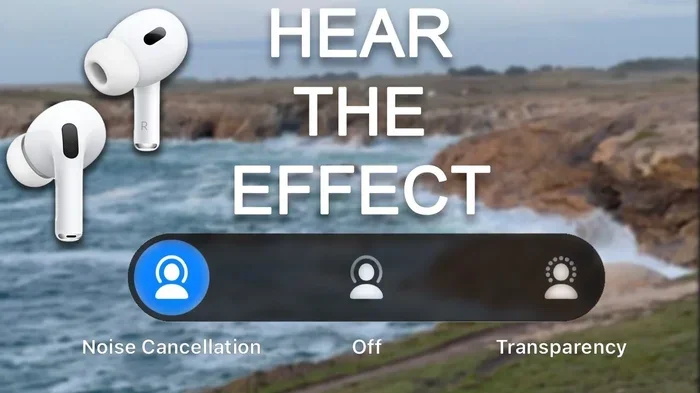
Visual guide about AirPods noise cancellation demonstration
Image source: i.ytimg.com
Here’s where it gets interesting. The better the seal between your AirPods and your ear canal, the less sound escapes. Apple designs AirPods Pro with silicone ear tips in multiple sizes (XS, S, M, L) specifically to create a tight acoustic seal. The AirPods 4 and AirPods Pro 2 even use an “Ear Tip Fit Test” through your iPhone to help you find the perfect size. When the seal is good, two things happen: you get better noise cancellation for yourself, and less sound leaks out for others to hear.
The Volume Factor
Think of your AirPods like a tiny speaker. At low volumes, the sound waves are weak and barely travel beyond your ear canal. But crank up the volume to 70% or higher, and suddenly those sound waves have enough energy to escape the seal and reach nearby ears. In a quiet library, someone sitting within 2-3 feet of you might catch faint whispers of your music. In a noisy subway, nobody will hear a thing because the ambient noise drowns out your leakage.
According to a 2022 study published in the journal Noise & Health, open-ear earbuds (like standard AirPods) leak approximately 15-25% of their audio output at 50% volume. That number jumps to 40-60% at maximum volume. That’s a lot of sound escaping into the world around you.
Passive Noise Isolation vs. Active Noise Cancellation
It’s worth distinguishing between two related but different concepts:
- Passive Noise Isolation: This is the physical blocking of sound by the ear tip material itself. Silicone or memory foam tips create a barrier that naturally reduces outside noise. It works for you AND it reduces leakage for others.
- Active Noise Cancellation (ANC): This is the electronic, battery-powered technology that analyzes and counteracts external sounds. It only works for the listener wearing the AirPods.
Apple’s premium AirPods use both technologies together for maximum effect, but neither one cancels noise for the people around you.
How Sound Leakage Works (And Why It Happens)
Let’s take a quick physics lesson, but I’ll keep it simple, I promise. When your AirPods play music, the speaker driver vibrates rapidly, pushing air molecules to create sound waves. These waves have two paths to travel:
- Inward: Into your ear canal, where you hear them clearly.
- Outward: Through and around the ear tip seal, escaping into the environment.
The outward path is what causes sound leakage. The tighter and more complete the seal, the more the outward path is blocked. The looser the fit, the more sound escapes. It’s exactly like covering your mouth with a pillow when you whisper versus whispering without any covering. The pillow blocks much of the sound from reaching someone standing nearby.
The Role of Ear Tip Material and Design
Apple’s silicone ear tips on AirPods Pro are designed with a specific shape that conforms to the unique curves of the human ear. The mesh covering the speaker also plays a role in diffusing sound and reducing direct leakage. However, even with perfect design, physics still applies. Some sound will always escape, especially at higher frequencies (like the “ssss” sounds in vocals or the “tss tss” of hi-hats in music).
Did you know that higher-frequency sounds leak more than lower-frequency sounds? That’s why someone nearby might hear the tinny shimmer of a cymbal but won’t hear the deep bass of a kick drum. Bass frequencies are longer waves that get absorbed more easily, while treble frequencies are shorter and escape more readily.
Real-World Leakage Scenarios
Let’s paint a picture. You’re sitting in a quiet office, wearing your AirPods Pro at about 40% volume, listening to a podcast. Can your coworker at the next desk hear anything? Probably not, especially if you have a good seal. Now, imagine you’re on a quiet bus at night, and you bump the volume to 80% to hear over the engine noise. The person next to you might catch fragments of the conversation in your podcast. The difference is volume, environment, and seal quality.
AirPods Models and Their Noise-Leakage Profiles
Not all AirPods are created equal when it comes to sound leakage. Some models are better at keeping your audio private than others, thanks to design differences.
AirPods Pro (1st and 2nd Generation)
The AirPods Pro line is the gold standard for noise control in the AirPods family. The silicone ear tips create a strong seal, and the ANC is highly effective. At moderate volumes (40-60%), leakage is minimal. Most people nearby won’t hear anything unless they’re within inches of your ears in a very quiet environment. The addition of Adaptive Transparency mode in the 2nd generation even lets you hear announcements without removing your AirPods, but this mode actually increases leakage because it allows more sound to pass through.
AirPods 4 (with Active Noise Cancellation)
The standard AirPods 4 with ANC feature an open-ear design (no silicone tips), which is more prone to sound leakage. Without a tight seal, sound waves have an easier path outward. At lower volumes, leakage is minimal, but at higher volumes, the open design struggles to contain audio. Apple has done some clever acoustic engineering with the H2 chip and the new acoustic architecture, but the lack of a physical seal means more leakage compared to the Pro models.
AirPods Max
These over-ear headphones have large ear cups with memory foam cushions, creating an excellent seal around your entire ear. Sound leakage is significantly reduced compared to earbuds, simply because the ear cups physically cover and contain the sound. At moderate volumes, people standing right next to you likely won’t hear anything. At very high volumes, some sound can still escape, but it’s far less than with earbuds.
Standard AirPods (1st, 2nd, and 3rd Generation)
The original AirPods have a hard plastic design that sits in the outer ear without sealing the ear canal. This open design means significant sound leakage, especially at higher volumes. If you’re using standard AirPods and your music is loud, people around you will likely hear it. These are the leakiest of the bunch.
Common Misconceptions About AirPods Noise Cancellation
There’s a lot of confusion about what AirPods can and cannot do. Let’s clear up the biggest myths.
Myth #1: “Noise Cancelling Means Silent for Everyone”
Nope. As we’ve covered extensively, ANC only works for the listener. If someone tells you their AirPods are “noise-cancelling for the whole room,” they’re misinformed. The technology simply doesn’t function that way.
Myth #2: “If I Can’t Hear Outside Noise, Others Can’t Hear My Music”
This seems logical but is incorrect. Your ability to hear (or not hear) external sounds depends on the inward-facing microphones and the anti-noise signals. Sound leakage is a separate phenomenon, determined by the outward escape of audio waves. You might be enjoying perfect silence in your ears while your music leaks out to a nearby seatmate on the airplane.
Myth #3: “ANC Works Better at Higher Volumes”
Actually, the opposite is often true. At higher volumes, your music can “mask” or overpower the noise-cancelling effect, making the ANC seem less effective. Additionally, the louder your music, the more it leaks out, defeating the purpose of using ANC in the first place (which is to hear clearly at lower, safer volumes).
Myth #4: “All Headphones Leak the Same Amount”
Far from it. Closed-back over-ear headphones leak the least, followed by in-ear monitors with good tips, then open-back headphones, and finally standard earbuds. AirPods Pro with proper tips leak very little; standard AirPods leak more; and bone conduction headphones leak the most because they don’t even sit in your ear canal.
How to Minimize Sound Leakage (Tips and Tricks)
Even though AirPods don’t cancel noise for others, you can be a considerate listener by minimizing how much your audio escapes. Here are practical tips.
Choose the Right Ear Tip Size
If you’re using AirPods Pro, take the time to find the correct ear tip size. Most people default to medium, but your ear canals might need small or large. Use the Ear Tip Fit Test on your iPhone (Settings > Bluetooth > AirPods Pro > Ear Tip Fit Test) to find your perfect match. A better seal means better noise cancellation for you and less leakage for others.
Keep the Volume Moderate
There’s a rule of thumb: if you can hear your music clearly when you remove one AirPod, the volume is probably too loud. Aim for 50-60% volume in quiet environments and 70-80% in noisy ones. This protects your hearing and reduces leakage. Did you know the World Health Organization recommends listening at no more than 60% of maximum volume for no more than 60 minutes at a time? It’s called the 60/60 rule, and it’s a great guideline.
Use Noise Cancellation Mode
When you enable ANC, you can lower your volume because you’re not fighting against external noise. Lower volumes mean less leakage. It’s a win-win: better sound quality, better hearing health, and less audio escape for bystanders.
Clean Your AirPods Regularly
Earwax and debris on the speaker mesh or ear tips can compromise the seal, leading to more leakage. Wipe your AirPods with a dry, lint-free cloth and clean the tips with water (let them dry completely before reattaching). Clean AirPods seal better and perform better.
Consider Your Environment
In a library, office, or quiet bedroom, keep the volume low. In a gym or on a noisy street, you can afford a bit more volume because ambient noise masks leakage anyway. Being mindful of your surroundings is just good etiquette.
The Social Etiquette of AirPods Use
Here’s something we don’t talk about enough: headphone etiquette. Even though your AirPods don’t cancel noise for others, your audio habits affect the people around you. A 2023 survey by the market research firm Statista found that 62% of respondents considered loud headphone use in public spaces to be “rude” or “inconsiderate.” That’s a significant number.
Think about it this way: if you’re on a quiet train and your music is blasting, you’re essentially forcing everyone within a few feet of you to listen to your playlist. Even if they don’t consciously notice it, it can be distracting or annoying. The considerate approach is to use ANC so you can listen at lower volumes, and to be aware of your environment.
When Sound Leakage Matters Most
Some situations demand extra consideration:
- Libraries and study spaces: Absolute silence is the norm here. Keep volume very low or use one AirPod at a time.
- Open-plan offices: Your coworkers will appreciate not hearing your conference calls or Spotify playlist.
- Bedrooms with a partner: If someone is sleeping next to you, even slight leakage can be disruptive.
- Public transportation at night: The quiet of late-night buses and trains amplifies even small sounds.
The Rise of “Quiet Listening” Culture
Interestingly, there’s a growing movement around quiet, mindful listening. People are realizing that blasting music at maximum volume isn’t just antisocial; it’s also damaging to hearing health. The WHO estimates that 1.1 billion young people worldwide are at risk of hearing loss due to unsafe listening practices. By using ANC and keeping volumes moderate, you’re protecting your ears AND respecting the people around you.
The Technology Behind AirPods ANC: A Deeper Look
Since we’re diving deep into how AirPods handle noise, let’s geek out a little on the tech. Apple’s H1 and H2 chips are the brains behind the operation. They process audio signals in real time, analyzing external sounds captured by outward-facing microphones and comparing them to the sound inside your ear canal captured by inward-facing microphones.
The chip then generates an anti-noise signal in less than a millisecond, which is played through the speaker driver. When this anti-noise meets the incoming external sound, they undergo destructive interference, effectively canceling each other out. It’s like adding a positive number to a negative number of the same magnitude: the result is zero, or in this case, silence.
The H2 chip in the AirPods Pro 2 is capable of processing 48,000 times per second, which is why the noise cancellation is so effective. But again, all of this processing power is aimed at your ears, not the world around you. The system has no mechanism for “silencing” your audio for bystanders, because that’s not how the technology works.
Adaptive Audio and Conversation Awareness
Newer AirPods models feature Adaptive Audio, which automatically adjusts the level of noise cancellation based on your environment. If you step from a quiet office into a noisy street, the ANC ramps up. If you start talking to someone, Conversation Awareness lowers the volume and switches to Transparency mode. These features are all designed for the wearer’s experience, not for managing sound leakage to others.
Final Verdict: Do AirPods Cancel Noise for Others?
Let’s bring it all home. Do AirPods cancel noise for others? Absolutely not. The noise-cancelling technology in AirPods is designed exclusively for the person wearing them. It uses microphones, processors, and anti-noise signals to create a quiet listening environment inside your ear canal. It does nothing to prevent your audio from being heard by people nearby, nor does it silence the world for anyone but you.
However, the amount of sound that actually leaks out depends on several factors: your AirPods model, the fit, the volume, and the environment. With AirPods Pro and a proper seal, leakage is minimal at moderate volumes. With standard AirPods or high volumes, leakage becomes noticeable.
The best approach? Use Active Noise Cancellation so you can enjoy your audio at lower, safer volumes. Choose the right ear tip size for a good seal. Be mindful of your surroundings, especially in quiet shared spaces. And remember: while AirPods don’t cancel noise for others, your consideration and courtesy do. That’s what truly makes for a pleasant shared audio experience, even if the technology is working only for you.
Your AirPods are amazing little devices, but they’re not magic. They can’t silence the world for everyone, and they can’t keep your music entirely private in every situation. What they can do is give you a personal oasis of sound in a noisy world, and that’s pretty incredible on its own.
Frequently Asked Questions
Do AirPods noise cancellation work for people around me?
No, AirPods noise cancellation only works for the person wearing them. The technology uses microphones and anti-noise signals to reduce sound inside your ears, but it has no effect on what others hear or experience around you.
Can people hear my AirPods when I’m wearing them?
Yes, at higher volumes or with a poor seal, people nearby can hear faint sound leaking from your AirPods. This is more common with standard AirPods (open design) than with AirPods Pro, which have silicone tips that create a better seal.
Which AirPods leak the least sound?
AirPods Pro and AirPods Max leak the least sound due to their sealed designs. The silicone ear tips on AirPods Pro and the over-ear cups on AirPods Max contain audio more effectively than the open design of standard AirPods.
Does Transparency Mode make sound leakage worse?
Yes, Transparency Mode allows more external sound into your ears, which often prompts users to increase their volume. Higher volume combined with the open acoustic pathway typically results in more sound leaking out for others to hear.
How can I stop my AirPods from leaking sound?
To minimize sound leakage, use the correct ear tip size for a tight seal, keep your volume at 50-70%, enable Active Noise Cancellation so you can listen at lower volumes, and clean your AirPods regularly to maintain a proper seal.
Is sound leakage from AirPods harmful to others?
Sound leakage from AirPods is not harmful in the way loud noise exposure is, but it can be annoying or distracting to people in quiet environments. Being mindful of your volume in shared spaces is a matter of courtesy and good etiquette.