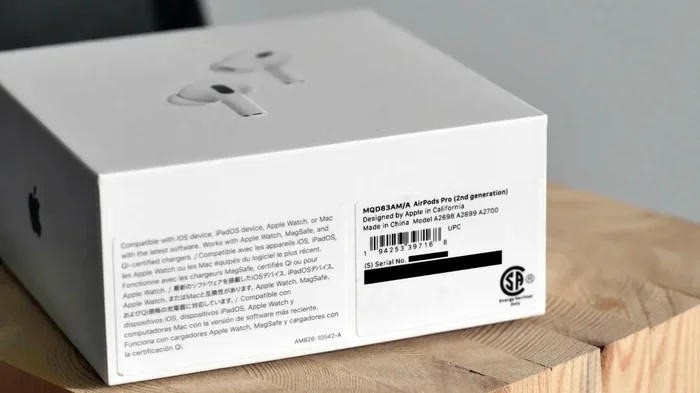
Featured image for AirPods Pro 2 serial number
Image source: androidauthority.com
Yes, AirPods Pro 2 have unique serial numbers printed on each earbud and charging case. These numbers help identify your device, verify authenticity, and assist with warranty claims. You can locate them in Settings, on the physical device, or on the original packaging. Each unit has its own distinct serial number that differs from other AirPods.
Have you ever wondered if your AirPods Pro 2 have different serial numbers? Maybe you bought a pair from a friend, found some at a great deal online, or simply want to make sure your expensive earbuds are the real deal. You’re not alone in asking this question.
Here’s the straightforward answer: yes, AirPods Pro 2 have unique serial numbers. In fact, each earbud and the charging case all have their own individual serial numbers. Think of it like a fingerprint for your earbuds. No two sets of AirPods Pro 2 share the exact same serial number combination.
Understanding your AirPods Pro 2 serial number is more useful than you might think. It helps you check if your device is genuine, register for warranty service, and even track them down if they get lost. In this guide, we’ll walk you through everything you need to know about AirPods Pro 2 serial numbers, where to find them, and why they matter for your everyday use.
Key Takeaways
- Unique Identification: Every AirPods Pro 2 unit has a distinct serial number for each earbud and case.
- Multiple Locations: Serial numbers appear on the device, packaging, and inside iPhone Settings.
- Authenticity Check: Serial numbers allow verification of genuine products and prevent counterfeits.
- Warranty Support: Apple uses serial numbers to track warranty coverage and service history.
- Lost Device Recovery: Serial numbers help locate lost or stolen AirPods through Apple’s services.
- Pairing Requirements: Apple sometimes requires serial numbers for support, replacements, and repairs.
- Privacy Protection: Serial numbers are tied to your Apple ID for Find My tracking and security features.
📑 Table of Contents
- What Exactly Is an AirPods Pro 2 Serial Number?
- Where Can You Find Your AirPods Pro 2 Serial Number?
- Why Do AirPods Pro 2 Have Different Serial Numbers?
- How to Verify If Your AirPods Pro 2 Are Genuine
- What to Do If You Lose Your AirPods Pro 2 Serial Number
- Common Questions About AirPods Pro 2 Serial Numbers
- Tips for Managing Your AirPods Pro 2 Serial Numbers
- The Bottom Line on AirPods Pro 2 Serial Numbers
What Exactly Is an AirPods Pro 2 Serial Number?
A serial number is a unique string of letters and numbers that acts like an ID card for your device. Just like your driver’s license number identifies you personally, a serial number identifies your specific AirPods Pro 2 unit. No two AirPods in the world have the exact same serial number.
Apple assigns these numbers during the manufacturing process. Each number is one-of-a-kind and gets stored in Apple’s database along with details about when and where the device was made. When you call Apple Support or visit an Apple Store, this is the number they’ll ask for to pull up your device’s information.
The Three Serial Numbers Explained
Here’s something that surprises many people: your AirPods Pro 2 actually have three separate serial numbers. One for the left earbud, one for the right earbud, and one for the charging case. Each one is different.
Why does Apple do this? It makes sense when you think about it. The earbuds and case are technically separate components. If you lose just one earbud, Apple needs to identify that specific piece. If your case breaks but your earbuds are fine, Apple can replace just the case using its unique serial number.
This three-part system also helps Apple track manufacturing quality. If a batch of left earbuds has a defect, Apple can pinpoint exactly which units are affected using their serial numbers.
Serial Numbers vs. Other Identifiers
You might also notice other numbers on your AirPods, like the model number. Don’t confuse these with serial numbers. Model numbers are the same for all AirPods Pro 2 units (they identify the product type), while serial numbers are unique to your specific device.
Think of it this way: the model number is like saying “iPhone 15 Pro” while the serial number is like saying “this specific iPhone 15 Pro owned by you.” The model tells you what something is, while the serial tells you which exact one you have.
Where Can You Find Your AirPods Pro 2 Serial Number?
Finding your AirPods Pro 2 serial number is easier than you might expect. Apple gives you several ways to locate it, whether you have the physical device in hand or just need to check digitally.
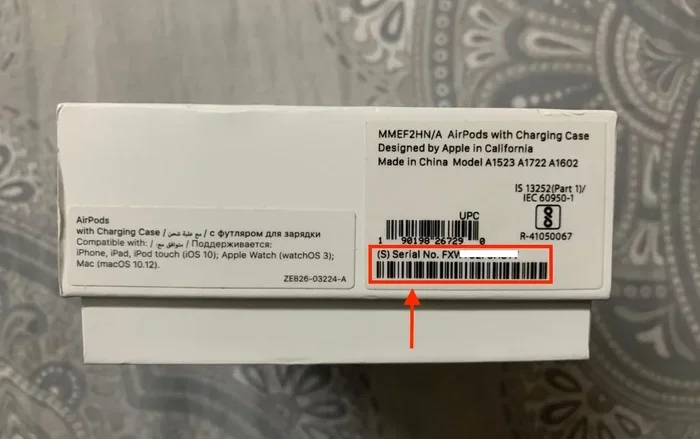
Visual guide about AirPods Pro 2 serial number
Image source: candid.technology
Method 1: Check Your iPhone Settings
The quickest way to find your serial number is through your iPhone. This method works as long as your AirPods are connected to your Apple device. Here’s how:
- Open the Settings app on your iPhone or iPad
- Tap on Bluetooth
- Find your AirPods Pro 2 in the list of connected devices
- Tap the “i” information button next to your AirPods name
- Scroll down to find the serial number listed
This digital method is super handy because you don’t need to physically have them with you. Even if your AirPods are across the room, you can still pull up their serial number as long as they’re connected.
Method 2: Look on the Physical Device
If you have your AirPods Pro 2 in hand, you can find serial numbers printed directly on them. For the charging case, check the underside of the lid or the bottom of the case itself. The number is small, but it’s there.
For the individual earbuds, you’ll need to look more carefully. The serial number is printed in tiny letters on each earbud. You might need good eyes or a magnifying glass to read it clearly. Apple made these numbers small on purpose so they don’t interfere with the sleek design.
Did you know that Apple has made these numbers progressively smaller over the years? Older AirPods had larger, easier-to-read serial numbers. The AirPods Pro 2 features some of the tiniest serial number text on any Apple product, which is why many people miss it.
Method 3: Check the Original Packaging
Still have the box your AirPods came in? Perfect. The original packaging has a sticker with all the serial numbers clearly printed. This is often the easiest way to read them because the text is larger than what’s printed on the device itself.
The packaging sticker typically shows three serial numbers (one each for left earbud, right earbud, and case) along with other information like the model number and barcode. If you keep your boxes, this becomes your backup reference whenever you need it.
Method 4: Use Apple’s Coverage Website
Apple has a website called “Check Coverage” where you can enter your serial number to see warranty information. While you need to know your serial number first to use this tool, it’s useful for verifying the numbers you’ve found are correct and legitimate.
Simply go to checkcoverage.apple.com, enter your serial number, and you’ll see your device’s purchase date, warranty status, and whether you have AppleCare+ coverage.
Why Do AirPods Pro 2 Have Different Serial Numbers?
You might wonder why Apple bothers giving each component its own serial number. Wouldn’t one number for the whole set be simpler? There are actually several important reasons behind this design choice.
Reason 1: Individual Component Replacement
Life happens. You might lose just one earbud, or your case might break while the earbuds stay perfectly fine. Having separate serial numbers means Apple can replace just the broken or lost piece without replacing the whole set.
This saves you money and reduces waste. If you lose your left earbud, Apple can identify that specific earbud by its serial number and send you a replacement that will pair with your existing right earbud and case. Without unique serial numbers, this wouldn’t be possible.
Reason 2: Manufacturing and Quality Control
From Apple’s perspective, unique serial numbers help track manufacturing quality. If a specific production run has issues, Apple can identify exactly which units need attention. This makes recalls and quality fixes much more efficient.
Apple produced over 70 million AirPods in 2022 alone, according to industry estimates. Managing that many devices requires a robust tracking system, and unique serial numbers make it possible.
Reason 3: Theft Prevention and Recovery
Serial numbers help deter theft and aid in recovery. If your AirPods are stolen, the serial number becomes official evidence. Police can use it to verify ownership, and Apple can potentially track the device through its systems.
While AirPods don’t have GPS like an iPhone, the serial number still plays a role in Apple’s Find My network. Your AirPods Pro 2 register their serial number with your Apple ID, making them traceable to you specifically.
Reason 4: Warranty and Service Tracking
When you bring your AirPods in for service, the technician needs to know exactly which unit you own. The serial number pulls up your warranty status, purchase date, and service history. This ensures you get the coverage you’re entitled to.
Apple’s warranty system relies entirely on serial numbers to function. Without them, the company couldn’t track which devices are still under warranty or covered by AppleCare+.
How to Verify If Your AirPods Pro 2 Are Genuine
Unfortunately, counterfeit AirPods have flooded the market. Some fakes look incredibly similar to real AirPods Pro 2. Here’s how your serial number can help you spot fakes.
Step 1: Check the Serial Number on Apple’s Website
Visit checkcoverage.apple.com and enter the serial number from your AirPods. If they’re genuine, Apple will show valid coverage information. If the number doesn’t exist in Apple’s system or shows no coverage for a product that should be new, you’ve got a fake.
This is the most reliable way to verify authenticity. Counterfeit manufacturers often use random or fake serial numbers that won’t match Apple’s database.
Step 2: Compare Numbers Across All Sources
On genuine AirPods, the serial number on the device, in your iPhone settings, and on the original packaging should all match. If they don’t match up, something’s wrong.
For example, if your Settings shows serial number A1B2C3 but the case shows X9Y8Z7, you either have a counterfeit or components from different sets were combined. Genuine AirPods will have matching numbers across all locations.
Step 3: Look for Quality Signs
Beyond serial numbers, genuine AirPods Pro 2 have specific quality markers. The print quality on the device and packaging should be crisp and clear. The case should have a satisfying magnetic click. The earbuds should pair instantly with your iPhone.
Fake AirPods often have slightly off details. The text might look smudged, the case might feel cheap, or pairing might require extra steps. Trust your instincts if something feels off.
Red Flags to Watch For
Be extra cautious if you notice any of these warning signs:
- The serial number doesn’t validate on Apple’s website
- The price seems too good to be true (significantly below retail)
- The seller is unofficial or unauthorized
- The packaging looks slightly different from genuine Apple packaging
- The numbers on the device and packaging don’t match
- There are spelling errors or typos anywhere
Did you know that Apple reportedly employs specialists whose entire job is to identify counterfeit Apple products? These experts work with customs agencies worldwide to intercept fake electronics before they reach consumers.
What to Do If You Lose Your AirPods Pro 2 Serial Number
Misplaced your AirPods serial number? Don’t panic. There are still ways to recover it, depending on your situation.
Check Your Apple ID Account
Your Apple ID stores information about devices you’ve connected, including serial numbers. Sign in to appleid.apple.com or check your Apple ID account settings on your iPhone. Under the Devices section, you should see your AirPods Pro 2 listed with their serial number.
This works because Apple automatically registers devices to your Apple ID when you pair them. The registration includes the serial number, so it’s preserved even if you lose the physical documentation.
Look in Your Email
Did you receive a digital receipt when you bought your AirPods? Check your email for the purchase confirmation. Most retailers include the serial number in the receipt, especially Apple itself.
If you bought from Apple, your receipt will have all three serial numbers (left bud, right bud, and case) along with your purchase details. This digital record stays in your email forever, making it a reliable backup.
Contact Apple Support
If all else fails, Apple Support can help. If you can prove ownership (through purchase records, original packaging with matching details, etc.), Apple can look up your serial number in their system.
Be prepared to provide proof of purchase. Apple takes device security seriously, so they won’t just give out serial numbers to anyone claiming ownership. Having your receipt or bank statement handy speeds up the process.
Use Find My App
If your AirPods are connected to Find My, you might be able to retrieve information through the Find My app on another Apple device. While this primarily helps locate lost AirPods, it may also show device details including serial numbers.
Open Find My, select your AirPods from the Devices tab, and look for any available device information. The app may show limited details, but it’s worth checking.
Common Questions About AirPods Pro 2 Serial Numbers
Let’s address some common questions people have about AirPods Pro 2 serial numbers. These come up frequently in support forums and Apple discussions.
Can Two Pairs of AirPods Pro 2 Have the Same Serial Number?
No, this is virtually impossible. Apple ensures every serial number is unique. If you ever find two AirPods Pro 2 sets claiming to have the same serial number, at least one of them is definitely counterfeit.
The chance of Apple accidentally duplicating a serial number is astronomically low. The number combinations Apple uses are extensive enough that collision (two devices with the same number) essentially never happens.
Do Serial Numbers Reveal Personal Information?
No, serial numbers themselves don’t contain your personal information. They’re just identifiers. However, when combined with your Apple ID in Apple’s system, they link to your account and personal details.
That’s why you should keep your serial numbers somewhat private. If someone knows your serial number and has access to other information, they could potentially make a false warranty claim or cause other issues.
Can You Change an AirPods Pro 2 Serial Number?
No, serial numbers are permanently programmed into the device during manufacturing. They cannot be changed, altered, or reset. This immutability is what makes them useful for tracking and identification.
If you’re buying used AirPods, this is good news. The original owner’s information can’t be transferred to you through the serial number. Your Apple ID becomes the new owner association when you pair them.
Are Serial Numbers Required for AppleCare+?
Yes, Apple needs your serial number to activate AppleCare+ coverage. When you purchase AppleCare+ for your AirPods Pro 2 (within 60 days of purchase), Apple registers the coverage against your device’s serial number.
Without the serial number, Apple can’t track which devices have AppleCare+ and which don’t. This is why keeping your serial number information accessible is so important for warranty purposes.
Tips for Managing Your AirPods Pro 2 Serial Numbers
Here are some practical tips to help you stay on top of your AirPods Pro 2 serial numbers and avoid problems down the road.
Tip 1: Take Photos of Your Serial Numbers
When you unbox your AirPods Pro 2, take clear photos of the serial numbers on the packaging and device. Store these photos in a secure location like a password-protected cloud folder. This creates a digital backup you can access anytime.
This simple step takes less than a minute but can save you hours of frustration if you ever need the numbers and can’t find the original packaging.
Tip 2: Register Your AirPods Immediately
Make sure your AirPods Pro 2 are registered to your Apple ID right away. When you pair them with your iPhone, this happens automatically. Verify by checking your Apple ID device list to confirm they’re listed.
Registration ensures Apple has your serial numbers on file tied to your account. This makes warranty claims, support requests, and Find My tracking much smoother.
Tip 3: Keep Your Original Box
Don’t throw away the original AirPods Pro 2 packaging. Even if you recycle other electronics boxes, keep this one in a safe place. The box contains all three serial numbers in easy-to-read format.
If space is tight, at minimum photograph or scan the sticker with serial numbers before storing or recycling the box. You’ll thank yourself later if you ever need to reference them.
Tip 4: Be Careful When Buying Used AirPods
If buying used AirPods Pro 2, ask for the serial numbers upfront. Verify them on Apple’s website before purchasing. Make sure the seller’s information matches what Apple’s system shows about the device.
This protects you from buying counterfeits or stolen goods. A legitimate seller will have no problem providing serial numbers for verification.
Tip 5: Document Everything for Insurance
If you have personal property insurance that covers electronics, your AirPods Pro 2 serial numbers might be needed for claims. Store them with your insurance documentation so you have everything in one place if you need to file a claim.
Some insurance companies specifically request serial numbers when you add expensive electronics to your policy. Having them ready makes the process smoother.
The Bottom Line on AirPods Pro 2 Serial Numbers
AirPods Pro 2 absolutely have different serial numbers for each component. Each earbud and the charging case have their own unique identifier, creating a three-part system that helps with everything from warranty claims to counterfeit detection.
Understanding where to find these numbers and why they matter makes you a more informed consumer. Whether you’re verifying authenticity, tracking warranty coverage, or recovering lost devices, your serial numbers are valuable tools.
Remember to keep this information safe. Take photos, save digital copies, and maintain your original packaging when possible. These small steps protect your investment and ensure you can access support whenever you need it.
The next time someone asks you “do AirPods Pro 2 have different serial numbers?” you’ll know exactly what to tell them. Yes, they do, and now you understand why this matters for every AirPods Pro 2 owner.