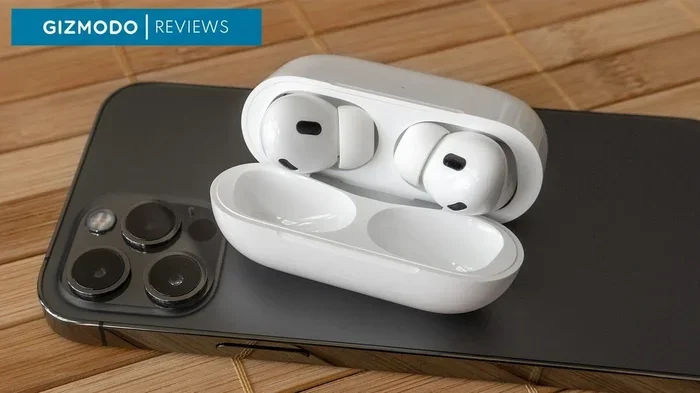
Featured image for iPhone with wireless earbuds
Image source: i.kinja-img.com
Not all wireless headphones work seamlessly with iPhone, but most Bluetooth-enabled models will connect and play music just fine. The key differences lie in advanced features like spatial audio, automatic device switching, and Siri integration—capabilities typically reserved for Apple-made or Beats products. Understanding Bluetooth compatibility helps you choose the right headphones for your iPhone experience.
Picture this: you’re standing in an electronics store, surrounded by dozens of wireless headphone options. Some bear the familiar Apple logo, others come from brands you’ve never heard of, and the price tags range from budget-friendly to genuinely expensive. You pull out your iPhone and wonder the obvious question—will any of these actually work with my device?
The good news is that wireless headphones and iPhones play together more nicely than you might think. The Bluetooth standard has become remarkably universal, meaning your pairing options are broader than ever before. However, not every connection is created equal, and understanding the differences can save you from buyer’s remorse.
This guide breaks down everything you need to know about wireless headphone compatibility with iPhone. Whether you’re considering AirPods, Beats, or a third-party alternative, you’ll discover what works, what doesn’t, and how to get the best audio experience from your device.
Key Takeaways
- Universal Bluetooth Compatibility: Any wireless headphones with Bluetooth technology can connect to an iPhone for basic audio functions like music playback and calls.
- Feature Limitations Exist: Non-Apple wireless headphones miss out on exclusive features such as spatial audio, automatic switching, and Find My integration.
- Apple’s W1/H1/H2 Chips Matter: Headphones with Apple-designed chips offer faster pairing, lower latency, and better power efficiency when used with iPhones.
- Bluetooth Version Affects Performance: Newer Bluetooth versions (5.0+) provide better range, stability, and battery efficiency on iPhone.
- Codec Support Varies: iPhones primarily use AAC codec, so headphones supporting AAC will deliver optimal sound quality.
- Pairing Process is Simple: Connecting wireless headphones to iPhone takes seconds via the Settings app or quick-pair pop-ups.
- Third-Party Options Are Viable: Brands like Sony, Bose, and Samsung produce excellent wireless headphones that work well with iPhones, just without Apple-exclusive features.
📑 Table of Contents
- The Short Answer: Yes, Most Wireless Headphones Work with iPhone
- Why Some Wireless Headphones Work Better Than Others
- What to Look for When Buying Wireless Headphones for iPhone
- Popular Wireless Headphone Options That Work with iPhone
- How to Pair Wireless Headphones with Your iPhone
- Making the Right Choice for Your Needs
The Short Answer: Yes, Most Wireless Headphones Work with iPhone
Here’s the simple truth: if wireless headphones use Bluetooth technology, they will connect to your iPhone. Apple has included Bluetooth support in every iPhone since 2007, and the company has never restricted which Bluetooth devices can pair with their phones.
Understanding Bluetooth as a Universal Standard
Think of Bluetooth like a common language spoken worldwide. Your iPhone speaks this language fluently, and so do virtually all wireless headphones manufactured in the past decade. When two Bluetooth devices meet, they can communicate regardless of who made them.
Did you know that over 4.7 billion Bluetooth devices ship annually? This massive adoption means manufacturers have strong incentives to ensure their products work across all major platforms, including iOS.
What “Working” Actually Means
When we say wireless headphones “work” with iPhone, we typically mean they can:
- Play music and audio from apps like Apple Music, Spotify, and YouTube
- Handle phone calls with built-in microphones
- Connect and disconnect automatically when in range
- Display battery levels in the iPhone interface
These core functions work with virtually any Bluetooth headphone, regardless of brand or price point. The differences emerge when you start exploring premium features.
Why Some Wireless Headphones Work Better Than Others
If all wireless headphones technically connect to iPhones, why do AirPods seem so much smoother? The answer lies in the special sauce Apple adds to its own audio products.
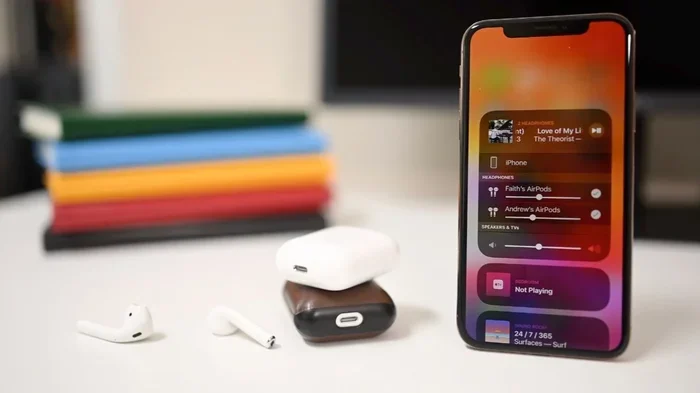
Visual guide about iPhone with wireless earbuds
Image source: robots.net
Apple’s Proprietary Chip Advantage
Apple designs custom chips specifically for their audio products. These tiny processors create a deeper integration than standard Bluetooth allows:
- W1 Chip (2016): Found in original AirPods and some Beats models, enabling faster pairing
- H1 Chip (2019): Added “Hey Siri” support and 30% faster connection speeds
- H2 Chip (2022): Powers AirPods Pro 2 with even better noise cancellation and efficiency
Think of these chips as a secret handshake between your iPhone and headphones. While standard Bluetooth is like meeting a stranger, Apple-chip-enabled headphones are like reuniting with an old friend—recognition happens instantly.
Exclusive Features Limited to Apple Ecosystem
Several features only function when using Apple or Beats headphones with an iPhone:
Spatial Audio with Head Tracking: This technology creates a theater-like experience where sound seems to come from fixed directions, even as you turn your head. Non-Apple headphones simply cannot replicate this feature because it requires specific hardware communication protocols.
Automatic Device Switching: AirPods and Beats can seamlessly hop between your iPhone, iPad, and Mac without manual reconnection. Third-party headphones require you to manually disconnect and reconnect.
Find My Integration: Lost your AirPods? Your iPhone can show their last known location on a map. This deep integration uses special signaling unavailable to other brands.
Audio Sharing: Two pairs of AirPods can connect to one iPhone, letting friends listen to the same content simultaneously. This feature requires Apple-chip-enabled headphones on both ends.
What to Look for When Buying Wireless Headphones for iPhone
Shopping for wireless headphones can feel overwhelming, but focusing on a few key specifications ensures you get a product that works well with your iPhone.
Bluetooth Version Compatibility
Bluetooth has evolved significantly over the years, and newer versions deliver meaningful improvements:
- Bluetooth 5.0 and newer: Offers twice the speed and four times the range of Bluetooth 4.2
- Bluetooth 5.2 and 5.3: Introduces LE Audio for better efficiency and audio quality
- Bluetooth 5.4: The latest version with enhanced security features
Your iPhone supports Bluetooth 5.0 or newer, so headphones with matching or higher versions will deliver optimal performance. Older Bluetooth versions still function but may experience more dropouts and shorter range.
Audio Codec Considerations
Codecs are like translators that convert digital audio files into the analog sound your ears actually hear. iPhones support specific codecs, and matching them improves quality:
AAC (Advanced Audio Coding): This is Apple’s preferred codec. Headphones supporting AAC will deliver the best wireless audio quality from your iPhone. Most modern wireless headphones include AAC support.
SBC (Sub-Band Codec): The universal fallback codec that all Bluetooth devices support. It’s reliable but doesn’t deliver the same quality as AAC.
aptX and LDAC: These higher-quality codecs exist in the Android world but iPhones don’t support them natively. Buying headphones specifically for these codecs won’t benefit your iPhone experience.
Battery Life and Charging Standards
Battery performance matters, especially for daily commuters and travelers. Look for headphones offering at least 5-6 hours per charge for earbuds, or 20+ hours for over-ear models.
Additionally, consider whether the headphones support wireless charging. Many modern wireless headphones—including non-Apple brands—offer Qi-compatible charging cases that work with the same chargers as your iPhone.
Popular Wireless Headphone Options That Work with iPhone
The wireless headphone market offers countless options compatible with iPhones. Here’s how some popular choices stack up.
Apple AirPods Lineup
Apple currently offers three main AirPods models, each with distinct characteristics:
AirPods (3rd generation): The standard option featuring spatial audio, water resistance, and up to 30 hours total battery life with the charging case. They represent the most affordable entry into the Apple audio ecosystem.
AirPods Pro 2: Premium earbuds with active noise cancellation, adaptive transparency mode, and the H2 chip. They’re the gold standard for iPhone users wanting the full Apple experience.
AirPods Max: Over-ear headphones with high-fidelity sound, premium materials, and excellent noise cancellation. They’re expensive but deliver audiophile-quality performance.
Beats by Dre Options
Since Apple acquired Beats in 2014, Beats headphones benefit from Apple chip technology while offering different aesthetics and form factors:
- Beats Fit Pro: Sport-oriented earbuds with secure wing tips and active noise cancellation
- Beats Studio Pro: Over-ear headphones with lossless audio support via USB-C
- Beats Solo 4: On-ear headphones balancing portability and sound performance
Third-Party Recommendations
Several non-Apple brands produce excellent wireless headphones for iPhone users:
Sony: The WF-1000XM5 and WH-1000XM5 are widely considered top-tier options with industry-leading noise cancellation. They lack Apple-exclusive features but often outperform AirPods in pure sound quality.
Bose: Known for exceptional comfort and noise cancellation, the QuietComfort series works beautifully with iPhones for core audio needs.
Samsung Galaxy Buds: Despite Samsung branding, these work fine with iPhones for basic functions. However, you’ll miss out on some Samsung-specific features that require Samsung phones.
JBL, Anker, and Jabra: Budget-friendly options that deliver reliable Bluetooth performance without premium features.
How to Pair Wireless Headphones with Your iPhone
Connecting wireless headphones to your iPhone is refreshingly simple, whether you’re using Apple-branded or third-party products.
Standard Pairing Method
For most wireless headphones, follow these steps:
- Put your headphones in pairing mode by holding the power button until an LED flashes (usually blue or white)
- Open Settings on your iPhone and tap “Bluetooth”
- Ensure Bluetooth is toggled on (it should be green)
- Find your headphones in the “Other Devices” list
- Tap the headphone name to complete pairing
Once paired, your iPhone will remember the headphones and automatically reconnect whenever they’re powered on and within range.
Apple’s Quick Pair Feature
For AirPods and other Apple-chip-enabled headphones, the process is even simpler:
- Open the headphone case (or power on the headphones) near your iPhone
- Wait for the pop-up animation to appear on your iPhone screen
- Tap “Connect” when prompted
This seamless pairing takes about 5 seconds total and automatically configures the headphones with your Apple ID for features like Find My and automatic switching.
Troubleshooting Common Connection Issues
Sometimes wireless headphones don’t cooperate. Try these solutions when problems arise:
Restart both devices: Turn off your headphones and iPhone, then power them back on. This resolves most temporary glitches.
Forget the device: In Settings > Bluetooth, tap the “i” icon next to your headphones and select “Forget This Device.” Then pair them again from scratch.
Check for interference: Wi-Fi routers, microwaves, and other Bluetooth devices can cause interference. Move to a different location if connections drop frequently.
Update firmware: Some headphones receive firmware updates through companion apps. Check the manufacturer’s app for available updates that might fix bugs.
Making the Right Choice for Your Needs
Choosing wireless headphones ultimately depends on what you value most in your audio experience.
Choose Apple or Beats If:
- You own multiple Apple devices and want seamless switching between them
- You use Siri frequently for hands-free commands
- You want the simplest possible pairing without managing settings
- You value Find My integration for peace of mind about lost headphones
Choose Third-Party Headphones If:
- Sound quality is your top priority over ecosystem features
- You prefer specific designs that Apple doesn’t offer
- Budget constraints matter and you want maximum value
- You only use Apple devices for iPhone and don’t need cross-product integration
Ultimately, the “best” wireless headphones for your iPhone are the ones that fit your ears comfortably, sound great to your ears, and fit your budget. Don’t pay extra for Apple-exclusive features you won’t use, but don’t sacrifice features you want just to save a few dollars either.
The wireless headphone market has never been more competitive or more capable. Whether you choose AirPods, Beats, Sony, Bose, or another reputable brand, your iPhone will deliver quality audio to your ears. The decision comes down to personal preference, feature priorities, and how deeply you’ve invested in the Apple ecosystem.
Whatever you choose, enjoy the freedom that wireless audio brings to your daily life.
Frequently Asked Questions
Do all wireless headphones work with iPhone?
Yes, any wireless headphones with Bluetooth technology will connect to your iPhone for basic audio functions like music playback and phone calls. However, exclusive features like spatial audio, automatic device switching, and Find My integration only work with Apple-made or Beats headphones.
Why won’t my wireless headphones connect to my iPhone?
Connection issues usually stem from the headphones not being in pairing mode, Bluetooth being disabled on your iPhone, or interference from other devices. Try putting headphones in pairing mode, toggling Bluetooth off and on, or forgetting the device in settings and re-pairing.
Do AirPods work better with iPhone than other wireless headphones?
AirPods offer smoother integration with iPhones thanks to Apple’s custom H1/H2 chips, providing faster pairing, automatic device switching, and exclusive features. Third-party headphones work perfectly for basic audio but lack these ecosystem-specific benefits.
Can I use Samsung or Sony wireless headphones with iPhone?
Absolutely. Samsung Galaxy Buds, Sony WF/XM series, and other brand-name wireless headphones connect to iPhones via standard Bluetooth. You’ll get excellent sound quality and core functions, though you won’t access brand-specific features designed for other platforms.
What Bluetooth version do I need for iPhone compatibility?
Your iPhone supports Bluetooth 5.0 or newer, so headphones with Bluetooth 5.0 and above will deliver optimal range, stability, and battery efficiency. Older Bluetooth versions still function but may have shorter range and more connection drops.
Do wireless headphones drain iPhone battery quickly?
Bluetooth headphones use relatively little phone battery, typically consuming 5-10% extra per hour of use. Modern Bluetooth 5.0+ is very efficient, and using newer headphones with your iPhone minimizes additional battery drain during audio playback.