Featured image for AirPods Pro 2 multipoint connection
Image source: i.ytimg.com
Yes, AirPods Pro 2 support multipoint connectivity through a feature Apple calls automatic switching, but only within the Apple ecosystem. This means you can seamlessly connect to multiple Apple devices (iPhone, iPad, Mac, Apple Watch) without manually pairing each time. However, multipoint doesn’t work with non-Apple devices like Android phones or Windows PCs the same way.
If you’ve ever wondered whether AirPods Pro 2 can connect to two devices at the same time, you’re not alone. This is one of the most common questions among wireless earbud buyers, especially people who juggle between a phone and a laptop throughout the day. The answer is yes, but with some important caveats you need to understand before buying.
Apple introduced a feature that works like multipoint, but they don’t call it multipoint. Instead, they call it “automatic switching.” It’s designed to make your life easier by letting your AirPods Pro 2 hop between your Apple devices without you needing to dig into Bluetooth settings every time. Think of it like a well-trained dog that automatically follows you to whatever room you walk into, except the “rooms” are your iPhone, iPad, Mac, and Apple Watch.
In this guide, we’ll break down exactly how multipoint works on AirPods Pro 2, what devices are supported, how to set it up, and what limitations exist. By the end, you’ll know whether this feature fits your lifestyle and how to get the most out of it.
Key Takeaways
- Multipoint is supported: AirPods Pro 2 do have multipoint functionality, but Apple brands it as “automatic switching.”
- Apple ecosystem only: The feature works seamlessly across iPhone, iPad, Mac, and Apple Watch, not Android or Windows devices.
- Requires iCloud account: All devices must be signed into the same Apple ID for multipoint to function properly.
- Bluetooth 5.3 chip: The H2 chip inside AirPods Pro 2 enables faster, more reliable device switching compared to older models.
- Audio Sharing is different: Multipoint (one AirPod to multiple devices) is not the same as Audio Sharing (two AirPods to one device).
- Manual override available: You can manually select your audio source in iOS or macOS if automatic switching doesn’t trigger.
- Future updates may expand: Apple could potentially enable true universal multipoint in future firmware updates.
📑 Table of Contents
- Understanding Multipoint on AirPods Pro 2
- Which Devices Support AirPods Pro 2 Multipoint?
- How to Set Up Multipoint on AirPods Pro 2
- AirPods Pro 2 vs. Competitors: How Does Multipoint Compare?
- Practical Tips for Getting the Most Out of Multipoint
- Common Myths About AirPods Pro 2 Multipoint
- The Future of AirPods Pro 2 Multipoint
- Final Verdict: Is AirPods Pro 2 Multipoint Worth It?
Understanding Multipoint on AirPods Pro 2
Let’s start with the basics. Multipoint is a Bluetooth feature that allows a wireless audio device to be connected to two or more source devices at the same time. It’s like having a universal remote that controls both your TV and your soundbar without needing to switch between them.
AirPods Pro 2 do support this type of multi-device connectivity. However, Apple implemented it differently than most other brands. Instead of calling it “multipoint,” Apple markets it as “automatic switching.” The terminology is different, but the core concept is the same: your earbuds can stay connected to multiple devices simultaneously and switch between them intelligently.
What Makes Automatic Switching Different?
Most multipoint implementations use a Bluetooth profile called A2DP (Advanced Audio Distribution Profile) to maintain simultaneous audio streams. Apple’s approach is more proprietary and tightly integrated with iCloud and the H2 chip inside the AirPods Pro 2.
This means:
- Your AirPods Pro 2 must be signed into your Apple ID across all devices
- The H2 chip manages the handoff between devices seamlessly
- Switching is based on what device is actively producing audio
For example, if you’re listening to music on your iPhone and then start playing a video on your Mac, your AirPods will automatically switch to the Mac within seconds. You don’t need to touch any buttons or open any menus.
Why Apple Doesn’t Call It “Multipoint”
Branding matters, and Apple loves to put their own spin on existing technology. By calling it “automatic switching,” Apple emphasizes the user experience rather than the technical capability. They want you to think of it as a magical, effortless feature rather than a spec sheet checkbox.
From a marketing standpoint, this makes sense. Apple’s ecosystem is known for tight integration, and calling it multipoint might imply it works the same way on all devices, which it doesn’t.
Which Devices Support AirPods Pro 2 Multipoint?
Here’s the deal: AirPods Pro 2 multipoint (automatic switching) works beautifully within the Apple ecosystem but has limitations outside of it. Let’s look at the specifics.
Visual guide about AirPods Pro 2 multipoint connection
Image source: appleking.cz
Supported Apple Devices
AirPods Pro 2 automatic switching works with the following Apple devices, provided they are updated to a compatible operating system:
- iPhone: iPhone 5s and later running iOS 16 or newer
- iPad: iPad Pro, iPad Air (3rd gen and later), iPad mini (5th gen and later), and standard iPad (6th gen and later) running iPadOS 16 or newer
- Mac: Mac models from 2018 and later running macOS Ventura or newer
- Apple Watch: Apple Watch Series 3 and later running watchOS 9 or newer
- Apple TV: Apple TV 4K and Apple TV HD running tvOS 16 or newer
For automatic switching to work, all devices must be signed into the same Apple ID. This is because the H2 chip uses your iCloud account to know which devices belong to you and are eligible for seamless handoff.
Non-Apple Device Compatibility
Here’s where things get tricky. If you’re an Android user or own a Windows PC, AirPods Pro 2 multipoint is extremely limited. Here’s what to expect:
- Android phones and tablets: AirPods Pro 2 can connect via standard Bluetooth, but they only maintain a connection to one Android device at a time. No automatic switching.
- Windows PCs: Same story. You can pair your AirPods Pro 2 with your Windows laptop, but they won’t automatically switch from your phone (unless it’s an iPhone).
- Smart TVs and other Bluetooth devices: AirPods Pro 2 can pair with these devices for audio output, but multipoint functionality is unavailable.
Did you know? According to a 2023 Statista report, Android holds approximately 71% of the global smartphone market share, while iOS holds about 28%. This means millions of potential AirPods Pro 2 buyers can’t fully utilize the multipoint feature.
What About Universal Multipoint?
Universal multipoint is a newer Bluetooth standard (introduced in Bluetooth 5.3 and later) that allows devices to connect to any two source devices regardless of brand or operating system. AirPods Pro 2 use the H2 chip, which supports Bluetooth 5.3, but Apple has not yet enabled universal multipoint in the firmware.
This means there’s untapped potential. Apple could theoretically release a software update to enable universal multipoint, but as of now, it’s an Apple-only feature.
How to Set Up Multipoint on AirPods Pro 2
Setting up multipoint (automatic switching) on your AirPods Pro 2 is surprisingly simple. If you’ve ever paired AirPods with an iPhone, you’ve already done most of the work.
Visual guide about AirPods Pro 2 multipoint connection
Image source: i.pinimg.com
Step-by-Step Setup Guide
Follow these steps to enable multipoint functionality:
Step 1: Update Your Devices
Before doing anything, make sure all your Apple devices are running the latest software. Automatic switching requires iOS 16, iPadOS 16, macOS Ventura, watchOS 9, or tvOS 16 (or newer). Go to Settings > General > Software Update on each device to check.
Step 2: Sign Into the Same Apple ID
All devices you want to use with multipoint must be signed into the same Apple ID. You can verify this by going to Settings > [Your Name] on iOS/iPadOS, System Settings > Apple ID on macOS, or the Watch app on iPhone for Apple Watch.
Step 3: Pair Your AirPods Pro 2
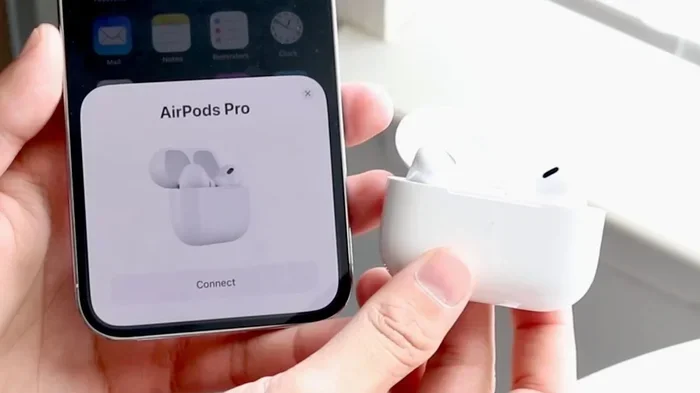
Open the AirPods Pro 2 case near your iPhone or iPad with the lid open. A setup animation should appear. Tap “Connect” and follow the on-screen prompts. Make sure to enable all features, including Siri and “Hey Siri.”
Step 4: Sync Across Devices
Once paired with one device, your AirPods Pro 2 should automatically appear in the Bluetooth settings of your other Apple devices signed into the same Apple ID. You may need to manually select them the first time on each device.
Step 5: Test the Automatic Switching
Play audio on your iPhone, then start playing a video on your Mac or iPad. Within a few seconds, your AirPods should switch to the new audio source automatically.
Troubleshooting Common Issues
Sometimes automatic switching doesn’t work as expected. Here are common fixes:
- Restart your devices: A simple reboot can resolve many Bluetooth glitches.
- Toggle Bluetooth off and on: This refreshes the connection pool.
- Check your Apple ID: Ensure all devices are signed into the same account.
- Reset your AirPods: Place them in the case, hold the setup button for 15 seconds until the light flashes amber, then white.
- Update firmware: AirPods Pro 2 firmware updates happen automatically when connected to an iPhone, but make sure your iPhone is up to date.
AirPods Pro 2 vs. Competitors: How Does Multipoint Compare?
Multipoint isn’t unique to AirPods Pro 2. Many premium wireless earbuds offer this feature. Let’s see how Apple’s implementation stacks up.
Sony WF-1000XM5
Sony’s flagship earbuds support true multipoint with two Bluetooth devices simultaneously, regardless of operating system. You can connect to an iPhone and a Windows laptop at the same time, and audio will switch automatically based on which device is playing sound. Sony’s implementation is more universal but requires manual setup in the Sony Connect app.
Jabra Elite 8 Active
Jabra earbuds have been pioneers of multipoint technology. They support up to 8 paired devices with 2 simultaneous connections. The Jabra Sound+ app provides granular control over which devices are active. Jabra’s multipoint works across all operating systems and is often praised for its reliability.
AirPods Pro 2 Advantage
What AirPods Pro 2 lack in universal compatibility, they make up for in seamless Apple ecosystem integration. If you’re deeply invested in the Apple ecosystem (iPhone, iPad, Mac, Apple Watch), AirPods Pro 2 multipoint is smoother and more intuitive than any competitor. There’s no need to manage connections manually, and the handoff is nearly instantaneous.
Think of it this way: AirPods Pro 2 multipoint is like a perfectly choreographed dance routine within the Apple ecosystem. Other brands offer more flexibility, but Apple offers more elegance for their users.
Where AirPods Pro 2 Fall Short
For mixed-OS households (e.g., iPhone + Windows PC, or iPad + Android phone), AirPods Pro 2 multipoint is a non-starter. You can manually pair to the non-Apple device, but you’ll need to disconnect from your Apple device first. This defeats the purpose of multipoint.
Did you know? A 2022 survey by Consumer Reports found that 43% of American households own at least one Apple product and one non-Apple product, making cross-platform multipoint a highly sought-after feature.
Practical Tips for Getting the Most Out of Multipoint
Now that you understand the basics, here are some insider tips to maximize your AirPods Pro 2 multipoint experience.
Tip 1: Customize Automatic Switching Behavior
Some users find automatic switching too aggressive. If your AirPods keep switching when you don’t want them to, you can disable automatic switching per device. On iPhone/iPad, go to Settings > Bluetooth > Tap the “i” next to your AirPods > Connect to This iPhone/iPad > choose “When Last Connected to This iPhone/iPad” or “Manually.”
Tip 2: Use Siri for Manual Switching
If automatic switching isn’t triggering, you can use Siri to manually switch devices. Just say, “Hey Siri, play audio on my Mac,” and your AirPods will route to the specified device.
Tip 3: Leverage iCloud for Quick Pairing
Because your AirPods Pro 2 are tied to your Apple ID, you can instantly pair them with any compatible device signed into the same account. No need to go through Bluetooth settings each time. Just select AirPods Pro 2 from the audio output menu.
Tip 4: Keep Devices Within Range
Bluetooth range is typically 30 feet (10 meters), but walls and interference can reduce this. For best multipoint performance, keep your devices within 15-20 feet of your AirPods.
Tip 5: Update Firmware Regularly
Apple frequently releases firmware updates that improve Bluetooth performance and battery life. Make sure your AirPods Pro 2 are connected to your iPhone overnight to receive the latest updates.
Common Myths About AirPods Pro 2 Multipoint
There are several misconceptions floating around about AirPods Pro 2 multipoint. Let’s debunk the most common ones.
Myth 1: AirPods Pro 2 Support Universal Multipoint Out of the Box
Truth: As of the latest firmware, AirPods Pro 2 only support automatic switching within the Apple ecosystem. Universal multipoint (across any brand) is not enabled.
Myth 2: Multipoint Drains Battery Faster
Truth: The H2 chip is designed to handle multipoint efficiently. Battery drain is minimal compared to single-device connections, and you can still get up to 6 hours of listening time with active noise cancellation enabled.
Myth 3: Multipoint Reduces Audio Quality
Truth: Because automatic switching is event-based (triggered by audio playback), there’s no degradation in audio quality. The H2 chip uses adaptive bitrate streaming to maintain optimal sound.
Myth 4: Multipoint Requires Wi-Fi
Truth: Multipoint uses Bluetooth, not Wi-Fi. However, iCloud syncing of your Apple ID does require an internet connection. Once devices are paired, multipoint works without Wi-Fi.
Myth 5: You Can Connect to Three or More Devices Simultaneously
Truth: AirPods Pro 2 multipoint is limited to two active connections at a time. You can pair with multiple devices, but only two can be active simultaneously.
The Future of AirPods Pro 2 Multipoint
Apple is constantly refining its products, and multipoint functionality may evolve in future updates. Here’s what to expect.
Potential Firmware Updates
Apple has historically added new features to AirPods via firmware updates. For example, Conversation Awareness and Adaptive Audio were added to AirPods Pro 2 after launch. Universal multipoint could be next on the list.
Bluetooth LE Audio and Auracast
Bluetooth LE Audio is a new standard that improves audio quality and enables new features like Auracast broadcast audio. AirPods Pro 2 are expected to support LE Audio in a future update, which could enable true universal multipoint.
Industry Trends
According to a 2024 report by MarketsandMarkets, the global true wireless earbuds market is expected to reach $563 billion by 2029. Multipoint is becoming a standard feature in premium earbuds, and Apple will likely expand support to remain competitive.
User Demand
Apple listens to user feedback. Forums, social media, and customer surveys all indicate strong demand for universal multipoint. If enough users request it, Apple may enable it in a future release.
Final Verdict: Is AirPods Pro 2 Multipoint Worth It?
So, do AirPods Pro 2 have multipoint? Yes, but with a caveat: it’s called automatic switching, and it works best within the Apple ecosystem. If you’re a dedicated Apple user with an iPhone, iPad, Mac, and Apple Watch, AirPods Pro 2 multipoint is seamless and reliable. The H2 chip makes switching nearly instantaneous, and iCloud integration eliminates the need for manual pairing.
However, if you rely on a mix of Apple and non-Apple devices, the experience is less impressive. Universal multipoint is missing, and you’ll need to manually switch between devices outside the Apple ecosystem.
Overall, AirPods Pro 2 multipoint is a valuable feature for the right audience. It enhances productivity, reduces friction, and makes your wireless audio experience more enjoyable. Just make sure you understand the limitations before purchasing.
If multipoint is a dealbreaker for you, consider alternatives like the Sony WF-1000XM5 or Jabra Elite 8 Active, which offer more universal compatibility. But if you’re deeply embedded in the Apple ecosystem, AirPods Pro 2 are hard to beat.
Frequently Asked Questions
Does AirPods Pro 2 have multipoint connectivity?
Yes, AirPods Pro 2 support multipoint connectivity through a feature Apple calls “automatic switching.” It allows your earbuds to stay connected to multiple Apple devices simultaneously and switch between them based on which device is playing audio.
Can AirPods Pro 2 connect to Android and iPhone at the same time?
No, AirPods Pro 2 automatic switching only works within the Apple ecosystem. You cannot simultaneously connect to an Android device and an iPhone using multipoint. You’ll need to manually disconnect from one to use the other.
Do I need the same Apple ID for multipoint to work?
Yes, all devices must be signed into the same Apple ID for automatic switching to function. This is how your AirPods Pro 2 recognize which devices belong to you and are eligible for seamless handoff.
How many devices can AirPods Pro 2 connect to simultaneously?
AirPods Pro 2 can maintain connections with up to two devices at the same time. While they can be paired with multiple devices (and remember them), only two can be actively connected at once.
Is AirPods Pro 2 multipoint the same as Audio Sharing?
No, these are different features. Multipoint (automatic switching) connects one set of AirPods to multiple devices. Audio Sharing allows two sets of AirPods to connect to a single device and listen to the same audio.
Will AirPods Pro 2 get universal multipoint in a future update?
Apple has not officially announced universal multipoint support for AirPods Pro 2. However, the H2 chip supports Bluetooth 5.3, which has the technical capability for universal multipoint. Apple could enable it in a future firmware update if they choose to.