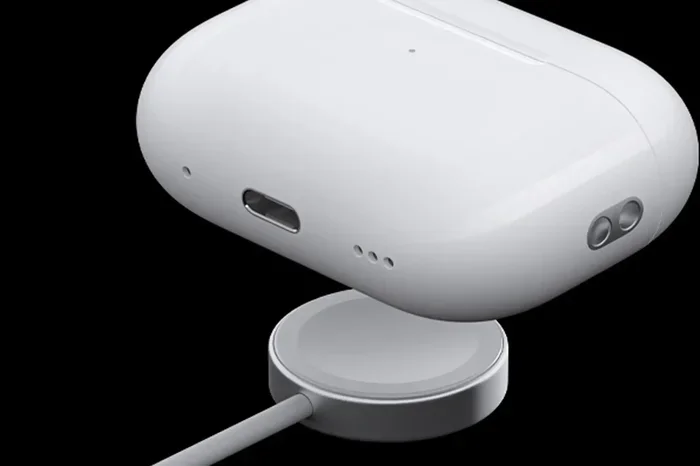
Featured image for AirPods Pro charging USB cable
Image source: b2c-contenthub.com
Yes, you can charge AirPods Pro with a USB cable, but it depends on your case model. AirPods Pro 1st and 2nd generation cases support either Lightning or USB-C cables, while AirPods Pro 2 with the newer case uses USB-C. Simply plug the appropriate cable into the charging port on your case and connect it to a power source.
Have you ever reached for your AirPods Pro, only to realize they’re dead right when you need them most? We’ve all been there. The good news is that charging your AirPods Pro is usually simple, but the type of cable you need depends on which version you own.
In this comprehensive guide, we’ll walk you through everything you need to know about charging your AirPods Pro with a USB cable. From identifying your case type to troubleshooting common issues, this article has you covered. Whether you’re a new AirPods Pro owner or a long-time fan, you’ll find practical tips and clear answers here.
By the end of this guide, you’ll understand exactly how to charge your AirPods Pro, what cables work, and how to keep your battery healthy for years to come. Let’s dive in!
Key Takeaways
- AirPods Pro Charging Compatibility: AirPods Pro cases support either Lightning or USB-C cables, depending on the generation and model.
- USB-C AirPods Pro 2: The newer AirPods Pro 2 (released September 2023) features a USB-C charging case for universal compatibility.
- Charging Speed: A 5W USB charger is sufficient, but higher wattage chargers won’t damage the case.
- Wireless Charging Alternative: All AirPods Pro cases also support Qi or MagSafe wireless charging.
- Battery Status Check: You can monitor charging status using your iPhone, iPad, or Mac.
- Common Issues: Dirty charging ports, outdated firmware, or faulty cables can prevent charging.
- Best Practices: Use Apple-certified cables and avoid extreme temperatures for optimal battery health.
📑 Table of Contents
Understanding AirPods Pro Charging Basics
Charging your AirPods Pro is straightforward once you understand the basics. Think of it like refueling a car. You need the right fuel (cable), the right tank (charging case), and the right station (power source). If any of these don’t match, things won’t work properly.
What Type of Cable Do AirPods Pro Use?
AirPods Pro cases come in two main types based on their charging port:
- Lightning Port: Found on AirPods Pro 1st generation and the original AirPods Pro 2nd generation cases.
- USB-C Port: Found on the newer AirPods Pro 2nd generation (released September 2023) and AirPods Pro 3 if available.
Did you know that Apple made the switch to USB-C largely due to European Union regulations requiring a universal charging standard? This change means newer Apple devices, including the AirPods Pro, now use the same port as most Android phones, laptops, and tablets.
How Does AirPods Pro Charging Work?
Think of your AirPods Pro case like a small power bank for your earbuds. The case itself has a battery, and you charge the case using a cable or wireless pad. The earbuds charge automatically whenever they’re placed inside the case.
Here’s the simple process:
- Place your AirPods Pro in the charging case.
- Connect the case to power using a USB cable.
- Wait for the earbuds and case to charge fully.
That’s it! No buttons to press, no switches to flip. It’s truly a plug-and-play experience.
Can You Charge AirPods Pro with USB-C Cable?
The short answer is yes, but only if your AirPods Pro case has a USB-C port. Let’s break this down further.
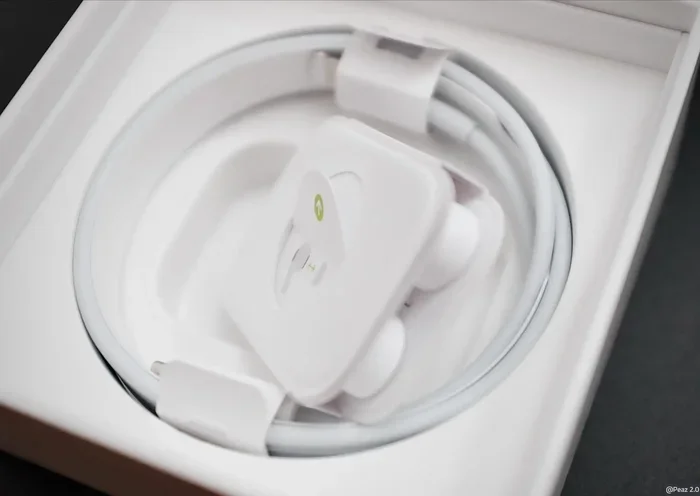
Visual guide about AirPods Pro charging USB cable
Image source: i0.wp.com
AirPods Pro 2 with USB-C Case
The AirPods Pro 2 (USB-C version) launched in September 2023 alongside the iPhone 15 series. This model features a USB-C charging port on the bottom of the case, making it compatible with any standard USB-C cable.
To charge these AirPods Pro:
- Plug a USB-C cable into the port on the bottom of the case.
- Connect the other end to a power adapter, computer, or power bank.
- Look for the status light to confirm charging.
Fun fact: Apple includes a USB-C cable in the box with these AirPods Pro, but you’ll need to provide your own power adapter.
AirPods Pro 1st Generation and Original AirPods Pro 2
These models use a Lightning cable for charging. They are not compatible with USB-C cables directly. However, you can use a Lightning to USB-C cable to connect the case to a USB-C power source.
Here’s how it works:
- Plug the Lightning end into your AirPods Pro case.
- Plug the USB-C end into a compatible power adapter or port.
This is similar to how you might charge an older iPhone with a newer MacBook charger. The cable acts as a bridge between two different standards.
What About AirPods Pro 3?
If Apple releases AirPods Pro 3 in the future, they will almost certainly use USB-C, following the industry trend toward universal charging standards.
Charging Methods Explained
Beyond USB cables, there are several ways to charge your AirPods Pro. Let’s explore each method in detail.
Wired Charging with USB Cable
Wired charging remains the fastest and most reliable way to power up your AirPods Pro. Here’s a step-by-step breakdown:
- Identify your case type: Look at the bottom of your AirPods Pro case. If you see a small rectangular port, it’s Lightning. If you see an oval-shaped port, it’s USB-C.
- Grab the right cable: Use a Lightning cable for older models or a USB-C cable for newer models.
- Connect to power: Plug the cable into a wall adapter, computer, or power bank.
- Check the status light: An amber light means charging, while green means fully charged.
Pro tip: Use a 5W or higher USB power adapter for optimal charging speed. While AirPods Pro won’t charge faster with a higher-wattage charger, using an underpowered source can slow down charging.
Wireless Charging with Qi and MagSafe
Did you know that all AirPods Pro cases support wireless charging? It’s like having a backup generator for your earbuds.
To charge wirelessly:
- Place the case on any Qi-compatible wireless charging pad.
- For MagSafe chargers, the case will magnetically snap into place (MagSafe-compatible cases only).
- Look for the status light to confirm charging.
Wireless charging is slower than wired charging but incredibly convenient. You can simply set your AirPods Pro down on your desk pad or nightstand charger without fumbling with cables.
Charging with a Power Bank
Power banks are perfect for travel or long days away from home. Any power bank with a USB-A or USB-C port will work with your AirPods Pro, provided you have the correct cable.
This method is especially useful for:
- Long flights
- Camping trips
- Commutes without easy access to wall outlets
Charging from a Computer
You can charge your AirPods Pro by plugging them into any computer with a USB port. This is handy when you’re working at a desk and don’t have a spare wall adapter.
However, charging from a computer is typically slower than using a wall adapter because USB ports provide less power.
Step-by-Step Guide: How to Charge AirPods Pro
Let’s walk through the exact process to charge your AirPods Pro, regardless of which model you own.
What You’ll Need
- Your AirPods Pro charging case with earbuds inside
- The appropriate USB cable (Lightning or USB-C)
- A power source (wall adapter, computer, or power bank)
Charging Instructions
- Place earbuds in the case: Make sure both AirPods Pro are properly seated in the case and the lid is closed.
- Connect the cable: Plug the appropriate end of the cable into your charging case.
- Connect to power: Plug the other end into a power source.
- Verify charging: The status light on the front of the case should glow amber (charging) or green (fully charged).
- Wait for completion: A full charge typically takes about an hour for the case and 30 minutes for the earbuds.
How to Check Charging Status
There are several ways to check if your AirPods Pro are charging:
- Status light: Amber means charging, green means fully charged, and no light means no power.
- iPhone pop-up: Open the case near your iPhone to see a battery status pop-up.
- Battery widget: Add the Batteries widget to your iPhone’s home screen for at-a-glance status.
- On Mac: Click the Bluetooth icon in the menu bar to see battery levels.
Common Charging Problems and Solutions
Sometimes, things don’t work as expected. Here are the most common AirPods Pro charging issues and how to fix them.
Problem: AirPods Pro Not Charging
If your AirPods Pro aren’t charging, try these solutions:
- Check the cable: Make sure the cable is firmly connected and not damaged.
- Clean the port: Lint and debris can accumulate in the charging port. Use a soft, dry brush to clean it gently.
- Try a different cable: Cables wear out over time. Swap in a known-good cable to test.
- Reset the AirPods: Press and hold the setup button on the back of the case for 15 seconds until the light flashes amber, then white.
- Check for updates: Make sure your AirPods Pro firmware is up to date through your iPhone settings.
Problem: Slow Charging
If charging seems unusually slow:
- Use a higher-wattage power adapter (at least 5W).
- Avoid charging from a computer’s USB port, which provides less power.
- Make sure the case isn’t in a hot environment, as heat can slow charging.
Problem: Case Not Holding Charge
If your case battery drains quickly, it might be time for a battery replacement. However, first try these steps:
- Update the firmware on your AirPods Pro.
- Reset the AirPods Pro.
- Avoid exposing the case to extreme temperatures.
Problem: One AirPod Not Charging
If only one earbud is charging:
- Clean the metal contacts inside the case with a soft cloth.
- Make sure the earbud is properly seated in the case.
- Try resetting the AirPods Pro.
Did you know? Apple offers battery service for AirPods Pro if your battery health drops below 80%. You can check your battery health through your iPhone settings.
Tips for Maintaining AirPods Pro Battery Health
Proper care can extend the life of your AirPods Pro battery significantly. Think of it like maintaining a car. Regular保养 keeps things running smoothly for years.
Best Charging Practices
- Avoid full discharges: Try not to let your AirPods Pro die completely before charging.
- Use Apple-certified cables: Cheap, uncertified cables can damage the battery over time.
- Don’t overcharge: While modern batteries have protection circuits, it’s still good practice to unplug once fully charged.
- Keep at room temperature: Extreme heat or cold can damage lithium-ion batteries.
Long-Term Storage Tips
If you plan to store your AirPods Pro for an extended period:
- Charge them to about 50% before storing.
- Store in a cool, dry place.
- Charge them at least once every six months to prevent battery degradation.
When to Replace the Battery
Like all lithium-ion batteries, AirPods Pro batteries degrade over time. According to Apple, AirPods Pro batteries are designed to retain up to 80% of their original capacity after 500 complete charge cycles. If you notice significantly shorter battery life, it might be time for a battery service.
Conclusion
Charging your AirPods Pro with a USB cable is simple once you know which type of cable you need. If you have the AirPods Pro 2 (USB-C version), you can use any standard USB-C cable. If you have an older model with a Lightning port, you’ll need a Lightning cable, though you can connect it to USB-C power sources using a compatible cable.
Remember that all AirPods Pro cases also support wireless charging through Qi and MagSafe chargers, giving you flexibility in how you power up your earbuds. By following the tips in this guide, you can keep your AirPods Pro charged and ready to go whenever you need them.
Whether you’re a casual listener or a podcast enthusiast, understanding how to properly charge your AirPods Pro ensures you always have power when you need it. Bookmark this guide for future reference, and share it with friends who might have the same questions!
Frequently Asked Questions
Can you charge AirPods Pro with any USB-C cable?
Yes, you can charge AirPods Pro 2 (USB-C version) with any standard USB-C cable. However, for the best results, use an Apple-certified cable or a high-quality third-party option from a reputable brand.
How long does it take to charge AirPods Pro with a USB cable?
Charging your AirPods Pro case fully takes about an hour, while the earbuds take around 30 minutes to charge from empty. A quick 5-minute charge in the case provides about an hour of listening time.
Can I charge AirPods Pro with my iPhone charger?
Yes, you can use any iPhone charger with a compatible cable. If you have an iPhone 15 or newer with a USB-C port, you can use the same cable for your AirPods Pro 2 (USB-C version).
Why won’t my AirPods Pro charge with a USB cable?
Common reasons include a dirty charging port, a damaged cable, outdated firmware, or a drained battery. Try cleaning the port, using a different cable, or resetting your AirPods Pro.
Can I charge AirPods Pro and iPhone with the same cable?
It depends on your devices. If you have AirPods Pro 2 (USB-C) and an iPhone 15 or newer, you can use the same USB-C cable for both. Otherwise, you’ll need different cables.
Is it safe to charge AirPods Pro overnight?
Yes, it’s safe to charge your AirPods Pro overnight. The charging case has built-in protection circuits that prevent overcharging. However, for optimal battery health, avoid leaving them plugged in constantly once fully charged.