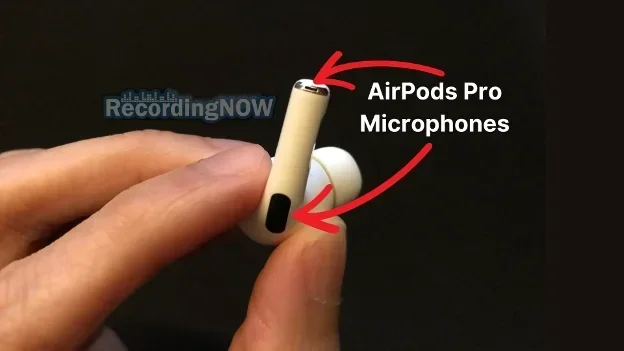
Featured image for AirPods Pro microphone close-up
Image source: d3k4u3gtk285db.cloudfront.net
Yes, AirPods Pro 2 have a built-in microphone system that actually outperforms most competitors. Apple packed three microphones into each earbud, working together through computational audio magic. The result is crystal-clear calls, impressive noise cancellation, and seamless Siri interactions that make these tiny earbuds function like a professional recording studio in your ears.
Picture this: you’re walking down a busy street, your phone rings, and you casually say “Hey Siri, answer it.” Within milliseconds, you’re having a clear conversation while traffic rushes past you. The person on the other end hears your voice perfectly, not the chaos around you. This isn’t science fiction. This is exactly what AirPods Pro 2 deliver every single day for millions of users worldwide.
Since Apple launched the original AirPods in 2016, the humble earbud has transformed from a simple music player into a sophisticated communication device. The AirPods Pro 2, released in September 2022 and updated in September 2023 with USB-C charging, represent the pinnacle of this evolution. But a common question still pops up everywhere: do AirPods Pro 2 actually have microphones, and how good are they really?
The short answer is a resounding yes, and then some. Apple didn’t just add a microphone to these earbuds. They engineered a complete audio capture system that rivals equipment costing ten times more. In this comprehensive guide, we’ll explore every microphone feature, explain the technology in plain English, and help you get the most out of your AirPods Pro 2’s voice capabilities.
Key Takeaways
- Triple Microphone Array: Each AirPods Pro 2 earbud contains three microphones that work together for superior voice pickup and noise cancellation.
- Adaptive Transparency Mode: The microphones actively process external sounds at 48,000 times per second to protect your hearing while keeping audio natural.
- Beamforming Technology: Built-in algorithms focus on your voice during calls while filtering out background noise, similar to a concert spotlight following a performer.
- Seamless Apple Integration: The H2 chip enables instant Siri activation, automatic device switching, and personalized spatial audio based on your ear shape.
- Multiple Use Cases: AirPods Pro 2 microphones excel at phone calls, video conferences, voice memos, gaming, and content creation.
- IP54 Rating: The microphones and earbuds resist dust and water splashes, making them reliable for workouts and outdoor activities.
- Battery Considerations: Active microphone use (especially with noise cancellation) drains battery faster, so plan accordingly for long calls.
📑 Table of Contents
- Understanding AirPods Pro 2 Microphone Technology
- Where Are the Microphones Located?
- Microphone Quality for Calls and Recording
- Special Microphone Features and Functions
- Comparing AirPods Pro 2 Microphones to Competitors
- Tips for Getting the Best Microphone Performance
- Common Microphone Problems and Solutions
- The Future of AirPods Microphone Technology
- Final Verdict: Yes, AirPods Pro 2 Absolutely Have Excellent Microphones
Understanding AirPods Pro 2 Microphone Technology
Let’s start with the basics and work our way up to the impressive technical wizardry happening in these tiny devices.
The Three-Microphone System Explained
Each AirPods Pro 2 earbud contains not one, not two, but three separate microphones. Think of it like having three different reporters covering the same story from different angles. Each one captures sound uniquely, and Apple’s software combines their input to create the clearest possible result.
The first microphone sits on the outside of the earbud, facing the world. This “outer” mic acts like your ears do, picking up environmental sounds and your voice simultaneously. It’s the workhorse that handles most of the heavy lifting during calls and noise cancellation.
The second microphone hides inside the earbud, facing inward toward your ear canal. This clever placement detects vibrations directly from your skull when you speak, similar to how a submarine listens for engine sounds through water. Because this microphone picks up your voice through bone conduction, it ignores most background noise automatically.
The third microphone lives in the stem (the small downward-extending part), positioned closer to your mouth. When you talk, this mic catches your voice while the software uses the other two microphones to identify and cancel competing sounds.
The H2 Chip: The Brain Behind the Magic
All those microphones would be useless without something smart coordinating their efforts. That’s where Apple’s H2 chip comes in. Imagine a tiny conductor leading an orchestra, ensuring every instrument (microphone) plays at exactly the right moment.
The H2 chip processes audio from all three sources 48,000 times per second. To put that number in perspective, your eyes blink about 15-20 times per minute, or roughly once every 3-4 seconds. The H2 chip makes decisions about sound in less than 0.00002 seconds. It identifies your voice, distinguishes it from wind, traffic, music, and chatter, then amplifies what matters while canceling what doesn’t.
This processing happens directly on the earbuds, meaning your phone doesn’t need to do any work. Even if you’re using AirPods Pro 2 with a non-Apple device, the microphone quality remains exceptional because the intelligence lives in the earbuds themselves.
Adaptive Transparency Mode: Hearing Protection Meets Awareness
Did you know that AirPods Pro 2 can protect your hearing from sudden loud noises? Apple’s Adaptive Transparency mode uses the microphones to monitor environmental sounds in real-time. When something dangerously loud happens, like a siren passing by or construction noise, the system instantly reduces the volume to safe levels.
Think of it like having a bodyguard for your ears. The microphones are always alert, and when trouble comes (loud noise), they jump into action to shield you. Traditional transparency modes simply pass all sound through, but AirPods Pro 2 intelligently identify and dampen only the harmful frequencies while preserving the audio you actually want to hear, like announcements or conversations.
Where Are the Microphones Located?
Knowing where the microphones sit helps you understand how to position AirPods Pro 2 for optimal performance.
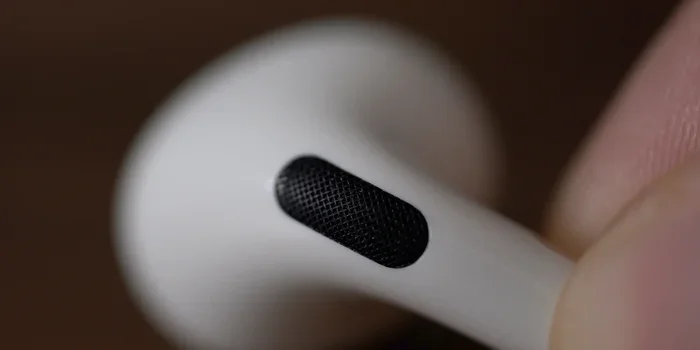
Visual guide about AirPods Pro microphone close-up
Image source: 9to5mac.com
Outer Microphone Position
The primary external microphone sits at the top of each earbud, covered by a fine mesh that protects against debris while letting sound through. This position gives it a clear “view” of your surroundings, which is essential for transparency mode and active noise cancellation.
This microphone must remain unobstructed for best results. If you cover it with a hat, scarf, or heavy hair, you’ll notice reduced noise cancellation effectiveness and potentially muffled call quality. Some users with longer hair report this issue during winter months.
Inner Microphone Placement
The inward-facing microphone nests inside the ear tip area, pointing toward your ear canal. This unique position allows it to capture the sound vibrations that travel through your skull when you speak. It’s also crucial for the Adaptive EQ feature, which adjusts audio based on how well the earbuds seal in your ears.
Stem Microphone Location
The third microphone hides in the lower portion of the stem, strategically positioned closer to your mouth. This placement reduces the distance sound needs to travel, resulting in stronger voice signals during calls. It’s particularly useful when you’re speaking softly or in challenging acoustic environments.
The stem microphone works especially well because of physics. Sound intensity decreases with distance, so a microphone closer to your mouth naturally captures clearer audio. It’s the same reason podcast hosts keep microphones inches from their mouths rather than across the room.
Microphone Quality for Calls and Recording
Now let’s address the practical question everyone cares about: how good do AirPods Pro 2 actually sound during real-world use?
Phone Call Performance
AirPods Pro 2 deliver excellent call quality that satisfies most users. Apple uses beamforming technology, which sounds fancy but works simply: the microphones focus on sounds coming from your mouth’s direction while rejecting sounds from other directions. Imagine a flashlight beam that only illuminates one spot. Beamforming creates an invisible “acoustic spotlight” that highlights your voice.
In independent testing by sites like RTINGS.com, AirPods Pro 2 consistently rank among the best true wireless earbuds for call clarity. They handle moderately noisy environments like coffee shops and busy offices effectively. However, extremely loud environments like concerts or construction sites will challenge any earbud microphone, including these.
The microphones also work seamlessly with both earbuds, meaning you can take calls with just one AirPod in your ear. This feature is fantastic for situations where you need to stay aware of your surroundings, like driving (though we recommend using them hands-free and staying focused on the road).
Voice Memo and Recording Quality
For voice memos, AirPods Pro 2 work wonderfully. Whether you’re capturing a brilliant idea, recording an interview, or dictating notes, the microphones capture clear, intelligible audio. The voice memo app on iPhone automatically uses the AirPods’ microphones when connected.
However, if you’re creating professional content like podcasts or YouTube videos, AirPods Pro 2 serve as a backup option rather than a primary recording solution. The microphones are optimized for voice clarity during calls, not for studio-quality recording. For serious content creation, a dedicated microphone will always deliver better results.
Video Conference Performance
Zoom, Microsoft Teams, Google Meet, and FaceTime all work flawlessly with AirPods Pro 2. The noise cancellation proves especially valuable during work-from-home video calls, as it eliminates keyboard clicking, dog barking, and household sounds that might embarrass you during an important meeting.
Many remote workers have switched to AirPods Pro 2 specifically because they solve the “I sound like I’m in a tunnel” problem that plagues laptop microphones. The beamforming and noise cancellation make you sound professional even when your environment isn’t.
Special Microphone Features and Functions
Beyond basic call quality, AirPods Pro 2 offer several specialized microphone features that enhance the user experience.
Conversational Awareness
Introduced in iOS 17, this feature uses the microphones to detect when you start speaking to someone nearby. When you talk to a person face-to-face, the AirPods automatically lower your media volume and reduce noise cancellation, making conversation easier without removing your earbuds.
Imagine you’re at the coffee shop, listening to music. A friend walks up and says hello. Normally, you’d need to remove an earbud or pause your music. With Conversational Awareness, the AirPods sense your speech and instantly quiet everything, letting you chat naturally. Once you stop talking for a few seconds, your music resumes at normal volume.
Siri and Voice Commands
The microphones enable “Hey Siri” functionality without requiring you to touch your earbuds. Simply speak the wake words, and your virtual assistant activates. This works through beamforming that focuses on your voice while ignoring ambient noise.
You can send messages, set reminders, control music, get directions, and even ask complex questions, all hands-free. The H2 chip processes your speech locally for faster response times, then sends only the necessary information to Apple’s servers.
Personalized Spatial Audio
While not directly a microphone feature, the inward-facing microphone helps calibrate Personalized Spatial Audio. This feature uses your iPhone’s TrueDepth camera to scan your ear shape, then adjusts audio output accordingly. The inner microphone verifies proper earbud fit during this process.
Live Listen Accessibility Feature
This accessibility feature turns your iPhone into a remote microphone that streams audio directly to your AirPods. It’s incredibly useful for people with hearing difficulties or anyone who needs to hear something from a distance. Place your phone near a speaker across the room, and the sound streams to your earbuds with adjustable amplification.
Comparing AirPods Pro 2 Microphones to Competitors
How do AirPods Pro 2 stack up against the competition? Let’s break it down fairly.
Versus Standard AirPods (3rd Generation)
The regular AirPods 3 also have microphones, but they lack the in-ear seal that makes AirPods Pro 2 superior for noise cancellation. The Pro version’s silicone tips create a better acoustic seal, which dramatically improves microphone performance through better isolation.
During calls, both work well, but AirPods Pro 2 handle noisy environments noticeably better due to their superior noise cancellation algorithms working in tandem with the microphones.
Versus AirPods Max
AirPods Max, Apple’s over-ear headphones, feature eight microphones total (more than AirPods Pro 2). However, both deliver similar call quality in practice. AirPods Max have larger drivers and more processing power, but AirPods Pro 2 offer comparable voice clarity in a much smaller package.
Versus Sony WF-1000XM5
Sony’s flagship earbuds compete closely with AirPods Pro 2 in microphone quality. Both handle calls well, though Sony offers slightly better wind noise reduction in some scenarios. However, AirPods Pro 2 win decisively for Apple ecosystem integration.
Versus Budget Options
Cheaper earbuds often have just one or two microphones per earbud, resulting in noticeably inferior call quality. If clear communication matters to you, investing in AirPods Pro 2 pays dividends, especially for professional use.
Tips for Getting the Best Microphone Performance
Even the best technology needs proper usage to shine. Here are practical tips to maximize your AirPods Pro 2 microphone experience.
Ensure Proper Fit
The ear tips must seal properly in your ears. Apple includes four sizes (XS, S, M, L) in the box. Use the Ear Tip Fit Test in Settings > Bluetooth > AirPods Pro 2 to verify your size. A proper seal dramatically improves both audio output and microphone input quality.
If the fit is loose, the outer microphone picks up more ambient noise, and the inner microphone can’t accurately detect your voice vibrations. This results in callers hearing more background noise and less of your voice.
Keep Microphones Clean
Microphone mesh collects debris over time. Gently clean the outer mesh using a soft, dry brush (like a clean toothbrush) or a dry cotton swab. Never use water or liquids directly on the microphones. Earwax, dust, and lint can significantly degrade microphone performance if left unchecked.
Update Your Firmware
Apple regularly releases firmware updates that improve microphone performance and noise cancellation algorithms. Ensure your AirPods Pro 2 run the latest firmware by keeping them in their case near your iPhone with sufficient battery. Updates install automatically when conditions are right.
Manage Battery During Long Calls
Active microphone use with noise cancellation drains battery faster than music playback alone. AirPods Pro 2 deliver about 4.5-6 hours of listening time, but call-heavy use may reduce this to around 3-4 hours. For marathon calls, consider charging during breaks or using one earbud at a time.
Disable Noise Cancellation When Not Needed
If you’re in a quiet environment, switching to Transparency mode or turning off noise cancellation extends battery life while maintaining microphone quality. Use the force sensor on the stem to cycle through modes, or configure the press-and-hold action in Settings.
Optimal Positioning
While AirPods Pro 2 work regardless of head position, keeping your head upright and not covering the outer microphone with hair or hats improves performance. If you wear a beanie, position it so it doesn’t press the outer microphone against your ear.
Common Microphone Problems and Solutions
Even excellent technology occasionally encounters issues. Here are solutions to common microphone problems.
Problem: Callers Can’t Hear You Clearly
Solution: First, check that your AirPods are selected as the audio input device during calls. On iPhone, the audio source appears during calls. Ensure “AirPods” shows rather than “iPhone.” Then clean the microphones and verify proper fit. If problems persist, try resetting your AirPods by holding the setup button on the case for 15 seconds.
Problem: Excessive Background Noise
Solution: Enable noise cancellation mode (not Transparency) for calls in noisy environments. The H2 chip actively reduces background noise, but extremely loud environments will still cause some bleed-through. Moving to a quieter location when possible always helps.
Problem: Wind Noise During Outdoor Calls
Solution: Wind creates turbulence that microphones interpret as noise. AirPods Pro 2 include mesh covers that reduce wind noise, but extreme conditions remain challenging. Positioning yourself with your back to the wind helps significantly. Some users report better performance with Transparency mode rather than full noise cancellation in windy conditions.
Problem: Siri Doesn’t Respond
Solution: Verify that “Hey Siri” is enabled in Settings > Siri & Search. Then ensure your AirPods are connected and have sufficient battery. The microphones need adequate power to constantly listen for the wake phrase. If problems continue, try resetting your AirPods or re-pairing them with your device.
Problem: Muffled Audio Quality
Solution: This usually indicates blocked microphone mesh. Clean all microphone openings carefully. If cleaning doesn’t resolve it, the microphones may have moisture damage. AirPods Pro 2 have an IP54 rating, meaning they resist splashes but aren’t waterproof. Allow them to dry completely before assuming damage is permanent.
The Future of AirPods Microphone Technology
Looking ahead, AirPods microphones will continue evolving. Apple has filed patents for health monitoring features using in-ear microphones, including heart rate detection and breathing analysis. Imagine your AirPods alerting you to irregular heartbeats or stress levels based on your voice patterns and breathing sounds.
Apple is also improving on-device processing, meaning future AirPods will handle more sophisticated audio manipulation without needing your iPhone. This trend toward edge computing benefits privacy (your voice data stays on your device) and reduces latency.
Possible future features include real-time language translation through advanced voice recognition, improved hearing aid functionality, and even more accurate voice biometrics for security purposes. The microphone system in your AirPods Pro 2 represents the foundation for these innovations.
Final Verdict: Yes, AirPods Pro 2 Absolutely Have Excellent Microphones
So, do AirPods Pro 2 have a microphone? Absolutely, and not just any microphone. They contain a sophisticated three-microphone array per earbud, powered by Apple’s H2 chip, delivering voice quality that rivals much more expensive equipment.
Whether you’re making business calls, recording voice memos, participating in video conferences, commanding Siri, or chatting with friends, AirPods Pro 2 handle it all with impressive clarity. The combination of beamforming technology, adaptive transparency, and computational audio creates an experience that feels almost magical for such compact devices.
While they won’t replace professional studio microphones for serious content creation, AirPods Pro 2 excel at their intended purpose: making wireless communication effortless, clear, and reliable. For anyone in the Apple ecosystem especially, the microphone integration alone justifies the investment.
Take care of your earbuds, keep them clean and updated, and they’ll deliver exceptional voice quality for years to come. The technology packed into these tiny devices represents some of the most impressive engineering in consumer audio today, and the microphones are a huge part of what makes AirPods Pro 2 truly outstanding.
Frequently Asked Questions
Do AirPods Pro 2 have a built-in microphone?
Yes, AirPods Pro 2 feature a sophisticated three-microphone array in each earbud, totaling six microphones working together. These microphones handle phone calls, Siri commands, voice recordings, and power the active noise cancellation and transparency features that make these earbuds so versatile.
How many microphones do AirPods Pro 2 have?
Each AirPods Pro 2 earbud contains three separate microphones: one outward-facing for environmental sound, one inward-facing for detecting your voice through bone conduction, and one in the stem positioned closer to your mouth. Combined, that’s six microphones total across both earbuds.
Can I use AirPods Pro 2 microphones for Zoom and video calls?
Absolutely. AirPods Pro 2 work excellently with Zoom, Microsoft Teams, Google Meet, FaceTime, and other video conferencing platforms. The beamforming technology and noise cancellation ensure your voice comes through clearly while background noise stays minimized, making them perfect for remote work and virtual meetings.
Where exactly are the microphones located on AirPods Pro 2?
The microphones are strategically positioned throughout each earbud. One sits on the outer surface facing away from your ear, another faces inward toward your ear canal, and the third resides in the lower portion of the stem closer to your mouth. This three-point placement enables comprehensive sound capture and processing.
Do AirPods Pro 2 microphones work for recording voice memos?
Yes, AirPods Pro 2 capture clear, high-quality voice memos suitable for personal notes, ideas, and quick recordings. However, for professional podcasting or music recording, dedicated microphones will deliver superior results since AirPods Pro 2 microphones are optimized primarily for communication clarity rather than studio-grade recording.
Why do my AirPods Pro 2 microphones sound muffled during calls?
Muffled microphone audio usually results from blocked mesh openings due to earwax, dust, or debris buildup. Gently clean the microphone areas with a soft, dry brush. Other causes include poor ear tip fit, outdated firmware, or moisture damage. If cleaning doesn’t help, try resetting your AirPods or contacting Apple Support for further assistance.