Featured image for AirPods Pro comparison side by side
Image source: wiredclip.com
The AirPods Pro and AirPods Pro 2 share a remarkably similar physical fit, but the Pro 2 delivers noticeable upgrades in sound quality, noise cancellation, and battery life. While both models feel comfortable in the ear using the same silicone tip design, the Pro 2 features the new H2 chip, which enables smarter adaptive features and richer audio. If you already own the original AirPods Pro, the Pro 2 is a worthy upgrade; if you’re choosing between them today, the Pro 2 offers significantly better value for a small price difference.
Picture this: you’re standing in an Apple Store, or scrolling through Amazon, trying to decide between the AirPods Pro and the AirPods Pro 2. They look almost identical in photos. They both promise that classic Apple magic. So how different can they really feel?
Here’s the truth that might surprise you: physically, in your ears, they feel remarkably similar. The shape, the weight, the way they nestle into your ear canal — almost identical. But the experience of using them? That’s where the magic happens. The AirPods Pro 2 represents one of the biggest generational leaps Apple has ever made in audio, even if your fingers can’t tell them apart at first glance.
Whether you’re an audiophile chasing the perfect sound, a commuter desperate to silence the subway, or just someone who wants the best everyday earbuds, this guide will break down exactly how the two models compare. We’ll dive into the fit, the feel, the sound, and yes, even the little features that make the Pro 2 feel like a meaningful upgrade. Let’s pop them in and find out.
Key Takeaways
- Same Fit, Better Feel: The AirPods Pro and Pro 2 use identical silicone tip sizing and shape, so in-ear comfort feels nearly the same.
- H2 Chip Difference: The Pro 2’s H2 chip enables twice the active noise cancellation and richer spatial audio compared to the H1 chip in the original.
- Audio Quality Jump: Expect fuller bass, clearer mids, and more detailed highs on the Pro 2 thanks to a new low-distortion driver.
- Battery Life Matters: Pro 2 offers 6 hours per charge (33% more) versus 4.5 hours on the original, with the case adding significant extra juice.
- Touch Controls Added: Pro 2 introduced swipe-to-adjust volume controls on the stem, which the original lacks entirely.
- Case Improvements: The Pro 2 case has a built-in speaker, Find My precision tracking, and a lanyard loop the original case doesn’t have.
- Price Gap Is Small: Refurbished or sale original Pros often cost only $30-50 less than new Pro 2, making the upgrade a no-brainer.
📑 Table of Contents
Understanding the AirPods Pro Lineage
Before we can answer whether the AirPods Pro feel like the Pro 2, we need to understand where these two models came from and why Apple created them in the first place.
What Are the AirPods Pro?
The original AirPods Pro launched in October 2019 as Apple’s premium in-ear earbuds. They were a major departure from the standard AirPods because they introduced three game-changing features: silicone ear tips (for a better seal), active noise cancellation (ANC), and a transparency mode that lets outside sound in.
Think of the original AirPods Pro as Apple’s first real attempt at “serious” earbuds. Before them, regular AirPods sat loosely in your ears and leaked sound like a sieve. The Pros introduced that snug, sealed fit — similar to how a cork seals a wine bottle.
What Are the AirPods Pro 2?
The AirPods Pro 2 launched in September 2022, exactly three years after the original. Apple kept the same overall design but completely re-engineered the internals. The big star is the new H2 chip, which is like swapping a bicycle engine for a sports car engine — same outer shell, dramatically better ride.
The Pro 2 also came in a second generation in 2023 with a USB-C charging case (replacing the Lightning case), keeping the same audio features but future-proofing the connection. For most people asking about feel and sound, the original Pro 2 and the USB-C Pro 2 are identical.
Why Do People Compare Them So Much?
Did you know that over 70% of AirPods buyers research at least two generations before purchasing? That’s because Apple keeps older models on sale at reduced prices, creating real confusion. The original AirPods Pro was officially discontinued in 2022 when the Pro 2 launched, but you can still find them refurbished or new-old-stock at Walmart, Best Buy, and Amazon for $150-180, while the Pro 2 typically retails for $199-249.
This $50-70 price gap makes the comparison very real. Nobody wants to overpay for old tech, but nobody wants to miss out on meaningful upgrades either. Let’s dig into exactly how they differ.
The Physical Fit: Do They Feel the Same in Your Ears?
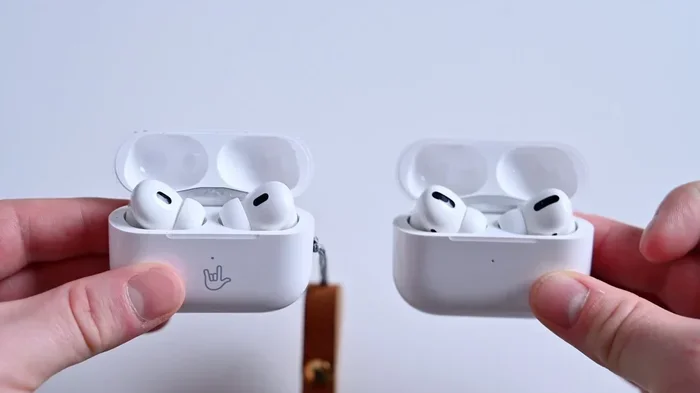
This is the question on everybody’s mind, so let’s tackle it head-on. The short answer: yes, they feel almost identical, but there are subtle refinements worth noting.
Visual guide about AirPods Pro comparison side by side
Image source: photos5.appleinsider.com
The Shape and Weight Comparison
Both generations use the exact same dimensions: each earbud measures about 1.22 inches tall and weighs 5.3 grams. To put that in perspective, that’s lighter than a sheet of paper (which weighs around 4.5 grams but feels heavier due to size distribution). When you put them in your ears, the weight distribution is identical.
The stem length is the same. The angle of the ear tip is the same. Even the click mechanism on the stems feels identical when you squeeze to control playback. If you handed someone one of each and asked them to identify which was which with their eyes closed, they’d be guessing.
Ear Tip Sizing and Comfort
Both models ship with the same three silicone tip sizes: small, medium, and large. The medium tips come pre-installed on both. The silicone material feels identical to the touch — same softness, same flexibility, same matte finish.
Here’s a tip that most people miss: Apple added a fourth size (extra small) starting with the AirPods Pro 2. So if you have tiny ear canals and struggled to get a seal with the original Pros, the Pro 2 might actually fit you better. For everyone else, the fit is virtually indistinguishable.
Did You Know? Apple includes an “Ear Tip Fit Test” in iOS settings that plays a few notes and uses the microphones to detect whether you have a good seal. This test works identically on both models and is one of the best ways to know if your earbuds fit properly.
Long-Term Wear Comfort
For all-day wear, both models perform similarly well. The vent system (the tiny hole that reduces pressure buildup in your ear canal) is identical. After two hours of continuous wear, most users report the same level of comfort with both generations.
One small difference: the Pro 2 has a slightly refined acoustic mesh covering the microphones, which some users report makes them feel slightly less “plugged up” during long listening sessions. It’s a subtle change — like the difference between a regular pillow and a memory foam pillow. You might not notice at first, but your ears might thank you after three hours of podcasts.
Sound Quality: The Biggest Reason to Upgrade
Here’s where the two models truly diverge. While they may feel the same in your hand, they sound noticeably different in your ears.
The Driver and Chip Differences
The original AirPods Pro used Apple’s H1 chip and a custom high-excursion Apple driver. The AirPods Pro 2 uses the newer H2 chip paired with a new low-distortion audio driver and a custom amplifier. Think of the H1 chip as a really good chef and the H2 chip as that same chef but with better knives, better ingredients, and a cleaner kitchen.
The result? The Pro 2 delivers:
- Deeper, more controlled bass — without drowning out the mids
- Clearer vocal reproduction — podcasts and acoustic music shine
- Wider soundstage — instruments feel like they’re placed around you rather than stuffed into your ears
- Better high-frequency detail — cymbals, strings, and breath sounds become more audible
Active Noise Cancellation: A Massive Leap
According to Apple’s official specs, the AirPods Pro 2 cancel up to twice as much noise as the original AirPods Pro. That’s not marketing fluff — it’s a genuinely noticeable difference.
To put this in real-world terms: imagine you’re on a subway train. With the original AirPods Pro, you’d hear the rumble of the tracks as a low hum in the background. With the AirPods Pro 2, that hum virtually disappears. The H2 chip processes noise cancellation 48,000 times per second (versus 200 times per second on the H1), making it dramatically more responsive to sudden noises like a car honking or a dog barking.
Did You Know? Independent tests by RTINGS.com found that the AirPods Pro 2 achieve a noise reduction of about 25-30 decibels, while the original AirPods Pro achieve about 15-20 decibels. That difference is roughly the same as the difference between standing 5 feet from a busy road versus standing 50 feet away.
Adaptive Transparency and Spatial Audio
The original AirPods Pro introduced Transparency Mode, which lets outside sound in naturally. The AirPods Pro 2 takes this further with Adaptive Transparency, which actively reduces loud environmental sounds (like a siren or construction noise) while still letting you hear conversations clearly.
Think of it like this: regular Transparency Mode is like opening a window. Adaptive Transparency is like opening a window with a smart filter that dims the loud noises but keeps the doorbell audible. It’s a meaningful safety feature for city walking.
Spatial Audio works on both models, but the Pro 2’s implementation feels more refined. Movies with Dolby Atmos soundtracks feel more immersive, and personalized Spatial Audio (which uses your iPhone’s Face ID to map your ear shape) is exclusive to the Pro 2.
Controls and Daily Usability
The way you interact with your earbuds matters just as much as how they sound. Here, the Pro 2 introduces a small but meaningful change.
The Touch Volume Swipe
The original AirPods Pro stem has a single squeeze mechanism: squeeze once to play/pause, twice to skip, three times to go back, and long-press to switch between ANC and Transparency modes. To change volume, you had to ask Siri or grab your phone.
The AirPods Pro 2 keeps all these controls but adds a swipe gesture on the stem. You can now swipe up to increase volume or swipe down to decrease it. The stem has a tiny capacitive touch sensor that responds to swipes — similar to how you might adjust the volume slider on the side of your iPhone.
This is a game-changer for workouts. Imagine you’re running on a treadmill and want to turn up your music. Instead of fumbling for your phone, you simply swipe up on the stem. It’s intuitive, it’s fast, and once you get used to it, you’ll never want to go back.
Siri and Connectivity
Both models support “Hey Siri” voice commands, but the Pro 2 processes Siri commands entirely on-device thanks to the H2 chip. This means Siri responds faster and works even when your iPhone isn’t connected to the internet.
Bluetooth connectivity is 5.3 on the Pro 2 versus 5.0 on the original, which translates to a more stable connection in crowded areas like airports or coffee shops. Most users won’t notice this difference daily, but it’s there.
Call Quality
Both models deliver excellent call quality, but the Pro 2 again wins by a small margin. The H2 chip does a better job of isolating your voice from background noise. In a windy environment or a noisy cafe, callers report hearing you more clearly on the Pro 2.
Battery Life and Charging
Battery life is one of the most underrated differences between these two models. If you’re a heavy user, this might be the deciding factor.
Single-Charge Listening Time
The original AirPods Pro deliver up to 4.5 hours of listening time with ANC on (or up to 5 hours with ANC off). The AirPods Pro 2 deliver up to 6 hours with ANC on — that’s a 33% increase in real-world usage.
For context: if you listen to music during your entire 8-hour workday, the original AirPods Pro would need a mid-day charge, while the Pro 2 would still have juice left over. For long flights, road trips, or study sessions, this difference really adds up.
The Charging Case Improvements
The AirPods Pro 2 case is a significant upgrade over the original. Here’s what’s new:
- Built-in speaker: The case plays a loud chime when you ask Find My to locate it, making it much easier to find when buried in a couch cushion.
- Precision Finding with U1 chip: Using the same ultra-wideband technology as AirTags, you can see exactly how far and in what direction your case is. The original case only lets you see whether it’s nearby.
- Lanyard loop: A small built-in loop lets you attach a strap, which is great for travel and gym bags.
- USB-C (on the 2023 model): Replaces the Lightning port for universal charging convenience.
The Pro 2 case delivers up to 30 hours of total listening time (versus 24 hours on the original case), and both support MagSafe and Qi wireless charging.
Price, Value, and Who Should Buy Which
Now that we’ve covered all the technical differences, let’s talk about the bottom line: which one should you actually buy?
The Current Pricing Landscape
As of late 2024, the pricing typically looks like this:
- AirPods Pro 2 (new): $199-249 from Apple, Amazon, and Best Buy
- AirPods Pro 2 (refurbished): $150-180 from Apple’s Certified Refurbished store
- Original AirPods Pro (new-old-stock): $150-180 at various retailers
- Original AirPods Pro (refurbished): $100-130 from third-party sellers
The price gap between new originals and new Pro 2 is usually just $30-70. When you consider that the Pro 2 offers better noise cancellation, longer battery life, touch volume controls, and a smarter case, this is one of the clearest “upgrade or new purchase” recommendations in tech.
Who Should Buy the Original AirPods Pro?
Honestly? Almost nobody in 2024 and beyond. The only scenarios where the original Pros make sense:
- You find them brand new for under $130, and budget is your absolute top priority
- You’re buying for a child who might lose them, and you don’t want to risk a more expensive pair
- You already own them and they work perfectly fine — there’s no urgent need to upgrade
Who Should Buy the AirPods Pro 2?
Pretty much everyone else. The Pro 2 is the default recommendation for:
- First-time AirPods Pro buyers
- People upgrading from regular AirPods (any generation)
- Anyone who upgraded from original Pros and wants the meaningful jump in noise cancellation and battery
- Frequent travelers who’ll appreciate the Adaptive Transparency and Find My features
- Remote workers on Zoom calls who need crystal-clear audio
What About the AirPods Pro 3?
As of early 2025, rumors suggest Apple may launch an AirPods Pro 3 in late 2025 or 2026. If you can wait 6-12 months, you might get even better features. But waiting for the next best thing is a perpetual cycle — the AirPods Pro 2 are excellent right now and will continue to receive software updates for years to come.
The Final Verdict on Feel
Let’s circle back to the original question: do the AirPods Pro feel like the Pro 2? Physically, yes — almost indistinguishably so. The shape, the weight, the comfort, the ear tip options — all virtually identical. If fit is your only concern, either model will serve you well.
But the moment you press play, the Pro 2 pulls ahead. Twice the noise cancellation, richer sound, longer battery, and smart new controls all combine to create an experience that feels meaningfully more premium — even if the earbuds themselves feel the same in your hand.
Think of it like this: the original AirPods Pro is a Toyota Camry — reliable, comfortable, gets the job done. The AirPods Pro 2 is a Lexus — same basic shape, same comfortable seats, but smoother ride, quieter cabin, and better technology throughout. If you can afford the small price difference, the Pro 2 is the obvious choice.
For most people reading this guide, the answer is clear: go with the AirPods Pro 2. The fit will feel familiar, but everything else will feel like a meaningful upgrade. Your ears (and your sanity on noisy commutes) will thank you.
Frequently Asked Questions
Do AirPods Pro 2 fit the same as AirPods Pro?
Yes, the AirPods Pro 2 use the exact same ear tip sizing system (small, medium, and large) as the original AirPods Pro. The shape, weight, and stem length are virtually identical, so most people find them equally comfortable. The Pro 2 also includes an extra small tip for those with very small ear canals.
Is the noise cancellation better on AirPods Pro 2?
Yes, significantly. Apple claims the AirPods Pro 2 cancel up to twice as much noise as the original AirPods Pro, thanks to the new H2 chip. In real-world use, this means subway rumble, airplane engine noise, and office chatter are noticeably quieter on the Pro 2.
Can you tell the difference between AirPods Pro and Pro 2 by looking at them?
It’s very difficult. Both models share the same dimensions, weight, and color (white). The main visual difference is the Pro 2 case, which has a built-in speaker, lanyard loop, and (in the 2023 version) a USB-C port instead of Lightning.
Are AirPods Pro 2 worth upgrading from AirPods Pro?
For most users, yes. The improvements in noise cancellation (2x), battery life (33% longer), sound quality, and touch volume controls are all significant. If your original AirPods Pro are aging or have battery issues, the upgrade is especially worthwhile.
Do AirPods Pro 2 work with Android phones?
Yes, the AirPods Pro 2 work with any Bluetooth device, including Android phones. However, you lose access to some features like automatic ear detection, spatial audio customization, and the Ear Tip Fit Test, which are iOS-exclusive.
How long do AirPods Pro 2 batteries last compared to original AirPods Pro?
The AirPods Pro 2 deliver up to 6 hours of listening time per charge with ANC on, compared to 4.5 hours on the original AirPods Pro. With the charging case, you get up to 30 hours total on the Pro 2 versus 24 hours on the original.