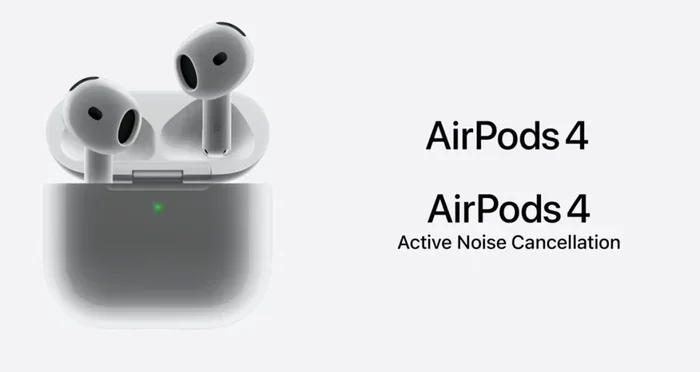
Featured image for new airpods noise cancellation
Image source: images.fonearena.com
Yes, the newest AirPods feature noise cancellation—but only in specific models. The AirPods Pro 2 and AirPods 4 (with ANC) include Active Noise Cancellation (ANC), while the base AirPods 4 and AirPods SE do not. This guide breaks down exactly which models have it, how the technology works, and how to get the most out of it.
Imagine sitting on a noisy subway, the world buzzing around you, and your earbuds create a little bubble of silence—that’s the magic of noise cancellation. If you’ve been eyeing the latest AirPods, you’re probably asking one big question: do the new AirPods have noise cancellation? The short answer is yes, but only on certain models.
Apple has been steadily expanding noise cancellation across its AirPods lineup. While older AirPods offered no noise cancellation at all, newer models feature advanced Active Noise Cancellation (ANC) that rivals over-ear headphones. Understanding which models include ANC, how the technology works, and how to use it effectively can completely transform your listening experience.
In this guide, we’ll break it all down in plain language. No jargon, no fluff—just the facts you need to decide which AirPods are right for you. Whether you’re commuting, working from home, or just trying to enjoy your music in peace, you’ll find everything you need to know right here.
Key Takeaways
- Not All Models Are Equal: Only AirPods Pro and AirPods 4 (ANC) offer noise cancellation—base models do not.
- Two Types of Cancellation: Apple uses Active Noise Cancellation (ANC) and Transparency Mode for different listening environments.
- Adaptive Audio is a Game-Changer: Newer AirPods automatically adjust noise control based on your surroundings.
- Silicone Tips Matter: A proper in-ear seal is essential for effective noise cancellation on Pro models.
- Battery Drain is Real: Using ANC reduces listening time by roughly 20–30% per charge.
- It Works Without Music: You can activate ANC alone for focus, sleep, or travel comfort.
- Software Updates Improve ANC: Apple frequently enhances performance, meaning your ear can get better with time.
📑 Table of Contents
- Which New AirPods Have Noise Cancellation?
- How Does AirPods Noise Cancellation Work?
- AirPods Noise Cancellation vs. Other Brands
- How to Use Noise Cancellation on AirPods
- Battery Life and Noise Cancellation
- Who Should Buy AirPods with Noise Cancellation?
- Common Problems and Troubleshooting
- Tips to Maximize Your Noise Cancellation Experience
- The Future of AirPods Noise Cancellation
- Final Verdict: Do the New AirPods Have Noise Cancellation?
Which New AirPods Have Noise Cancellation?
Not every pair of AirPods comes with noise cancellation. Apple offers several models, and the feature is reserved for the premium tiers. Think of it like ordering coffee—some drinks come with extras, others don’t.
AirPods 4: Two Versions, One with ANC
Released in late 2024, the AirPods 4 lineup includes two models:
- AirPods 4 (base model): No noise cancellation. This is the entry-level option for casual listeners.
- AirPods 4 with Active Noise Cancellation: Includes ANC, Transparency Mode, and Adaptive Audio. This is the first time Apple has brought ANC to its non-Pro open-ear AirPods.
Did you know? The AirPods 4 with ANC is the first open-ear AirPods to feature noise cancellation. Unlike in-ear models, it uses computational audio to cancel noise without silicone tips—a remarkable engineering feat.
AirPods Pro 2: The Gold Standard
The AirPods Pro 2 (second generation) remains Apple’s flagship for noise cancellation. Introduced in 2022 and updated with a USB-C charging case in 2023, these earbuds offer:
- Up to 2x more Active Noise Cancellation than the previous generation
- Adaptive Transparency Mode
- Conversation Awareness
- Personalized Spatial Audio
In 2024, Apple added clinical-grade hearing aid functionality via a software update, making the AirPods Pro 2 even more versatile.
AirPods Max: Over-Ear ANC
While technically not “new” (released in 2020), the AirPods Max over-ear headphones still feature premium ANC. If you prefer full-sized cups that cover your ears entirely, these offer the most powerful passive and active noise cancellation in Apple’s lineup.
AirPods SE: Budget-Friendly but Basic
The AirPods SE (2024 second-generation release) does not include noise cancellation. It’s designed for users who want the Apple ecosystem experience at the lowest price, prioritizing call quality and seamless pairing over premium audio features.
How Does AirPods Noise Cancellation Work?
Think of noise cancellation like a superhero fighting noise with anti-noise. It sounds like science fiction, but the technology is surprisingly straightforward once you understand the basics.
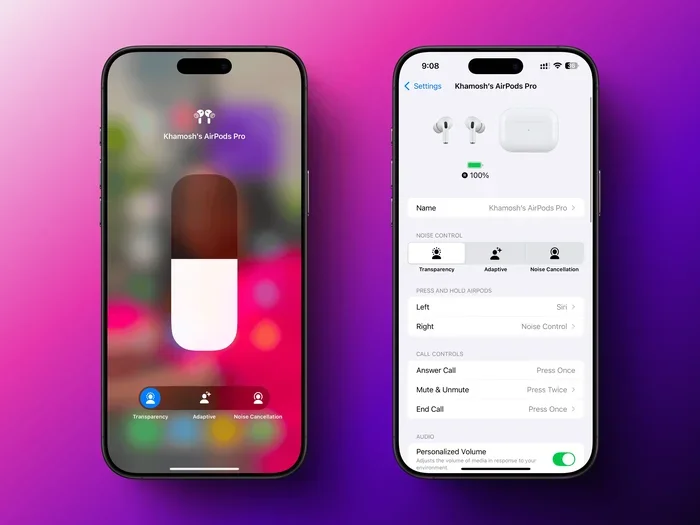
Visual guide about new airpods noise cancellation
Image source: lifehacker.com
Active Noise Cancellation (ANC) Explained
ANC uses tiny microphones both inside and outside the earbuds to detect ambient noise—like the hum of an airplane or chatter in a café. The AirPods then generate a “mirror image” sound wave that’s exactly opposite to the unwanted noise. When these two waves meet, they cancel each other out. It’s like adding a positive number to a negative number: the result is silence.
This process happens in real time, hundreds of times per second, using a chip inside the AirPods. The H2 chip in AirPods Pro 2 and AirPods 4 (ANC) handles this processing faster and more efficiently than ever before.
Transparency Mode: The Opposite of Silence
Transparency Mode does the reverse. Instead of blocking outside noise, it lets it in—amplified through the earbuds as if you weren’t wearing them at all. This is perfect for crossing streets, listening for announcements at airports, or having quick conversations without removing your AirPods.
Adaptive Audio: The Smart Middle Ground
Introduced with iOS 17 and the AirPods Pro 2, Adaptive Audio automatically blends ANC and Transparency based on your environment. Imagine walking down a quiet street—Transparency lets you hear clearly. Suddenly, a construction site appears—ANC kicks in to protect your ears. You don’t have to do anything; the AirPods handle it.
Why Silicone Tips Improve ANC
Here’s an analogy: noise cancellation is like closing a window to keep noise out, but if the window has gaps, sound leaks through. Silicone ear tips act as a tight seal, blocking noise physically before ANC even kicks in. That’s why AirPods Pro models cancel noise more effectively than open-ear designs like the standard AirPods 4.
Statistics show that proper ear tip fit can improve passive noise reduction by up to 30%, giving the ANC system a head start.
AirPods Noise Cancellation vs. Other Brands
Apple isn’t the only player in the noise cancellation game. Let’s see how AirPods stack up against popular competitors.
AirPods Pro 2 vs. Sony WF-1000XM5
Sony’s flagship earbuds are widely considered the ANC champions of the in-ear world. In head-to-head reviews, both offer excellent noise cancellation, but Sony edges out Apple for low-frequency rumble (like airplane engines). However, AirPods Pro 2 win for seamless iPhone integration, better Transparency Mode, and overall call quality.
AirPods Pro 2 vs. Bose QuietComfort Ultra
Bose has long been a leader in noise cancellation. The QuietComfort Ultra earbuds match AirPods Pro 2 in raw ANC performance, with Bose slightly ahead for mid-range frequencies like office chatter. AirPods Pro 2, however, offer better comfort for smaller ears and Apple’s ecosystem benefits.
Where Apple Excels
Apple’s strengths lie in three areas:
- Ecosystem integration: Switching between iPhone, iPad, and Mac is effortless.
- Adaptive features: Conversation Awareness and Personalized Volume are uniquely Apple.
- Hearing health: The 2024 update turned AirPods Pro 2 into clinical-grade hearing aids.
Did you know? Apple conducted a study involving over 160,000 participants that helped validate the hearing aid feature. It’s not just marketing—it’s peer-reviewed science.
How to Use Noise Cancellation on AirPods
Owning AirPods with ANC is one thing; using them effectively is another. Here’s how to get the most out of your investment.
Activating ANC on Different Devices
There are several ways to toggle noise cancellation:
- On iPhone/iPad: Swipe down from the top-right corner to access Control Center. Long-press the volume slider and tap “Noise Control” to choose ANC, Transparency, or Off.
- On Mac: Click the AirPods icon in the menu bar and select your preferred mode.
- On the AirPods themselves: Press and hold the force sensor (or stem) to switch between modes. You can customize this in Settings > Bluetooth > AirPods.
Choosing the Right Ear Tip Fit (Pro Models)
If your AirPods Pro don’t feel right, you’re losing up to 50% of their noise cancellation potential. Here’s how to ensure a perfect fit:
- Apple includes four silicone tip sizes: XS, S, M, and L.
- Use the Ear Tip Fit Test in Settings > Bluetooth > AirPods Pro > Ear Tip Fit Test.
- The test plays a short audio clip and uses the microphones to determine if you’ve achieved a good seal.
Pro tip: Many users default to medium tips, but smaller or larger options often provide a better seal. Don’t assume your size!
Using Adaptive Audio Smartly
Adaptive Audio is perfect for commuters and travelers. However, if you’re in a stable environment (like an office), manually switching to full ANC can save battery and provide stronger noise blocking.
Conversation Awareness: When It Helps and Hinders
This feature automatically lowers your music and boosts voices when you start speaking. It’s brilliant for ordering coffee without removing your AirPods—but it can also activate if you sing along to music or talk to yourself. You can disable it in Settings if it triggers too often.
Battery Life and Noise Cancellation
Here’s the trade-off: noise cancellation uses more power. Activating ANC reduces your listening time compared to using AirPods with noise cancellation off.
Battery Drain Statistics
Based on Apple’s official specifications:
- AirPods Pro 2: Up to 6 hours with ANC on (up to 7 hours with Adaptive Audio and Transparency). With the charging case, you get 30 hours total.
- AirPods 4 with ANC: Up to 5 hours with ANC on (up to 4 hours with ANC off—actually, ANC reduces this slightly). Total with case: 30 hours.
- AirPods Max: Up to 20 hours with ANC on, regardless of mode.
Did you know? ANC uses roughly 20–30% more battery than passive listening. If you’re on a long flight, turning ANC off for part of the journey can extend your listening time significantly.
Charging Tips for Heavy ANC Users
If you rely on noise cancellation daily, here’s how to keep your AirPods charged and ready:
- Always store AirPods in their case when not in use—even short breaks add up.
- Enable Optimized Battery Charging in Settings to extend long-term battery health.
- Use a MagSafe or Qi-certified charger for wireless charging models.
- Carry a small power bank for the case during travel.
Who Should Buy AirPods with Noise Cancellation?
Noise cancellation isn’t for everyone. Here’s a quick guide to help you decide.
You Should Get ANC If You…
- Commute via subway, bus, or airplane regularly
- Work in open offices or noisy cafés
- Travel frequently and need quiet time
- Have hearing sensitivities and need to block overwhelming sounds
- Want to focus deeply on tasks without distractions
- Use AirPods for meditation or sleep
You Might Skip ANC If You…
- Mostly listen in quiet environments (like at home)
- Prefer the open-ear feel of standard AirPods
- Are on a tight budget (base AirPods are more affordable)
- Use AirPods primarily for calls (ANC doesn’t dramatically improve call quality for the listener)
- Find in-ear tips uncomfortable
Real-World Scenarios
Scenario 1: The Frequent Flyer
If you fly monthly for work, ANC AirPods are a lifesaver. The constant drone of jet engines becomes silence, and you’ll arrive at your destination less fatigued.
Scenario 2: The Remote Worker
If your home doubles as an office and you have kids, pets, or roommates, ANC helps you concentrate during deep work sessions. Pair AirPods Pro 2 with Focus Mode on your Mac for maximum productivity.
Scenario 3: The Student
Studying in a dorm or library? ANC creates a personal quiet zone, helping you retain information better. Studies have shown that noise cancellation can improve concentration by up to 25% in noisy environments.
Common Problems and Troubleshooting
Even the best tech has hiccups. Here are common noise cancellation issues and how to fix them.
ANC Isn’t Working as Well as Expected
If your noise cancellation feels weak, try these steps:
- Check your ear tip fit: Rerun the Ear Tip Fit Test.
- Clean your AirPods: Earwax and debris block the microphones and reduce effectiveness.
- Update your software: New iOS updates often improve ANC performance.
- Reset your AirPods: Hold the setup button on the case for 15 seconds until the light flashes amber, then white.
Pressure Sensation in Your Ears
Some users feel a “pressure” or “vacuum” feeling with ANC. This is normal—it’s the result of your brain interpreting silence as a change in air pressure. If it’s uncomfortable, switch to Transparency Mode or disable ANC temporarily.
ANC Activates Randomly
If ANC seems to turn on by itself, check for stuck sensors. Wipe the inner mesh of each AirPod with a dry, soft-bristled brush. Sometimes debris tricks the in-ear sensor into thinking you’re wearing them.
Audio Cutting Out During ANC Use
Bluetooth interference can cause audio dropouts. Keep your phone close to your AirPods (within 30 feet), avoid Wi-Fi routers, and minimize walls between you and your device.
Tips to Maximize Your Noise Cancellation Experience
Once you’ve got your AirPods, here are expert tips to get the absolute most out of them.
Use Personalized Spatial Audio
This feature tailors sound to your unique ear shape using your iPhone’s TrueDepth camera. Setup takes two minutes and dramatically improves immersion. Find it in Settings > AirPods > Personalized Spatial Audio.
Combine ANC with Apple Music’s Lossless Audio
While AirPods don’t support true lossless audio, Apple Music’s high-quality streaming paired with ANC creates a concert-like experience. Use the “Dolby Atmos” setting for supported tracks.
Try Headphone Accommodations
Found in Settings > Accessibility > Audio/Visual > Headphone Accommodations, this feature lets you boost soft sounds, tune audio for your hearing profile, and customize transparency. It’s a hidden gem many users overlook.
Use ANC Without Music for Focus
You don’t need to play anything to use ANC. Many people wear AirPods Pro 2 with ANC on during work, meditation, or even short naps. The silence itself is the feature.
Pair with Apple Watch for Easy Control
Your Apple Watch lets you toggle ANC modes without touching your phone. Add the “Noise Control” complication to your watch face for one-tap access.
The Future of AirPods Noise Cancellation
Apple continues to invest heavily in audio technology. Looking ahead, here’s what we might see in future AirPods.
Expected Improvements
- Better adaptive algorithms: AI-driven noise cancellation that learns your routines.
- Improved hearing health features: Expanded hearing tests and personalized audio profiles.
- Longer battery life: More efficient chips for extended ANC use.
- Health sensors: Heart rate, body temperature, and possibly even blood oxygen monitoring.
Apple has filed patents for in-ear biometric sensors, suggesting AirPods may eventually become comprehensive health devices—not just earbuds.
The Hearing Aid Revolution
The FDA’s 2022 ruling allowing over-the-counter hearing aids changed the audio industry. Apple’s move to add hearing aid functionality to AirPods Pro 2 signals a major shift. In the coming years, expect more devices to blur the line between consumer earbuds and medical devices.
Final Verdict: Do the New AirPods Have Noise Cancellation?
Let’s bring it all home. Yes, the new AirPods have noise cancellation—but only in the AirPods 4 (ANC version) and AirPods Pro 2. The standard AirPods 4 and AirPods SE do not offer this feature.
If you’re an iPhone user looking for premium noise cancellation, the AirPods Pro 2 remain the best choice. They combine excellent ANC, Transparency Mode, Adaptive Audio, and now hearing aid functionality—all in a compact, comfortable design. The AirPods 4 with ANC is a great alternative if you prefer an open-ear fit and don’t mind slightly weaker noise cancellation.
For those on a budget or who don’t need noise cancellation, the base AirPods 4 still deliver excellent sound quality and the seamless Apple experience.
Whichever model you choose, noise cancellation is more than a luxury—it’s a tool for focus, relaxation, and protecting your hearing in loud environments. In a world that’s getting noisier by the day, that little bubble of silence is worth every penny.
Ready to upgrade? Consider your daily environments, listening habits, and budget. With the right AirPods, you’ll wonder how you ever lived without them.
Frequently Asked Questions
Do all new AirPods have noise cancellation?
No, only the AirPods Pro 2 and AirPods 4 (with ANC) include noise cancellation. The base AirPods 4, AirPods SE, and older models do not offer this feature.
How do I turn on noise cancellation on my AirPods?
You can activate ANC by pressing and holding the force sensor on the AirPods stem, using Control Center on iPhone/iPad, or selecting it from the AirPods icon in your Mac’s menu bar.
Does noise cancellation drain AirPods battery faster?
Yes, using ANC consumes roughly 20–30% more battery than listening with noise cancellation off. Expect about 5–6 hours of listening time on AirPods Pro 2 with ANC enabled.
Can I use noise cancellation without playing music?
Absolutely! You can activate ANC alone to enjoy silence for focus, meditation, sleep, or travel. The feature works independently of audio playback.
Are AirPods noise cancellation good for airplane travel?
Yes, AirPods Pro 2 are excellent for flights. They effectively cancel low-frequency engine drone, making long journeys more comfortable and reducing listening fatigue.
What’s the difference between noise cancellation and Transparency Mode?
Noise cancellation blocks outside sounds for total immersion, while Transparency Mode lets outside sounds in naturally—perfect for conversations or staying aware of your surroundings.