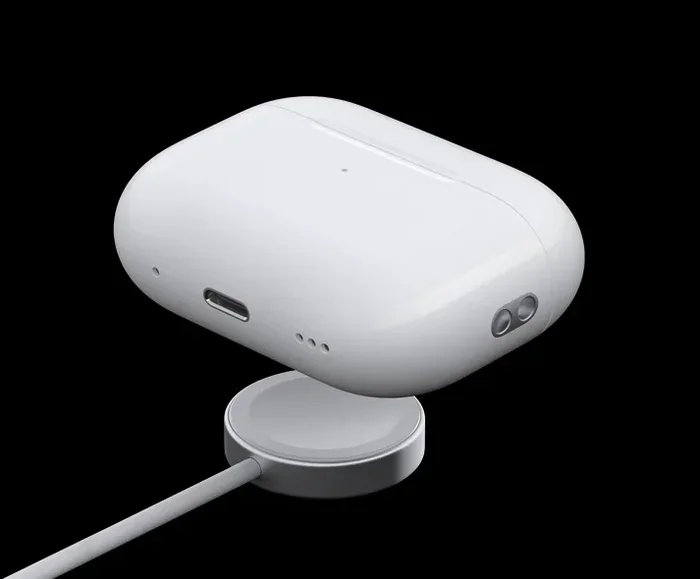
Featured image for AirPods Pro 2 charging case
Image source: tradelinestores.s3.amazonaws.com
AirPods Pro 2 initially launched with a Lightning charging case in September 2022, but Apple released a USB-C version in September 2023 alongside the iPhone 15 lineup. The USB-C model offers better compatibility with modern Apple devices and complies with upcoming EU regulations. Both versions are still actively sold, so knowing which one you have matters for charging cables and accessories.
If you’ve ever held an iPhone, you know that satisfying “click” when the charging cable snaps into place. For years, that click came courtesy of Apple’s proprietary Lightning connector—a tiny port that became as iconic as the bitten apple logo itself. Now, imagine buying a shiny new pair of premium wireless earbuds, only to realize you’re not sure what kind of cable you need to charge them. That’s exactly the confusion many people face with the AirPods Pro 2.
Here’s the short answer: it depends on when you bought them. The AirPods Pro 2 originally launched with a Lightning charging case in September 2022. Then, in September 2023, Apple quietly released a refreshed version with a USB-C charging case. Both versions still exist on shelves today, which is why this question trips up so many shoppers. Think of it like buying a car from the same model year but different trim levels—the engine is the same, but some features under the hood differ.
This guide will walk you through everything you need to know. We’ll cover who makes AirPods, what exactly the Lightning port situation is, when each version launched, where you can buy them, and why Apple made the switch. By the end, you’ll be able to identify your case, choose the right cable, and make sense of Apple’s charging strategy. Let’s dive in.
Key Takeaways
- Two Versions Exist: AirPods Pro 2 come in two charging case variants—one with Lightning (original 2022 release) and one with USB-C (released September 2023).
- Same Earbuds, Different Case: The earbuds themselves are identical; only the charging port on the case differs between versions.
- USB-C Model Has Added Benefits: The USB-C version supports lossless audio with Apple Vision Pro and offers IP54 dust and water resistance.
- Charging Cable Matters: You’ll need the correct cable type matching your case—Lightning cables won’t work with USB-C cases and vice versa.
- EU Regulation Influence: Apple’s switch to USB-C was largely driven by the European Union’s common charger directive taking effect in 2024.
- How to Identify Yours: Check your case model number (A2968 = Lightning, A2968 with USB-C = USB-C) or look at the physical port on the bottom.
- Wireless Charging Works Either Way: Both versions support Qi, Qi2, and MagSafe wireless charging regardless of the wired port type.
📑 Table of Contents
- Understanding the AirPods Pro 2 Charging Case Basics
- The Lightning Port Version: Original AirPods Pro 2
- The USB-C Version: What’s Different and When It Launched
- How to Identify Which Version You Have
- Charging Your AirPods Pro 2: Practical Tips and Tricks
- Comparing AirPods Pro 2 Versions: Which Should You Buy?
- The Bigger Picture: Why Apple’s Charging Strategy Matters
- Conclusion: Making Sense of AirPods Pro 2 Charging
Understanding the AirPods Pro 2 Charging Case Basics
Before we get into Lightning versus USB-C, let’s establish some foundational knowledge. The AirPods Pro 2 are Apple’s second-generation premium wireless earbuds, sitting at the top of their in-ear headphone lineup. They launched on September 23, 2022, replacing the original AirPods Pro from 2019.
Each pair of AirPods Pro 2 comes with three main components:
- The Earbuds: The two tiny devices that go in your ears, complete with silicone tips in four sizes.
- The Charging Case: A small pill-shaped container that stores and charges your earbuds.
- The Cable: A charging cable that connects the case to a power source.
Now here’s the crucial point: the earbuds themselves have no port at all. They’re charged wirelessly through metal contacts when placed inside the case. The port we’re discussing—the Lightning or USB-C connector—lives on the bottom of the charging case, similar to how a gas tank opening is on the side of a car. The case acts as both a protective home and a battery pack for your earbuds.
What Does the Charging Case Actually Do?
Think of the charging case as a portable power bank for your ears. When your AirPods run low on battery, popping them into the case recharges them. The case itself holds multiple full charges—Apple claims up to 30 hours of total listening time when you factor in case charges. But the case eventually needs juice too, and that’s where that little port on the bottom comes into play.
Why the Port Type Matters
Imagine owning a gas car but only having a diesel pump at your nearest station. Frustrating, right? Similarly, having the wrong cable for your AirPods case renders you unable to charge them. This is why knowing whether your AirPods Pro 2 use Lightning or USB-C isn’t just trivia—it’s practical information you’ll use regularly.
The Lightning Port Version: Original AirPods Pro 2
When Apple first released the AirPods Pro 2 in September 2022, the charging case featured a Lightning port on the bottom. This made complete sense at the moment, because at that time, every iPhone—from the iPhone 5 all the way to the iPhone 14—used Lightning connectors. Apple was deeply committed to its proprietary ecosystem.
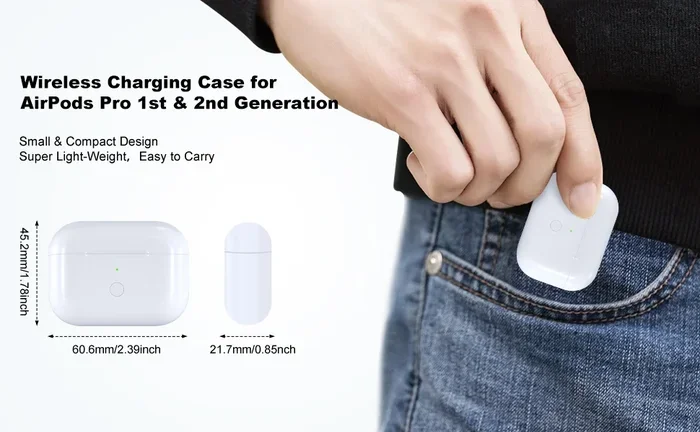
Visual guide about AirPods Pro 2 charging case
Image source: m.media-amazon.com
Key Features of the Lightning Case Version
- Charging Port: Lightning connector at the bottom of the case.
- Included Cable: A USB-C to Lightning cable in the box (yes, the cable has USB-C on one end because the power adapter is typically USB-C nowadays).
- Model Number: A2968 (this is how you can identify it).
- Wireless Charging: Supports Qi-compatible wireless charging and MagSafe.
- Water Resistance: The case is rated IPX4, meaning splash-resistant but not dust-resistant.
If you bought AirPods Pro 2 between September 2022 and sometime in late 2023, you almost certainly have the Lightning version. Apple continued selling this version even after the USB-C model launched, and they may still have stock at certain retailers.
Who Needs to Know This Information?
Anyone who already owns the Lightning version needs to know what cable to use. The good news is that if you’ve ever owned an iPhone before the iPhone 15, you probably have Lightning cables lying around everywhere—your nightstand, your car, your office drawer, your travel bag. That existing cable collection works perfectly with the Lightning AirPods Pro 2 case.
The USB-C Version: What’s Different and When It Launched
Fast forward to September 2023. Apple hosted its annual iPhone event and unveiled the iPhone 15 lineup—the first iPhones to feature USB-C ports instead of Lightning. Alongside that announcement, Apple also quietly updated the AirPods Pro 2 to feature a USB-C charging case.
The earbuds themselves remained identical in design and features. The only meaningful change was the port on the bottom of the case, plus a couple of subtle enhancements we’ll discuss shortly.
Did You Know?
The European Union passed legislation in 2022 mandating that all small electronic devices sold in EU countries must use USB-C charging by the end of 2024. This regulation, called the “common charger directive,” was a major catalyst for Apple’s transition. Rather than create separate products for different regions, Apple standardized on USB-C globally. According to EU estimates, this single regulation could save consumers up to €250 million annually on unnecessary cable purchases.
Key Features of the USB-C Case Version
- Charging Port: USB-C connector at the bottom of the case.
- Included Cable: A USB-C to USB-C cable in the box.
- Model Number: Also A2968, but with different packaging and regulatory markings.
- Wireless Charging: Supports Qi, Qi2, and MagSafe wireless charging.
- Water and Dust Resistance: Upgraded to IP54, meaning better protection against dust ingress.
- Lossless Audio Support: Works with Apple Vision Pro for 20-bit/48 kHz lossless audio with ultra-low latency.
Why USB-C Became the New Standard
USB-C isn’t just a port—it’s a universal language. The same cable that charges your MacBook, iPad Pro, Nintendo Switch, Android phone, and now AirPods Pro 2 can do it all. Think of USB-C like the English language of charging cables: widely spoken, increasingly understood, and likely to be accepted wherever you go. This universality is precisely why regulators and consumers pushed for it.
How to Identify Which Version You Have
Here’s a practical scenario: you bought AirPods Pro 2 as a gift, inherited them from a family member, or just can’t remember which model you grabbed during the holiday sale. How do you figure out which version is sitting in your pocket?
The Quick Visual Check
Flip the charging case over and look at the bottom edge. You’ll see a small oval-shaped port. Compare it to your cables:
- If the port matches a Lightning cable, you have the Lightning version.
- If the port matches a USB-C cable, you have the USB-C version.
This method works about 95% of the time. The ports are visually different shapes—Lightning is smaller and more rounded, while USB-C is slightly larger and more oval.
The Model Number Method
For absolute certainty, check the model number printed inside the charging case lid. You’ll need to open the lid and look at the tiny text near the hinge. Both versions technically use the A2968 model number, but the packaging and firmware versions differ. The most reliable identifier is the original packaging, which clearly labels the port type.
The Settings Check on iPhone
If your AirPods are connected to your iPhone, navigate to Settings, then Bluetooth, then tap the “i” next to your AirPods Pro 2. Scroll down to view the model number and firmware version. While this doesn’t directly say “Lightning” or “USB-C,” the firmware version can hint at which case you have, since they run slightly different software.
Charging Your AirPods Pro 2: Practical Tips and Tricks
Now that you know which version you have, let’s talk about keeping those bad boys powered up. Charging AirPods Pro 2 is straightforward, but a few insider tips can maximize battery life and convenience.
Wired Charging Best Practices
- Use Apple-Certified Cables: Cheap third-party Lightning cables can damage your case’s charging circuitry. Stick with Apple’s own cables or MFi-certified alternatives.
- Don’t Wait Until Empty: Lithium-ion batteries last longer when you top them off rather than fully draining them. Charge your case when it drops below 20%.
- Avoid Extreme Temperatures: Don’t charge your case in direct sunlight or freezing conditions. Apple recommends ambient temperatures between 0°C and 35°C (32°F to 95°F).
Wireless Charging Convenience
Both AirPods Pro 2 versions support wireless charging, which feels almost futuristic. Just place the case on any Qi-compatible charging pad, and it starts juicing up—no cables needed. The USB-C version added Qi2 support, which means faster and more efficient wireless charging when paired with a Qi2-certified pad.
Did You Know? MagSafe technology, originally designed for iPhones, works beautifully with AirPods Pro 2 cases. The magnets in MagSafe chargers align perfectly with the case, ensuring optimal charging positioning. This means you can use your iPhone’s MagSafe charger to power up your AirPods case.
The Apple Watch Charger Hack
Here’s a neat trick: the USB-C version of AirPods Pro 2 can actually charge using an Apple Watch charging puck. This feature was specifically engineered to add convenience for users deep in the Apple ecosystem. The original Lightning version does not support this method.
Comparing AirPods Pro 2 Versions: Which Should You Buy?
If you’re shopping for AirPods Pro 2 today, you’ll likely encounter both versions at various retailers. Understanding the differences helps you make a smart purchasing decision based on your needs and budget.
Price Considerations
The Lightning version is often discounted as Apple and retailers clear inventory. You might find them $20-$50 cheaper than the USB-C version. If you already own multiple Lightning cables and don’t care about future-proofing, this represents solid value.
The USB-C version typically retails at the standard $249 price point. If you’re building a USB-C-centric setup or own newer Apple devices, the extra investment pays off in convenience.
Future-Proofing Your Purchase
Here’s something to consider: Apple will eventually discontinue the Lightning version entirely. Once existing stock sells out, that’s it. If you buy Lightning AirPods Pro 2 today, you’ll own them for years, and during that time, Lightning cables will become increasingly rare as Apple transitions its entire lineup to USB-C.
For example, the iPhone 15 (2023), iPhone 16 (2024), and presumably all future iPhones use USB-C. The iPad Pro switched to USB-C in 2018. Even the basic AirPods (non-Pro) received USB-C cases in 2023. Lightning is being phased out across Apple’s ecosystem.
Feature Comparison Table
- Lightning Version: IPX4 rating, no lossless audio with Vision Pro, standard Qi and MagSafe wireless charging.
- USB-C Version: IP54 rating (better dust resistance), lossless audio with Apple Vision Pro, Qi2 support, Apple Watch charger compatibility.
For most users, these differences are minor. The IP54 versus IPX4 distinction matters more if you frequently use your AirPods in dusty environments like workshops or beaches. The lossless audio feature only applies if you own (or plan to own) the $3,500 Apple Vision Pro headset.
The Bigger Picture: Why Apple’s Charging Strategy Matters
Apple’s transition from Lightning to USB-C represents one of the most significant connector shifts in consumer electronics history. To put it in perspective, Apple introduced the Lightning connector in September 2012 with the iPhone 5. That little port survived for 11 years across billions of devices. Switching such a massive ecosystem is no small feat.
Environmental Impact
Did You Know? The European Commission estimates that discarded or unused charging cables generate approximately 11,000 to 13,000 tons of electronic waste annually in the EU alone. By standardizing on USB-C, regulators hope to dramatically reduce this waste, since consumers won’t need new cables every time they switch devices.
Consumer Convenience
Imagine traveling internationally and forgetting your charger. With USB-C becoming universal, you can borrow a cable from virtually any fellow traveler, regardless of what brand of device they own. This was impossible during the era of proprietary connectors like Lightning, Micro-USB, and older 30-pin Apple connectors.
Industry Influence
Apple’s switch sent ripples throughout the entire consumer electronics industry. When Apple moves, competitors pay attention. While Android phones had already embraced USB-C years earlier, Apple’s adoption accelerated accessory makers, car manufacturers, and even hotel chains to standardize their offerings around USB-C.
Conclusion: Making Sense of AirPods Pro 2 Charging
So, do AirPods Pro 2 have a Lightning port? The honest answer is: sometimes. If you purchased them between September 2022 and mid-2023, you likely have the Lightning version. If you bought them after September 2023, you probably have the USB-C version. Both versions remain functional, popular, and well-supported by Apple.
The key takeaway is simple: identify which version you own, keep the appropriate cable handy, and don’t stress about it. Both versions deliver identical audio quality, noise cancellation performance, and battery life. The charging port is just one small detail in an otherwise excellent product.
If you’re shopping for new AirPods Pro 2 today, our recommendation leans toward buying the USB-C version unless you find a significant discount on the Lightning model. The USB-C version offers better future-proofing, slightly improved durability, and enhanced compatibility with modern Apple devices. Plus, you won’t have to worry about hunting for Lightning cables in a few years when they become increasingly scarce.
Ultimately, the AirPods Pro 2 are among the finest wireless earbuds available, regardless of which charging port your case features. Enjoy the music, take the calls, and let Apple handle the cable confusion.
Frequently Asked Questions
Do all AirPods Pro 2 use Lightning?
No, not all AirPods Pro 2 use Lightning. The original AirPods Pro 2 released in September 2022 came with a Lightning charging case, but Apple released an updated version in September 2023 with a USB-C charging case. Both versions are still available for sale depending on the retailer.
Can I use a USB-C cable with the Lightning AirPods Pro 2 case?
No, USB-C cables are physically incompatible with Lightning ports. The Lightning AirPods Pro 2 case requires a Lightning cable for wired charging. However, you can still charge both versions wirelessly using any Qi or MagSafe-compatible charging pad.
How do I tell if my AirPods Pro 2 are Lightning or USB-C?
The easiest way is to look at the port on the bottom of your charging case. Lightning ports are smaller and more rounded, while USB-C ports are slightly larger and more oval-shaped. You can also check the model number inside the case lid or on the original packaging.
Which AirPods Pro 2 version is better?
Both versions deliver identical audio quality and features. The USB-C version offers minor upgrades including IP54 dust resistance (versus IPX4), lossless audio support with Apple Vision Pro, and Apple Watch charger compatibility. For future-proofing, the USB-C version is the better long-term investment.
Did Apple stop making Lightning AirPods Pro 2?
Apple has been gradually phasing out the Lightning version as inventory depletes, but they haven’t announced a specific discontinuation date. Many retailers still sell both versions, though the Lightning model becomes harder to find over time as Apple shifts focus to USB-C.
Can I charge AirPods Pro 2 with my iPhone charger?
Yes, as long as you use the correct cable type. If you have the Lightning AirPods Pro 2 case, use a Lightning cable with any USB power adapter. If you have the USB-C version, use a USB-C cable. The charging case works with any standard USB power source, including iPhone chargers, computer USB ports, and portable battery banks.