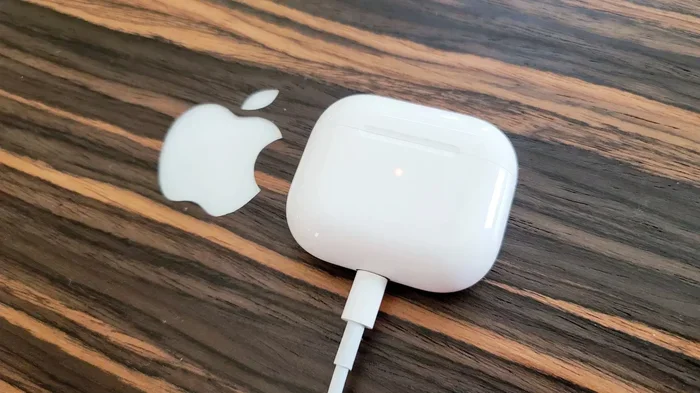
Featured image for AirPods Pro 2 Lightning cable
Image source: cdn.mos.cms.futurecdn.net
Yes, the original AirPods Pro 2 (released September 2022) use a Lightning cable for charging. However, Apple released a USB-C version in September 2023, which charges via USB-C instead. The key difference comes down to the charging case—open yours and check the port to identify which version you own.
Picture this: you just unboxed a shiny new pair of AirPods Pro 2. You’re excited, ready to pair them with your iPhone and dive into your favorite playlist. But then you reach for a charging cable and suddenly pause. Is this a Lightning cable or a USB-C cable? Does it even matter? If you’ve ever asked yourself, “Do AirPods Pro 2 use Lightning cable?” you’re definitely not alone. Thousands of people search for this exact answer every single month.
The truth is, the answer depends on which version of the AirPods Pro 2 you own. Apple released two different versions in just one year, and they use two different ports. The original 2022 model uses Lightning. The refreshed 2023 model uses USB-C. Confusing, right? Don’t worry—by the end of this guide, you’ll know exactly which cable your AirPods need, how to tell them apart, and even why Apple made the switch in the first place.
Let’s break it all down in plain English, just like we’re chatting over coffee. No tech jargon, no confusing specs, just clear answers you can actually use.
Key Takeaways
- Original AirPods Pro 2 = Lightning: The first-generation AirPods Pro 2 (2022) comes with a Lightning charging case and Lightning to USB-C cable.
- 2023 Refresh = USB-C: Apple released an updated AirPods Pro 2 in September 2023 that uses a USB-C charging case instead of Lightning.
- How to tell which you have: Look at the port on the bottom of the charging case—Lightning is small and oval; USB-C is wider and rectangular.
- Both versions still work with any Lightning or USB-C cable: You don’t need an Apple-branded cable; any certified third-party cable will charge your case.
- Wireless charging works on both: Both the Lightning and USB-C AirPods Pro 2 cases support Qi, Qi2, and MagSafe wireless charging.
- The change reflects EU regulations: Apple switched to USB-C to comply with the European Union’s Common Charger Directive, which requires USB-C on most portable electronics.
- Wireless earbuds are now the bigger trend: AirPods sales continue to climb, with Apple shipping over 80 million units worldwide in recent years.
📑 Table of Contents
- What Cable Do AirPods Pro 2 Use? The Quick Answer
- How to Tell Which AirPods Pro 2 You Have
- The Big Differences Between the Lightning and USB-C Versions
- What About the Charging Cable in the Box?
- Can You Use AirPods Pro 2 While Charging?
- What Happens If You Use the Wrong Cable?
- Why Did Apple Switch to USB-C? The Real Reason
- Common Scenarios: Which Cable Do You Need?
- Tips for Keeping Your Charging Cable in Good Shape
- The Future of AirPods Charging
- Frequently Asked Questions About AirPods Pro 2 Charging
- The Final Verdict: Do AirPods Pro 2 Use Lightning?
What Cable Do AirPods Pro 2 Use? The Quick Answer
Let’s get straight to the point because I know you’re here for a quick answer. The AirPods Pro 2 come in two flavors, and each one uses a different charging cable.
The original AirPods Pro 2 (released in September 2022) uses a Lightning cable. It comes with a Lightning to USB-C cable in the box. You plug the USB-C end into a wall adapter, power bank, or computer, and the Lightning end goes into the charging case.
The updated AirPods Pro 2 (released in September 2023) uses a USB-C cable. It comes with a USB-C to USB-C cable in the box. Both ends are the same, so you can plug it in either way.
Think of it like this: imagine you have two different phones, an older iPhone and a newer Android. The older one has a small oval charging port. The newer one has a wider, rectangular port. That’s basically the difference between Lightning and USB-C. They’re two different shapes designed to do the same job: charge your device.
Why Are There Two Versions?
Great question. Apple didn’t just randomly decide to switch things up. The change happened because of new rules in Europe. The European Union passed a law called the Common Charger Directive, which says most small electronics—including phones, tablets, and wireless earbuds—must use USB-C as their charging port by the end of 2024.
Apple didn’t want to make two completely separate products just for Europe, so they switched the global version to USB-C. This way, one model works everywhere, and Apple can keep its production line simple. It’s a smart business move, even if it leaves some folks with a drawer full of Lightning cables they no longer need.
How to Tell Which AirPods Pro 2 You Have
Okay, so now you know there are two versions. But how do you figure out which one is sitting in your pocket right now? Don’t worry—you don’t need to be a tech detective. There are three super easy ways to find out.
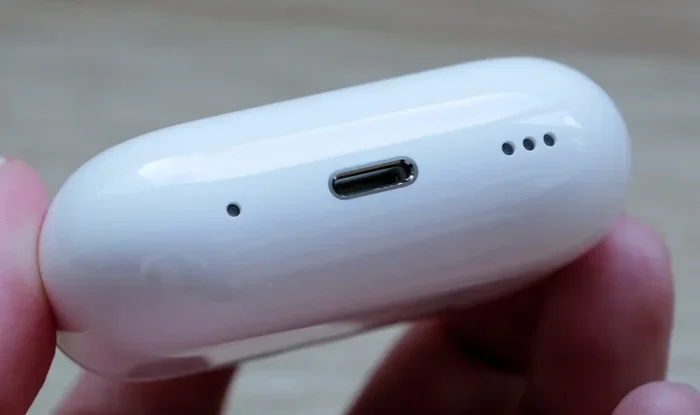
Visual guide about AirPods Pro 2 Lightning cable
Image source: assets.hardwarezone.com
Method 1: Check the Charging Port
This is the fastest and easiest way. Grab your AirPods Pro 2 charging case and look at the bottom of it. You’ll see a small port where the cable plugs in.
- If the port is small and oval-shaped: You have the original 2022 model with a Lightning port.
- If the port is wider and rectangular: You have the 2023 model with a USB-C port.
It’s that simple. The two ports look very different, so you can’t really mix them up. The Lightning port looks like a tiny rounded slot, kind of like a flattened oval. The USB-C port looks like a small rectangle with rounded corners. Once you see them side by side, you’ll never confuse them again.
Method 2: Look at the Model Number
If you want to be 100% certain, you can check the model number. Here’s how:
- Open the Settings app on your iPhone.
- Tap on Bluetooth.
- Find your AirPods in the list of paired devices.
- Tap the little “i” icon next to them.
- Look at the Model Number.
Model A2968: This is the AirPods Pro 2 with Lightning charging case (2022 version).
Model A2968: Wait, that says the same thing! Let me clarify. The model number for the charging case is what you want to check. The original AirPods Pro 2 case has model number A2700. The USB-C version has model number A2700 for the earbuds but A2968 for the case. Honestly, this method can get confusing, so I’d stick with Method 1—it’s way easier.
Method 3: Check the Box or Receipt
If you still have the original box, take a look at it. Apple prints a small icon on the back of the box showing which type of cable is included. A Lightning icon means it’s the 2022 model. A USB-C icon means it’s the 2023 model. If you bought them online, your receipt or order confirmation will usually mention which version you purchased.
The Big Differences Between the Lightning and USB-C Versions
Now, you might be wondering: besides the charging port, is there any other reason to care which version you have? The answer is yes, but the differences are pretty small. Let me walk you through them.
Charging Speed
Here’s something cool. The USB-C version actually charges a tiny bit faster than the Lightning version, especially when you use a higher-wattage power adapter. We’re not talking a huge difference—maybe 10 to 15 minutes faster to fully charge the case—but it’s something.
Lightning cables typically support up to 12 watts of charging power. USB-C cables can handle much more, but the AirPods case itself only draws around 5 watts either way. So in real-world use, you’ll barely notice the difference. The bigger advantage is that USB-C is just more convenient if you already have other USB-C gadgets.
Audio and Features
Here’s where things get interesting. The 2023 USB-C version of the AirPods Pro 2 has one extra trick up its sleeve: it supports lossless audio when paired with the Apple Vision Pro headset. The Lightning version doesn’t have this feature.
What does lossless audio mean? Imagine you’re listening to a song. Regular Bluetooth audio is like looking at a photograph that got compressed—it’s still good, but some of the tiny details are missing. Lossless audio is like looking at the original uncompressed photo. Every detail is preserved, and the sound is richer and clearer.
Of course, to take advantage of this, you’d need the Apple Vision Pro, which is a $3,500 headset. So for most people, this difference doesn’t really matter. But it’s worth knowing about if you’re a serious audio enthusiast.
Water and Dust Resistance
The earbuds themselves have the same IP54 rating on both versions. That means they’re protected against dust and splashes of water. Just don’t take them swimming. The charging case is a little different, though. The USB-C version has an IP54 rating for the case too, while the Lightning version’s case doesn’t have an official rating. In real life, both cases can handle a little rain, but neither one wants to take a swim.
Price
Here’s some good news: both versions typically sell for the same price. When the USB-C version launched, Apple kept the price at $249. You can often find both versions on sale now, and the Lightning version is sometimes cheaper because it’s the older model.
What About the Charging Cable in the Box?
Let’s talk about what’s actually included when you buy AirPods Pro 2. This is where things get a little tricky, especially if you’re buying used or refurbished.
What Comes with the Lightning Version?
If you buy the original AirPods Pro 2 (2022), you’ll get:
- One pair of AirPods Pro 2 earbuds
- One Lightning Charging Case
- One Lightning to USB-C cable (yes, the cable has a Lightning end and a USB-C end)
- Silicone ear tips in four sizes (XS, S, M, L)
- Documentation (the little quick start guide)
Wait, did you catch that? The cable has a Lightning end on one side and a USB-C end on the other. That’s because most modern Apple computers and chargers have USB-C ports. The Lightning end goes into the AirPods case, and the USB-C end goes into your charger.
Here’s something people often miss: Apple does NOT include a wall adapter in the box. You’ll need to buy one separately or use one you already have. The same goes for the USB-C version.
What Comes with the USB-C Version?
If you buy the 2023 AirPods Pro 2, you’ll get:
- One pair of AirPods Pro 2 earbuds
- One USB-C Charging Case
- One USB-C to USB-C cable (both ends are USB-C)
- Silicone ear tips in four sizes (XS, S, M, L)
- Documentation
Notice the difference? The 2023 version uses USB-C on both ends. This is great news if you have a newer MacBook, iPad, or Android phone, because you can use the same cable for everything.
Do You Need the Original Cable?
Here’s a fun fact: you don’t actually need to use the cable that came in the box. Any working Lightning cable (for the 2022 model) or any working USB-C cable (for the 2023 model) will charge your AirPods just fine. Apple doesn’t put any special chips in their cables that lock you into using only their products.
So if your cat chewed through your cable and you need a new one, just grab any compatible cable from Amazon, Best Buy, or your local store. Just make sure it’s “MFi certified” if you’re buying a Lightning cable—that means it’s approved by Apple. For USB-C cables, look for ones that are USB-IF certified for the best quality.
Can You Use AirPods Pro 2 While Charging?
This is a question I get all the time, and the answer is a little funny. You can’t actually charge the charging case while listening to music because the case itself doesn’t play music. The earbuds are what play the music, and they charge when they’re inside the case.
But here’s the cool part: the case has enough battery power to fully charge your AirPods multiple times before the case itself needs charging. Apple says the case gives you about 24 hours of total listening time. The earbuds themselves last about 6 hours on a single charge with noise cancellation turned on.
So the typical routine is this: you use your AirPods until they run out of battery, then you put them back in the case to recharge. The case charges them up while you go about your day. When the case itself runs low, you plug it in with a Lightning or USB-C cable, depending on which version you have.
Wireless Charging: A Game-Changer
Here’s something neat: both versions of the AirPods Pro 2 support wireless charging. That means you can just set the case down on a wireless charging pad and it will charge up without plugging in any cable at all.
Both versions support:
- Qi wireless charging: The universal standard that works with most wireless chargers.
- MagSafe charging: Apple’s magnetic system that snaps the case perfectly into place on the charger.
- Qi2 wireless charging: The newer, faster wireless charging standard that came out in 2023.
Wireless charging is slower than wired charging, but it’s super convenient. Just drop the case on your nightstand charger before bed, and you’ll wake up to fully charged AirPods. No fumbling with cables in the dark.
Did You Know? Over 60% of smartphone users now own a wireless charger, and that number keeps growing every year. Wireless charging is quickly becoming the norm, not the exception.
What Happens If You Use the Wrong Cable?
Okay, let’s say you accidentally grabbed the wrong cable. What happens if you try to plug a Lightning cable into a USB-C port or vice versa? The good news is: nothing bad will happen. You simply can’t plug them in. They’re different shapes, so they won’t fit. It’s like trying to put a square peg in a round hole.
You won’t damage your AirPods, your cable, or your charger by trying the wrong one. It’ll just feel a little wobbly and won’t actually go in. So you can grab cables at random without worrying about breaking anything.
Third-Party Cables: Safe or Risky?
You might be wondering if it’s safe to use cheap third-party cables instead of Apple’s official ones. The answer is: it depends on the cable.
For Lightning cables, you want to look for “MFi certified” on the packaging. MFi stands for “Made for iPhone,” and it means Apple has approved the cable. These cables have a small authentication chip inside that tells your AirPods it’s safe to charge. Non-certified cables might still work, but they can sometimes cause weird charging issues or error messages on your iPhone.
For USB-C cables, you want to look for “USB-IF certified.” This is a similar program run by the USB Implementers Forum. Certified USB-C cables are tested for safety and quality. Cheap, uncertified cables can sometimes overheat or charge slowly.
My recommendation? Spend an extra few dollars on a certified cable from a brand you trust. It’s not worth saving $5 if it means risking damage to your $250 AirPods.
Why Did Apple Switch to USB-C? The Real Reason
You might be wondering: why did Apple bother switching from Lightning to USB-C in the first place? After all, Lightning was Apple’s own design, and they made a lot of money from accessories and licensing fees.
The answer is a mix of three things: regulations, consumer demand, and convenience.
1. EU Regulations
The biggest reason is the European Union’s Common Charger Directive. This law requires most portable electronics sold in the EU to use USB-C as their charging port. The goal is to reduce electronic waste. Think about it: how many old charging cables do you have lying around because you upgraded your phone? The EU wants to fix that by making one cable work for everything.
The law took effect at the end of 2024, but Apple switched the AirPods Pro 2 to USB-C in September 2023 to get ahead of the deadline. Once one of the biggest tech companies in the world switches ports, it sends a clear message to everyone: USB-C is the future.
2. Consumer Demand
Let’s face it: people were getting tired of carrying around multiple cables. iPhones used Lightning. Newer iPads used USB-C. MacBooks used USB-C. Android phones used USB-C. It was a mess. Consumers begged Apple to switch to USB-C for years, and Apple finally listened.
3. Convenience
USB-C is more versatile than Lightning. It can carry data, video, audio, and power all through one tiny port. Lightning was designed mostly for charging and basic data transfer. With USB-C, you can do so much more, even on tiny devices like AirPods.
Did You Know? The average household has at least three different types of charging cables, according to a 2022 consumer electronics survey. That’s a lot of clutter!
Common Scenarios: Which Cable Do You Need?
Let me paint a few real-life pictures to help you figure out exactly what you need.
Scenario 1: You Just Bought AirPods Pro 2 New in 2024
If you bought your AirPods Pro 2 in 2024 or later, chances are you have the USB-C version. Apple has mostly phased out the Lightning version, so most stores sell the newer one. You’ll need a USB-C cable to charge the case.
Scenario 2: You Bought Them in 2022 or Early 2023
If you bought them when they first came out, you likely have the Lightning version. You’ll need a Lightning cable to charge the case.
Scenario 3: You Got Them as a Gift
If someone gave you AirPods Pro 2 and you’re not sure when they were bought, just check the port on the case. Lightning or USB-C—it’s that simple.
Scenario 4: You Only Have USB-C Cables at Home
If you’ve gone fully USB-C in your house and only have the Lightning AirPods Pro 2, don’t panic. You can still charge them with any Lightning cable. They’re cheap and easy to find. Or, you could invest in a wireless charger and never worry about cables again.
Scenario 5: You’re Buying Used AirPods
If you’re buying used AirPods Pro 2, always check the case port before you buy. Make sure the seller is clear about which version they’re selling. A Lightning case is slightly older and might be priced lower, but you’ll need the right cable. A USB-C case is newer and might cost a little more, but it’s more future-proof.
Tips for Keeping Your Charging Cable in Good Shape
Cables wear out. There’s no way around it. But with a little care, you can make your charging cable last a lot longer. Here are some easy tips.
Don’t Bend It Too Sharply
The area where the cable meets the connector is the weakest spot. If you bend it at a sharp angle, the wires inside can break over time. Try to keep the cable straight when you’re using it.
Unplug by the Connector
When you unplug your cable, pull on the plastic or metal connector, not the cable itself. Yanking on the cable puts stress on the wires inside.
Avoid Extreme Temperatures
Don’t leave your cable in a hot car or out in the freezing cold. Extreme temperatures can damage the insulation and the wires inside.
Use a Cable Organizer
If you toss your cable in a bag or drawer, it can get tangled and damaged. A small cable organizer or pouch can keep it safe.
Replace When Needed
If your cable is frayed, exposed wires, or doesn’t charge reliably, it’s time for a new one. Don’t try to repair it with electrical tape—it’s not worth the safety risk.
The Future of AirPods Charging
So where are we headed with AirPods charging? Here’s what the experts think.
The next big thing is even more wireless charging. Apple is working on making AirPods charge faster over wireless connections, and we might see new features like reverse charging, where you can charge your AirPods by placing them on the back of your iPhone. Some Android phones already do this.
There’s even talk of completely portless AirPods someday. Imagine AirPods that charge only wirelessly, with no port at all. This would make them more water-resistant and even more minimalist. We might be a few years away from that, but it’s coming.
Did You Know? Apple shipped approximately 80 million AirPods in 2023 alone. That’s more than the entire population of Germany! AirPods are one of Apple’s most popular products ever.
Frequently Asked Questions About AirPods Pro 2 Charging
Before we wrap up, let me answer a few more questions that come up often about charging AirPods Pro 2.
Does the AirPods Pro 2 case come with a charger?
No, the AirPods Pro 2 charging case does not come with a wall adapter in the box. Apple stopped including chargers with most of its products a few years ago. You’ll need to buy a wall adapter separately or use one you already have at home.
Can I charge AirPods Pro 2 with my iPhone charger?
Yes, you can charge the AirPods Pro 2 with any iPhone charger, as long as you have the right cable. If you have the Lightning version, use your old iPhone charger with a Lightning cable. If you have the USB-C version, use your newer iPhone charger with a USB-C cable.
How long does it take to fully charge an AirPods Pro 2 case?
It takes about 1 hour to fully charge the AirPods Pro 2 case using a wired connection. Wireless charging takes a bit longer, usually around 1.5 to 2 hours.
Can I charge AirPods Pro 2 with an Android phone?
You can’t charge the AirPods case directly from an Android phone’s port. However, if your Android phone supports reverse wireless charging, you might be able to charge the case by placing it on the back of the phone.
Do AirPods Pro 2 work with any Lightning cable?
Yes, the Lightning version of the AirPods Pro 2 works with any MFi-certified Lightning cable. The USB-C version works with any USB-C cable. You don’t need to use Apple’s official cables.
Is it bad to leave AirPods Pro 2 charging overnight?
No, it’s perfectly safe to charge your AirPods Pro 2 case overnight. The case has built-in circuitry that stops charging when the battery is full. You can’t overcharge it.
The Final Verdict: Do AirPods Pro 2 Use Lightning?
So, do AirPods Pro 2 use a Lightning cable? Here’s the bottom line: the original AirPods Pro 2 from 2022 uses a Lightning cable, while the updated version from 2023 uses USB-C. The two look very similar on the outside, but the charging port on the bottom of the case tells you everything you need to know.
If you own the Lightning version, you can keep using it without worry. Lightning cables are still widely available, and your AirPods will work just as well as they always have. If you’re buying new AirPods today, you’ll likely get the USB-C version, which is the future of charging.
Either way, AirPods Pro 2 are fantastic wireless earbuds. Whether you have the Lightning or USB-C version, you’re getting active noise cancellation, transparency mode, spatial computing, and amazing sound quality. The charging port is just a small detail in the grand scheme of things.
Now that you know exactly which cable you need, go enjoy your AirPods! And remember: if you ever upgrade to a newer pair someday, you might not even need a cable at all. The future of charging is wireless, and it’s looking bright.