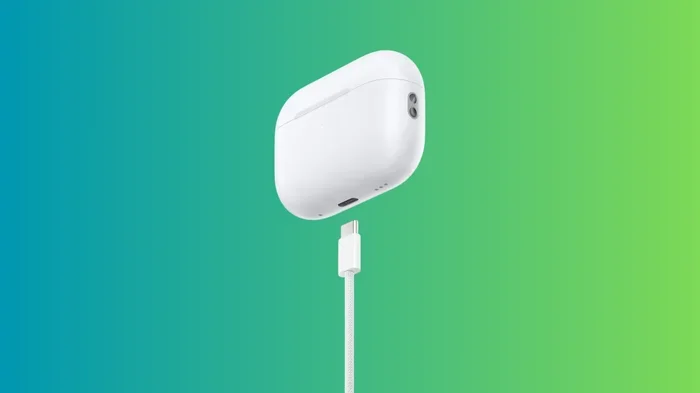
Featured image for AirPods Pro USB-C charging
Image source: techwiser.com
Yes, AirPods Pro now come with USB-C. Apple introduced USB-C charging cases with the AirPods Pro 2 refresh in September 2023, and this became the standard port for newer models. The original AirPods Pro (2019) and early AirPods Pro 2 versions still use Apple’s Lightning connector. If you want USB-C, you’ll need either the AirPods Pro 2 (USB-C version) or the newer AirPods Pro 3.
Picture this: you just unboxed a shiny new pair of AirPods Pro, ready to connect them to your iPhone, and you reach for a cable. You grab what you think is the right one, but it doesn’t fit. That tiny moment of confusion is something millions of Apple fans have experienced over the years. Why? Because Apple’s charging ports have changed, and the answer to “do AirPods Pro have USB-C” depends on when your earbuds were made.
Here’s the short answer: yes, modern AirPods Pro use USB-C. But the full story is a bit more interesting. Apple’s switch from Lightning to USB-C didn’t happen overnight. It was a gradual rollout that started with iPads, moved to iPhones, and finally landed on AirPods. Knowing which model you have (or want to buy) can save you frustration, extra cables, and even money.
In this guide, we’ll walk through every AirPods Pro model, what port it uses, when the switch happened, and why it matters. We’ll also cover the benefits of USB-C, charging tips, and what to do if you’re stuck with an older Lightning version. Let’s clear up the confusion once and for all.
Key Takeaways
- USB-C arrived in 2023: Apple launched the AirPods Pro 2 with USB-C in September 2023, ending the Lightning era for premium AirPods.
- AirPods Pro 3 has it too: The latest AirPods Pro generation uses USB-C, making it the current standard across Apple’s audio lineup.
- Older models use Lightning: The original AirPods Pro (2019) and the first AirPods Pro 2 (2022) still feature Lightning ports.
- EU regulations played a role: The European Union’s common charger law pushed Apple toward USB-C adoption across devices.
- USB-C offers real benefits: Faster charging, universal compatibility, and the ability to charge from your iPhone 15 or Mac.
- Wireless charging still works: All AirPods Pro models support Qi and MagSafe wireless charging, regardless of port type.
- Check before you buy: Knowing the port type matters if you’re switching ecosystems or replacing cables.
📑 Table of Contents
- The Short Answer: Yes, AirPods Pro Have USB-C (Now)
- The History: How AirPods Pro Went from Lightning to USB-C
- Why USB-C Matters: The Real Benefits
- How to Tell Which Port Your AirPods Pro Have
- What If You Have the Older Lightning Version?
- Charging Tips and Best Practices
- The Future of AirPods Charging
- Final Thoughts
The Short Answer: Yes, AirPods Pro Have USB-C (Now)
Let’s get the obvious question out of the way first. Do AirPods Pro have USB-C? Yes, current AirPods Pro models charge via USB-C. If you buy AirPods Pro today, you’ll get a USB-C charging case. You can plug it into any modern MacBook, iPad, iPhone 15 or later, or even a Nintendo Switch. The same cable that charges your laptop can charge your earbuds. It’s that simple.
But this wasn’t always the case. Apple stuck with its proprietary Lightning port for years, even as the rest of the tech world moved to USB-C. The first two generations of AirPods Pro both launched with Lightning. It wasn’t until September 2023 that Apple finally made the switch.
So if someone asks you “do AirPods Pro have USB-C,” the best reply is: “It depends on the model.” The newest ones do. The older ones don’t. That’s the foundation for everything else we’ll cover.
Which Models Have USB-C?
Here’s a quick breakdown:
- AirPods Pro (1st generation, 2019): Lightning port
- AirPods Pro (2nd generation, 2022): Lightning port (original version)
- AirPods Pro (2nd generation, 2023 refresh): USB-C port
- AirPods Pro (3rd generation, 2024/2025): USB-C port
If you want USB-C, you need either the updated AirPods Pro 2 or the newer AirPods Pro 3. Anything older will require a Lightning cable or a USB-C to Lightning adapter.
The History: How AirPods Pro Went from Lightning to USB-C
To really understand why this matters, let’s rewind a bit. Apple’s love affair with the Lightning connector started in 2012. At the time, Lightning was a huge upgrade from the old 30-pin connector. It was smaller, reversible, and faster. For nearly a decade, Lightning was the standard across iPhones, iPads, and AirPods.

Visual guide about AirPods Pro USB-C charging
Image source: static.iphoneaddict.fr
But the world changed. By 2020, USB-C had become the universal standard for nearly every device. Android phones, laptops, tablets, game consoles, and even some cameras all used USB-C. Apple was the odd one out. And that created a real problem: people were drowning in cables. A 2022 survey showed the average household had at least three different charging cables lying around. Imagine how much e-waste that creates when multiplied across billions of homes.
Enter the European Union. In October 2022, EU lawmakers passed a law requiring all smartphones, tablets, and headphones sold in the EU to use USB-C by the end of 2024. Apple, which sells globally, didn’t want to make different versions for different regions. So they decided to switch everything to USB-C worldwide.
The iPhone Kicked Off the Change
The iPhone 15 lineup, released in September 2023, was Apple’s first iPhone to use USB-C. That set the stage for everything else. A few days later, Apple quietly announced the AirPods Pro 2 with a USB-C case. It was the same earbuds most people already knew, just with a new port and a few upgrades like dust resistance and lossless audio with the Vision Pro headset.
By 2024, when the AirPods 4 launched, USB-C was the standard across Apple’s audio lineup. The Lightning port, once ubiquitous, is now mostly a memory.
A Quick Timeline
- 2019: AirPods Pro (1st gen) launches with Lightning
- 2022: AirPods Pro (2nd gen) launches with Lightning
- September 2023: AirPods Pro (2nd gen) refresh arrives with USB-C
- 2024: AirPods 4 launches with USB-C
- 2024/2025: AirPods Pro (3rd gen) launches with USB-C
Did you know? Apple sold more than 80 million AirPods in 2023 alone, according to Counterpoint. So when Apple switched to USB-C, it affected a huge chunk of the global earbud market almost overnight.
Why USB-C Matters: The Real Benefits
You might be thinking, “Okay, but why does it matter what port my earbuds use?” Fair question. The answer is: it matters more than you’d think, especially if you value convenience.
One Cable to Rule Them All
The biggest win is simplicity. With USB-C, you can charge your MacBook, iPad, iPhone, Nintendo Switch, and AirPods Pro all with the same cable. No more drawer full of tangled wires. No more borrowing the wrong one at a friend’s house. This is what people mean when they call USB-C the “universal” port.
Think of it like this. Imagine every gas station only accepted a special fuel nozzle unique to your car brand. That’d be a nightmare, right? USB-C is like having one nozzle that works at every pump. It’s a tiny change that makes daily life easier.
Faster Charging Speeds
USB-C generally supports faster charging than Lightning. The AirPods Pro 2 (USB-C) can deliver about an hour of listening time from just five minutes in the case. While Lightning models charge at similar speeds, USB-C opens the door for even faster top-ups using higher-wattage chargers.
Quick tip: If you want the fastest AirPods Pro charging, use a 20W or higher USB-C power adapter. Apple’s own 20W brick works great, but any reputable third-party USB-C charger will do the trick.
Charge from Anything
Here’s a fun benefit that often gets overlooked. With USB-C AirPods Pro, you can charge the case directly from your iPhone 15 or later. Just plug a USB-C cable into your iPhone, and it will share power with your earbuds. This is perfect for travel, long flights, or emergencies.
You can also charge from your iPad, MacBook, or even a friend’s Android phone. The flexibility is incredible compared to the Lightning era.
Better for the Environment
Did you know that the average person replaces their charging cables every two to three years? Multiply that by 1.5 billion smartphone users worldwide, and you’ve got a massive amount of cables ending up in landfills. By standardizing on USB-C, the EU estimates it can reduce e-waste by 11,000 tons per year. That’s a lot of cables.
Apple’s switch wasn’t purely environmental, but it’s a nice bonus. When everyone uses the same cable, fewer cables get thrown away.
How to Tell Which Port Your AirPods Pro Have
Maybe you already own a pair of AirPods Pro and you’re not sure which model you have. Don’t worry, it’s easy to check.
Look at the Case
The simplest way is to look at the charging port on the bottom of the case. If it’s a small, narrow oval, it’s Lightning. If it’s a wider, rounded rectangle, it’s USB-C. USB-C ports are also slightly larger overall.
Check Your iPhone Settings
You can also verify through your iPhone. Go to Settings > Bluetooth, tap the “i” next to your AirPods Pro, and look at the model number. Here are the relevant codes:
- A2083, A2084: AirPods Pro 1st gen (Lightning)
- A2968, A2700: AirPods Pro 2nd gen, Lightning version
- A2968 (refreshed): AirPods Pro 2nd gen, USB-C version
- A3047, A3048, A3049: AirPods Pro 3rd gen (USB-C)
If you see model numbers starting with A3047 or A3, you almost certainly have USB-C.
Check the Box or Receipt
If you still have the original packaging, the box should clearly state “USB-C” or show the USB-C symbol. The same applies to your receipt or order confirmation email from Apple.
What If You Have the Older Lightning Version?
Maybe you bought your AirPods Pro before the switch, and now you’re stuck with Lightning. That’s not the end of the world. Here’s how to deal with it.
Stick With What You Have
If your AirPods Pro still work great, there’s no urgent need to upgrade just for the port. Lightning cables are easy to find, often included with older iPhones, and your existing setup probably already includes them.
Buy an Adapter
If you’ve gone full USB-C and have no Lightning cables left, you can buy a USB-C to Lightning adapter. Apple’s official adapter is small, reliable, and inexpensive. Third-party options also work, but stick with trusted brands like Anker or Belkin to avoid cheap knockoffs.
Use Wireless Charging Instead
Here’s the best part. Every AirPods Pro model supports wireless charging. The Lightning models support Qi, and the newer models support Qi, MagSafe, and Apple Watch chargers. If you have a wireless pad on your desk or nightstand, you may never need to plug in your case at all.
This is one of those underrated features. Just set your AirPods Pro on a charging pad and forget about cables entirely.
Consider Upgrading
If your AirPods Pro are old, the battery is weak, or you simply want the latest features, an upgrade might make sense. The AirPods Pro 3 (USB-C) offer better active noise cancellation, improved sound quality, and a sleeker design. It’s a noticeable jump from the original AirPods Pro.
Charging Tips and Best Practices
Whether you have USB-C or Lightning, here are some tips to get the most out of your AirPods Pro.
Don’t Overcharge
Modern lithium-ion batteries are smart, but leaving them plugged in at 100% for days can slowly degrade them. If you use wireless charging, consider removing the case once it’s full. With USB-C, it’s easier to top up briefly and unplug.
Use a Quality Charger
Cheap, no-name USB-C chargers can damage batteries or pose safety risks. Stick with the Apple-branded charger, or use a reputable third-party option. Look for “USB-IF certified” labels for peace of mind.
Keep the Port Clean
Pocket lint, dust, and debris love to collect in charging ports. Every few weeks, gently clean your AirPods Pro case with a soft, dry brush or a wooden toothpick. Compressed air also works. A clean port ensures a reliable connection and faster charging.
Avoid Extreme Temperatures
Don’t leave your AirPods Pro in a hot car or freezing environment. Batteries hate extremes. Apple recommends using and storing AirPods Pro between 32°F and 95°F (0°C to 35°C) for best results.
Update the Firmware
Apple periodically releases firmware updates that can improve battery life and charging efficiency. Make sure your AirPods Pro are connected to your iPhone and updated to the latest firmware. You can check by going to Settings > Bluetooth > [Your AirPods] > More Info.
The Future of AirPods Charging
So what’s next? Is USB-C the final destination, or will Apple change again?
Wireless Everything
Industry insiders predict that Apple may eventually remove ports entirely from AirPods cases, relying solely on wireless charging. The Apple Watch already does this with certain models. As wireless charging speeds improve and battery life extends, this becomes more realistic.
USB-C Is Here to Stay
For now, USB-C is the standard. It will likely remain so for the next 5 to 10 years. Even if Apple shifts to portless designs, USB-C will dominate the transition period.
MagSafe and Beyond
Current AirPods Pro already support MagSafe charging, which uses magnets to align the case perfectly on a charging pad. Future versions might include reverse wireless charging, allowing your iPhone to charge your AirPods by simply stacking them on the back. Some Android phones already do this.
The bottom line? USB-C is the present and near future of AirPods Pro charging. Whether you buy them today or upgrade next year, USB-C will be the standard for a long time.
Final Thoughts
So, do AirPods Pro have USB-C? Yes, they do, as long as you’re looking at the right model. The AirPods Pro 2 (2023 refresh) and AirPods Pro 3 both feature USB-C charging cases. Older models still use Lightning. The switch happened because of a mix of EU regulations, consumer demand for simpler charging, and Apple’s gradual transition across its product lineup.
USB-C brings real benefits: one cable for all your devices, faster charging, the ability to share power from your iPhone, and a small win for the planet. If you’re in the market for new AirPods Pro, USB-C is now the standard, so you’ll get it by default. If you’re holding onto older Lightning AirPods, they still work fine, especially if you use wireless charging.
Whichever model you own, take care of the battery, keep the port clean, and use quality chargers. That way, your AirPods Pro will keep delivering great sound for years to come.
Still have questions about AirPods Pro charging or features? Drop them in the comments, and we’ll help you sort it out.
Frequently Asked Questions
Do all AirPods Pro have USB-C?
No, only newer AirPods Pro models have USB-C. The original AirPods Pro (2019) and the first version of AirPods Pro 2 (2022) use Apple’s Lightning connector. The AirPods Pro 2 refresh from September 2023 and the AirPods Pro 3 both use USB-C.
When did AirPods Pro get USB-C?
Apple introduced USB-C to AirPods Pro in September 2023 with a refreshed version of the AirPods Pro 2. This update coincided with the iPhone 15’s switch to USB-C and was partly driven by new European Union regulations requiring a common charging standard.
Can I charge AirPods Pro with USB-C from my iPhone?
Yes! If you have an iPhone 15 or newer, you can charge your USB-C AirPods Pro case directly from your iPhone using a USB-C cable. This is perfect for travel or when you don’t have access to a wall outlet. The iPhone will share its battery power with the case.
Are AirPods Pro USB-C cases waterproof?
USB-C AirPods Pro cases have an IP54 rating, which means they’re resistant to dust and splashes of water. They can handle sweat and light rain, but you should not submerge them in water. The earbuds themselves have the same IP54 rating.
Is the AirPods Pro USB-C case different from Lightning?
The cases look almost identical, but the USB-C version has a slightly different port shape and adds IP54 dust resistance. The USB-C model also supports lossless audio with the Apple Vision Pro headset. Battery life and other features remain similar.
Should I upgrade to AirPods Pro USB-C if I have Lightning ones?
It depends on your needs. If your current AirPods Pro work well and you have Lightning cables, there’s no rush. But if you want better noise cancellation, improved sound, dust resistance, and the convenience of USB-C, the upgrade is worth it. The AirPods Pro 3 offers the most significant improvements.