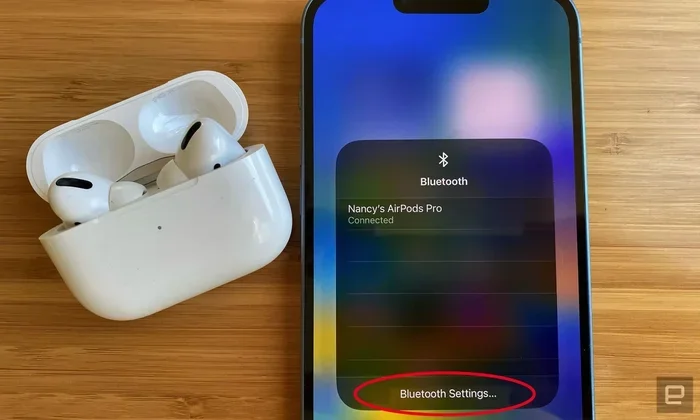
Featured image for AirPods Pro Bluetooth connection
Image source: robots.net
Yes, AirPods Pro use Bluetooth technology to wirelessly connect to your devices. They feature Bluetooth 5.3 for stable connections, extended range, and improved power efficiency. Whether you’re pairing with an iPhone, iPad, Mac, or even an Android device, Bluetooth is the magic that makes your AirPods Pro work seamlessly.
Imagine this: you pull a tiny white case from your pocket, flip it open near your iPhone, and within seconds, a little popup appears on your screen. “Connect.” You tap it, and suddenly, your favorite music is flowing directly into your ears. No wires. No hassle. Just pure audio magic.
But have you ever stopped to wonder how this wireless wizardry actually works? What’s the invisible thread connecting your AirPods Pro to your phone? The answer is simpler than you might think, yet the technology behind it is remarkably sophisticated.
In this comprehensive guide, we’ll dive deep into the wireless technology powering your AirPods Pro. You’ll learn exactly how they connect, what makes them special, how far they can really reach, and how to fix common connection hiccups. Whether you’re a tech newbie or a curious gadget lover, this article has something for you.
Key Takeaways
- Bluetooth 5.3 Technology: AirPods Pro (2nd generation) use the latest Bluetooth 5.3 standard for faster, more reliable wireless connections.
- Universal Compatibility: AirPods Pro work with any Bluetooth-enabled device, including iPhones, iPads, Macs, Android phones, and Windows PCs.
- Typical Range: AirPods Pro maintain a stable Bluetooth connection up to 30-60 feet (10-18 meters) in open spaces.
- Apple’s H2 Chip: Beyond Bluetooth, the H2 chip enables special features like automatic device switching and spatial audio.
- Energy Efficient: Bluetooth Low Energy (BLE) technology helps AirPods Pro deliver up to 6 hours of listening time per charge.
- Easy Pairing: Apple’s custom Bluetooth pairing process makes connecting AirPods Pro nearly instant with Apple devices.
- Troubleshooting Tips: Most connection issues can be fixed by resetting your AirPods or forgetting the device in Bluetooth settings.
📑 Table of Contents
- What Wireless Technology Do AirPods Pro Use?
- How Does Bluetooth Work in AirPods Pro?
- Which Devices Can AirPods Pro Connect To Via Bluetooth?
- How Far Can AirPods Pro Reach via Bluetooth?
- Common AirPods Pro Bluetooth Issues and How to Fix Them
- AirPods Pro Bluetooth vs. Other Wireless Technologies
- Tips for Getting the Best Bluetooth Experience with AirPods Pro
- Frequently Asked Questions About AirPods Pro and Bluetooth
- Final Thoughts
What Wireless Technology Do AirPods Pro Use?
Let’s cut right to the chase: AirPods Pro use Bluetooth technology. This is the same wireless standard that powers your wireless speakers, smartwatches, and countless other gadgets. But Apple’s implementation of Bluetooth in AirPods Pro goes far beyond the basics.
Understanding Bluetooth Basics
Think of Bluetooth as a universal language that devices speak to each other wirelessly. It’s like two people having a conversation across a room without anyone else hearing them. Bluetooth uses radio waves in the 2.4 GHz frequency band to transmit data over short distances.
Here’s a fun fact: Bluetooth technology is named after Harald Bluetooth, a 10th-century Danish king known for uniting Scandinavian tribes. Just as King Harald united different groups, Bluetooth technology unites different devices. Cool, right?
AirPods Pro and Bluetooth 5.3
The AirPods Pro (2nd generation) feature Bluetooth 5.3, which is the latest mainstream version of this technology. This matters because each new Bluetooth version brings improvements:
- Faster data transfer: Music and calls sound crisper with less delay.
- Longer range: You can wander further from your device without losing connection.
- Better battery life: Bluetooth 5.3 is more energy-efficient than older versions.
- Improved stability: Fewer dropouts and interruptions.
The original AirPods Pro (1st generation) uses Bluetooth 5.0, which is still excellent but slightly older. Either way, you’re getting reliable wireless performance.
How Does Bluetooth Work in AirPods Pro?
Now that you know AirPods Pro use Bluetooth, let’s explore how this technology actually functions in your earbuds. It’s like peeking under the hood of a car, except way more interesting.
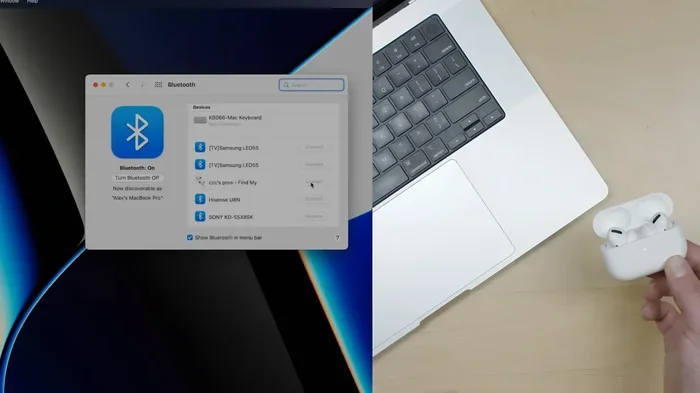
Visual guide about AirPods Pro Bluetooth connection
Image source: blog-uploads.eneba.games
The Pairing Process Explained
Pairing is basically the “getting to know you” phase between your AirPods Pro and your device. Here’s what happens step by step:
- Discovery mode: When you open your AirPods Pro case near an Apple device, the case broadcasts a Bluetooth signal saying, “Hey, I’m here!”
- Authentication: Your device recognizes the AirPods and verifies them with Apple’s servers.
- Connection establishment: A secure wireless link is created between your device and the AirPods.
- Handshake complete: From now on, your AirPods will automatically connect whenever they’re near your device.
With Apple devices, this process is almost magical. With non-Apple devices, you’ll need to go through your standard Bluetooth pairing menu. The AirPods Pro store pairing information for up to 8 different devices.
The Role of Apple’s H2 Chip
Here’s where things get interesting. While AirPods Pro use Bluetooth to communicate, they also have Apple’s custom-designed H2 chip (or H1 chip in the 1st generation). This chip works alongside Bluetooth to deliver features you won’t find in regular Bluetooth earbuds.
Think of it this way: Bluetooth is the highway, and the H2 chip is the specialized sports car driving on it. The highway (Bluetooth) provides the road, but the sports car (H2 chip) provides the speed, handling, and special features.
The H2 chip enables:
- Adaptive Transparency mode: Lets important sounds in while reducing loud noises.
- Personalized Spatial Audio: Creates a 3D surround sound experience.
- Active Noise Cancellation: Blocks unwanted background sound.
- Hands-free “Hey Siri”: Voice assistant activation without touching your earbuds.
Which Devices Can AirPods Pro Connect To Via Bluetooth?
One of the best things about AirPods Pro is their versatility. They can connect to virtually any device with Bluetooth capabilities. Let’s break this down by category.
Apple Devices
AirPods Pro offer the best experience with Apple products, including:
- iPhone (running iOS or later)
- iPad (running iPadOS or later)
- Mac (running macOS or later)
- Apple Watch (running watchOS or later)
- Apple TV (running tvOS or later)
- iPod touch (running iOS or later)
When paired with Apple devices, you get extra features like automatic device switching, audio sharing, and “Find My” integration. Did you know you can track your AirPods Pro case using the “Find My” app? It’s like having a tiny GPS for your earbuds!
Non-Apple Devices
Here’s some great news: AirPods Pro work with non-Apple Bluetooth devices too. You can pair them with:
- Android smartphones (Samsung, Google Pixel, OnePlus, etc.)
- Windows PCs and laptops
- Smart TVs
- Gaming consoles (PlayStation, Xbox, Nintendo Switch)
- Bluetooth-enabled audio receivers
However, you’ll miss out on some Apple-specific features when using non-Apple devices. Spatial Audio, automatic switching, and Siri integration may not work. But basic functions like music playback, calls, and noise cancellation still function perfectly.
Multi-Device Pairing Limitations
Here’s something important to understand: AirPods Pro can only actively connect to one device at a time. Unlike some headphones that connect to multiple devices simultaneously, AirPods Pro play nicely with just one source at any given moment.
However, Apple devices signed into the same iCloud account can automatically hand off audio to your AirPods. So if you’re listening to music on your iPhone and then start playing a video on your Mac, the audio can switch automatically. Pretty neat, right?
How Far Can AirPods Pro Reach via Bluetooth?
Bluetooth range is one of the most common questions people have about wireless earbuds. After all, what good are wireless earbuds if you have to keep your phone in your pocket?
Typical Bluetooth Range
AirPods Pro can maintain a stable connection up to 30-60 feet (10-18 meters) from your device in open spaces. In real-world conditions, expect around 30-40 feet with some walls in between.
Several factors affect this range:
- Obstacles: Walls, furniture, and even your body can reduce range.
- Interference: Wi-Fi networks, microwaves, and other Bluetooth devices can cause signal disruption.
- Environment: Outdoor open spaces provide better range than crowded indoor areas.
- Device capability: The Bluetooth version in your source device matters too.
Pro tip: Your body is one of the biggest obstacles. If you keep your phone in your back pocket and turn your head, you might experience brief dropouts. Try keeping your device in your front pocket or on the same side as your AirPods for the best connection.
Bluetooth Range Comparison
To put AirPods Pro’s range in perspective, here’s how different Bluetooth versions compare:
- Bluetooth 4.2: Up to 30 feet (10 meters)
- Bluetooth 5.0: Up to 200 feet (60 meters) theoretical, 50 feet practical
- Bluetooth 5.3: Up to 200 feet (60 meters) theoretical, 60+ feet practical
AirPods Pro (2nd generation) with Bluetooth 5.3 offer some of the best range in consumer earbuds. The original AirPods Pro with Bluetooth 5.0 are still excellent, just slightly less powerful.
Common AirPods Pro Bluetooth Issues and How to Fix Them
Even with great technology, sometimes things go wrong. Let’s tackle the most common Bluetooth issues with AirPods Pro and their solutions.
Issue 1: AirPods Pro Won’t Connect
If your AirPods Pro refuse to connect, try these steps in order:
- Check Bluetooth is on: Make sure Bluetooth is enabled on your device.
- Check the case battery: Your AirPods case needs charge too.
- Bring them closer: Move your AirPods closer to your device.
- Restart your device: Sometimes a simple restart fixes everything.
- Reset your AirPods: Hold the setup button on the case for 15 seconds until the light flashes amber, then white.
Issue 2: Audio Cutting Out or Stuttering
Nothing’s more annoying than choppy audio. Here’s how to fix it:
- Reduce distance: Stay within 30 feet of your device.
- Minimize interference: Move away from Wi-Fi routers and microwaves.
- Update your firmware: Keep your AirPods Pro firmware up to date.
- Check for obstructions: Don’t put your phone in a bag or behind thick walls.
Issue 3: Only One AirPod Working
If only one AirPod is producing sound, try this:
- Place both AirPods in the case and close the lid for 30 seconds.
- Open the lid and try again.
- If the problem persists, check the audio balance settings on your device.
- Clean the mesh and contacts on the non-working AirPod.
Issue 4: Poor Connection Quality
For general connection quality issues, “forgetting” the device and re-pairing often works wonders. Go to your Bluetooth settings, tap the “i” icon next to your AirPods, and select “Forget This Device.” Then pair them again from scratch.
Did You Know? Approximately 15% of Bluetooth pairing issues are solved simply by toggling Bluetooth off and on again. It’s the classic “turn it off and turn it on again” for a reason, it really works!
AirPods Pro Bluetooth vs. Other Wireless Technologies
You might have heard about other wireless technologies like Wi-Fi or proprietary wireless systems. How does Bluetooth compare?
Bluetooth vs. Wi-Fi Audio
Some high-end audio systems use Wi-Fi instead of Bluetooth. Here’s how they differ:
- Range: Wi-Fi has longer range than Bluetooth.
- Audio quality: Wi-Fi can support lossless audio; Bluetooth compresses audio.
- Power consumption: Wi-Fi uses more battery than Bluetooth.
- Convenience: Bluetooth is simpler and more universal.
For portable earbuds like AirPods Pro, Bluetooth is the perfect choice. It balances quality, range, and battery life beautifully.
Bluetooth Audio Codecs Explained
When Bluetooth transmits audio, it uses codecs to compress and decompress the sound. Different codecs offer different quality levels:
- SBC: The standard Bluetooth codec. Decent quality, works everywhere.
- AAC: Apple’s preferred codec. Better quality, used by AirPods Pro.
- AptX: Popular on Android devices. Good quality with low latency.
- LDAC: Sony’s high-resolution codec. Excellent quality but drains battery.
AirPods Pro primarily use the AAC codec, which provides excellent audio quality while maintaining battery efficiency. When connected to Apple devices, the AAC codec performs at its best.
The Future of AirPods Pro Connectivity
Apple is constantly innovating. Rumors suggest future AirPods models might include:
- Support for Bluetooth LE Audio for better efficiency
- Improved spatial audio capabilities
- Enhanced health monitoring features
- Even better noise cancellation
Bluetooth technology continues to evolve, and so will AirPods Pro. The wireless earbuds of tomorrow will likely be even more impressive than today’s models.
Tips for Getting the Best Bluetooth Experience with AirPods Pro
Want to maximize your AirPods Pro Bluetooth performance? Here are some pro tips that make a real difference.
Optimization Tips
- Keep your devices updated: Software updates often include Bluetooth improvements.
- Charge regularly: Low battery can affect Bluetooth performance.
- Clean your AirPods: Dirty contacts can cause connection issues.
- Avoid interference zones: Stay away from microwaves and crowded Wi-Fi areas when possible.
- Use Apple devices when possible: The experience is optimized for the Apple ecosystem.
Extending Your AirPods Pro Battery Life
Since Bluetooth is the biggest battery drain on wireless earbuds, optimizing your Bluetooth use helps battery life:
- Use one AirPod at a time if you don’t need stereo sound.
- Turn off features like spatial audio when not needed.
- Keep your AirPods in their case when not in use.
- Avoid extreme temperatures, which can damage the battery.
Did You Know? AirPods Pro can last up to 6 hours on a single charge with active noise cancellation enabled. With the charging case, you get up to 30 hours total listening time. That’s enough for a cross-country flight plus some!
Frequently Asked Questions About AirPods Pro and Bluetooth
Let’s wrap up with answers to some of the most common questions people ask about AirPods Pro and Bluetooth technology.
Do all generations of AirPods Pro use Bluetooth?
Yes, every AirPods Pro model uses Bluetooth technology. The original AirPods Pro (2019) features Bluetooth 5.0, while the AirPods Pro 2 (2022) upgraded to Bluetooth 5.3 for improved performance and efficiency.
Can AirPods Pro connect to two devices at the same time?
AirPods Pro can only actively connect to one device at a time. However, with Apple devices signed into the same iCloud account, audio can automatically switch between devices, giving you a seamless multi-device experience.
Why do my AirPods Pro keep disconnecting from Bluetooth?
Common causes include being out of range, low battery, Bluetooth interference, or outdated firmware. Try staying closer to your device, charging your AirPods, updating firmware, and minimizing interference from other wireless devices.
Do AirPods Pro use more battery with Bluetooth than wired earphones?
Yes, Bluetooth requires power to transmit audio wirelessly, which uses more battery than wired connections. However, AirPods Pro are engineered for efficiency, providing up to 6 hours of listening time per charge despite using Bluetooth.
Is Bluetooth audio quality good enough for music lovers?
Absolutely! Modern Bluetooth codecs like AAC (used by AirPods Pro) deliver excellent audio quality that satisfies most listeners. While audiophiles might prefer wired connections for lossless audio, most people can’t tell the difference in everyday listening.
Can I use AirPods Pro with my TV?
Yes, if your TV has Bluetooth capability, you can pair AirPods Pro with it. This is great for late-night viewing without disturbing others. Some older TVs may require a separate Bluetooth audio adapter to work with AirPods Pro.
Final Thoughts
So, do AirPods Pro use Bluetooth? Absolutely, and they use it brilliantly! Bluetooth is the invisible thread that makes the magic of wireless audio possible, and Apple’s implementation of this technology in AirPods Pro is among the best in the industry.
From the convenience of seamless pairing to the freedom of movement, Bluetooth technology has transformed how we listen to music, take calls, and enjoy entertainment. AirPods Pro take this technology and elevate it with features like active noise cancellation, spatial audio, and the powerful H2 chip.
Whether you’re an iPhone enthusiast or an Android user, a music lover or a podcast addict, understanding how your AirPods Pro work can help you get the most out of them. Keep them charged, keep them updated, and they’ll keep delivering fantastic audio whenever you need it.
Now that you’re an AirPods Pro Bluetooth expert, go enjoy your favorite tunes wirelessly. After all, life’s too short for tangled cables!