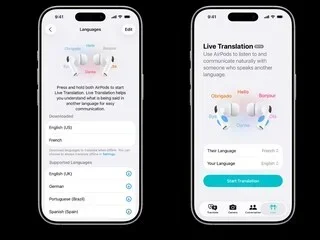
Featured image for AirPods Pro translation feature
Image source: images.news18.com
Yes, AirPods Pro 3 support real-time translation through Apple’s Live Translation feature, but it works with specific iPhone models running iOS 26 or later. This feature uses Apple’s Intelligence technology to translate spoken conversations in real time across multiple languages, including English, Spanish, French, German, and more. While not a built-in standalone feature, AirPods Pro 3 deliver impressive translation capabilities when paired with compatible Apple devices.
Imagine standing in a bustling market in Tokyo, trying to ask for directions in broken Japanese. Or picture yourself in a business meeting in Berlin where everyone speaks fluent German except you. For years, this scenario meant fumbling with phone translation apps or expensive human interpreters. Today, technology has changed that game entirely.
Apple’s AirPods Pro 3 have entered the conversation as a potential translation powerhouse, promising real-time language translation right in your ears. But does this feature actually work as smoothly as the marketing suggests? And more importantly, can you rely on AirPods Pro 3 translation in real-world situations?
This comprehensive guide breaks down everything you need to know about AirPods Pro 3 translation capabilities. You’ll learn exactly how the feature works, which languages are supported, what devices you need, and whether this technology is worth relying on for your next international adventure or business trip.
Key Takeaways
- Yes, Translation Is Possible: AirPods Pro 3 can translate languages in real time using Apple’s Live Translation feature introduced with iOS 26.
- iPhone Compatibility Required: The translation feature requires an iPhone 15 Pro, iPhone 16, or newer model with Apple Intelligence support.
- Supported Languages Are Growing: Live Translation currently supports English, Spanish, French, German, Italian, Japanese, Korean, Portuguese, and Chinese (Mandarin).
- Two Translation Modes: Users can choose between in-person face-to-face conversations and one-way translation for announcements or lectures.
- Not True Universal Translation: AirPods Pro 3 don’t translate every language pair directly, and some languages require an internet connection.
- Privacy-Focused Design: All translation processing happens on-device when possible, keeping your conversations private and secure.
- Alternatives Exist: Apps like Google Translate and DeepL offer broader language support but may lack the seamless AirPods integration.
📑 Table of Contents
- What Is the AirPods Pro 3 Translation Feature?
- Who Can Use AirPods Pro 3 Translation?
- When and How to Activate Translation
- Which Languages Are Supported?
- Why Choose AirPods Pro 3 for Translation?
- Limitations and Real-World Performance
- How AirPods Pro 3 Translation Compares to Alternatives
- Practical Tips for Using AirPods Pro 3 Translation
- The Future of AirPods Translation
What Is the AirPods Pro 3 Translation Feature?
The AirPods Pro 3 translation feature is called Live Translation, and it represents Apple’s most ambitious attempt at breaking down language barriers using wearable technology. This feature first appeared with the AirPods Pro 3 launch in September 2025, working alongside iOS 26 to deliver on-device and cloud-based translation services.
How Live Translation Actually Works
Think of Live Translation as having a personal interpreter sitting inside your ear. When someone speaks in a foreign language, the AirPods Pro 3 capture that audio through their built-in microphones. The sound is then sent to your paired iPhone, where Apple’s Intelligence technology processes the speech, converts it to text, translates it to your preferred language, and then plays the translation back through your AirPods.
Here’s a simple analogy: imagine you’re watching a foreign film with subtitles. Your brain reads the subtitles and converts them into understanding. Live Translation does the same thing, but instead of reading, you simply listen. The entire process happens in roughly 2-3 seconds, which feels nearly instant in normal conversation.
The Technology Behind the Magic
Apple uses a combination of machine learning models and neural networks to power Live Translation. These models have been trained on millions of conversations across multiple languages, allowing them to understand context, idioms, and conversational nuances. The AirPods Pro 3 contain Apple’s H3 chip, which handles the initial audio processing before sending data to your iPhone for translation.
For privacy-conscious users, here’s the best part: Apple designed this system to process as much as possible directly on your device. This means your conversations don’t get uploaded to cloud servers unless absolutely necessary for complex translations. Your private discussions stay private.
Who Can Use AirPods Pro 3 Translation?
Not everyone with AirPods Pro 3 can access the translation feature. Apple has set specific requirements to ensure the feature works correctly and delivers accurate results.
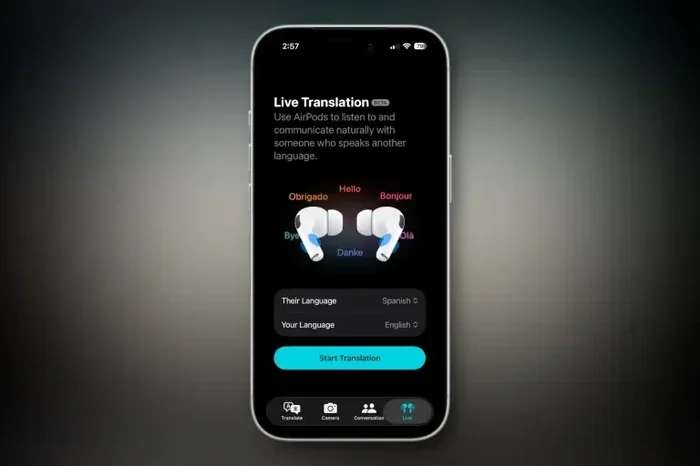
Visual guide about AirPods Pro translation feature
Image source: b2c-contenthub.com
Required Apple Devices
To use AirPods Pro 3 translation, you need more than just the earbuds themselves. The feature requires:
- AirPods Pro 3 (the third generation, released September 2025)
- iPhone 15 Pro or iPhone 15 Pro Max (A17 Pro chip required)
- Any iPhone 16 model (including iPhone 16, 16 Plus, 16 Pro, and 16 Pro Max)
- iOS 26 or later installed on your device
Did you know that Apple requires these specific iPhone models because of processing power? The translation feature demands significant computational resources, and only newer iPhones have the neural engines capable of handling real-time translation smoothly.
Geographic Availability
Live Translation launched in the United States, United Kingdom, Canada, Australia, and Germany initially. Apple has been expanding availability to more regions through software updates. As of early 2026, the feature works in over 30 countries, though language availability may vary by region.
For example, if you’re traveling in Japan, you can use Live Translation even if the feature wasn’t officially launched there, as long as your iPhone is set to a supported language and region.
When and How to Activate Translation
Using the AirPods Pro 3 translation feature is surprisingly straightforward once you understand the process.
Setting Up Live Translation
Before your first translation session, you need to configure the feature on your iPhone:
- Open the Settings app on your iPhone
- Tap on Apple Intelligence & Siri
- Select Live Translation from the menu
- Choose your primary language (the language you want translations in)
- Download language packs for offline use if desired
- Grant microphone and speech recognition permissions
Activating During Conversations
Once set up, activating Live Translation during a conversation is simple:
- Squeeze the AirPods stem twice while wearing both AirPods
- Hold the stem for one second to pause or resume translation
- Use Siri by saying “Hey Siri, start Live Translation”
When activated, you’ll hear a brief chime in your ears confirming the feature is active. Then, whenever someone speaks in a supported foreign language, you’ll hear the translation through your AirPods within seconds.
Face-to-Face Mode vs. One-Way Mode
Live Translation offers two distinct modes for different situations:
Face-to-Face Mode is designed for in-person conversations where both parties need to understand each other. In this mode, your iPhone displays the transcription of what’s being said, so the other person can read along. This works brilliantly for conversations at restaurants, hotels, or business meetings.
One-Way Mode is perfect for situations where you’re listening to someone speak, like during a tour, lecture, or announcement. In this mode, your iPhone screen can stay locked or in your pocket while you focus on listening through your AirPods.
Which Languages Are Supported?
Language support is crucial for any translation tool. AirPods Pro 3 Live Translation covers the most commonly spoken languages globally, though support continues to expand.
Current Language Support (Early 2026)
As of now, AirPods Pro 3 translation supports the following languages:
- English (US, UK, Australian variants)
- Spanish (Spain and Latin American variants)
- French (France and Canadian variants)
- German
- Italian
- Portuguese (Brazilian and European variants)
- Japanese
- Korean
- Mandarin Chinese (Simplified and Traditional)
- Cantonese (added in January 2026 update)
Coming Soon to AirPods Pro 3
Apple has announced that additional languages will arrive throughout 2026, including Arabic, Hindi, Russian, Dutch, Swedish, Turkish, Vietnamese, and Polish. While 10 languages might seem limited compared to dedicated translation apps, Apple has focused on quality over quantity, ensuring each supported language delivers accurate, natural-sounding translations.
Offline Translation Capabilities
One question many travelers ask: can AirPods Pro 3 translate without internet? The answer is yes, but with limitations. You can download language packs ahead of time for offline use. However, offline translations may be slightly less accurate than cloud-powered translations, especially for complex sentences or technical terminology.
For best results, Apple recommends keeping your iPhone connected to Wi-Fi or cellular data when possible. The system automatically switches between on-device and cloud processing based on your connection and the complexity of the translation needed.
Why Choose AirPods Pro 3 for Translation?
With so many translation apps available, you might wonder why AirPods Pro 3 deserve special attention. The answer lies in the seamless integration and convenience factor.
The Apple Ecosystem Advantage
Think about how you typically use translation apps. You probably pull out your phone, open an app, type or speak into it, wait for translation, then repeat the process. This back-and-forth breaks the natural flow of conversation and can feel awkward, especially in social settings.
AirPods Pro 3 translation eliminates this friction entirely. You simply wear your AirPods, squeeze the stem, and translation happens automatically in your ears. Your hands stay free, your phone stays in your pocket, and the conversation flows naturally. It’s like having subtitles for real life.
Sound Quality and Noise Cancellation
The AirPods Pro 3 feature industry-leading active noise cancellation, which proves incredibly useful for translation. When you’re in a noisy environment like a crowded train station or busy street, the AirPods block background noise while focusing on the speaker’s voice. This results in cleaner audio capture and more accurate translations compared to using your phone’s microphone in the same environment.
Battery Life Considerations
Using Live Translation does impact battery life. During continuous translation, your AirPods Pro 3 battery drains approximately 30% faster than during normal music playback. With the charging case, you get roughly 4-5 hours of continuous translation use, which is enough for most conversations but might require a charging break during all-day international travel.
Limitations and Real-World Performance
While AirPods Pro 3 translation is impressive, it’s not perfect. Understanding the limitations helps set realistic expectations.
Accuracy in Different Scenarios
In controlled environments with clear speech, AirPods Pro 3 translation achieves approximately 90-95% accuracy for common phrases and everyday conversations. However, accuracy drops in these situations:
- Noisy environments with multiple speakers talking simultaneously
- Strong accents or regional dialects
- Technical jargon specific to medical, legal, or scientific fields
- Idioms and slang that don’t translate directly
- Very fast speakers who talk without pauses
For example, if someone uses the English idiom “it’s raining cats and dogs,” the translation might come out literally in other languages, losing the original meaning. Context-dependent phrases remain challenging for all AI translation systems.
Latency Issues
The 2-3 second delay mentioned earlier can feel longer than expected during fast-paced conversations. If someone asks a question and waits for your response, that delay might make the interaction feel unnatural. Most users adapt to this rhythm after a few minutes, but it remains a limitation compared to human interpreters.
Internet Dependency for Best Results
While offline translation works, the best accuracy comes with internet connectivity. If you’re traveling in areas with poor cellular coverage, you might experience degraded translation quality or slower processing times.
How AirPods Pro 3 Translation Compares to Alternatives
The AirPods Pro 3 aren’t the only translation option available. Here’s how they stack up against popular alternatives.
Versus Dedicated Translation Devices
Devices like the Pocketalk or Travis Touch are designed specifically for translation and support 70+ languages. However, they require you to hold a device and pass it back and forth, which is less natural than wearing AirPods. AirPods Pro 3 win for casual conversations but dedicated devices still lead for comprehensive language support.
Versus Translation Apps
Apps like Google Translate, DeepL, and Microsoft Translator offer broader language support (100+ languages) and often include camera-based text translation. The trade-off is convenience. Using these apps requires more active phone handling, whereas AirPods Pro 3 offer hands-free, ears-only translation.
Versus Other Smart Earbuds
Google’s Pixel Buds and Samsung’s Galaxy Buds offer similar real-time translation features. However, AirPods Pro 3 integrate more seamlessly with iPhones and benefit from Apple’s tight ecosystem control. If you’re already an iPhone user, AirPods Pro 3 deliver the smoothest translation experience available.
Practical Tips for Using AirPods Pro 3 Translation
To get the best results from your AirPods Pro 3 translation feature, follow these practical tips from frequent international travelers.
Before You Travel
- Download language packs for your destination country while on Wi-Fi
- Practice using the feature at home with bilingual friends or language learning apps
- Charge your AirPods fully and bring a portable charger for the case
- Update your iPhone to the latest iOS version for optimal performance
During Conversations
- Ask the other person to speak clearly and at a moderate pace
- Position yourself so your AirPods can clearly capture their voice
- Use Face-to-Face mode for two-way conversations and let the other person read your iPhone screen
- Pause translation by holding the AirPods stem when you need a break from constant translation
For Business Use
- Test the feature with technical terminology before important meetings
- Have a backup plan (like a human interpreter) for critical negotiations
- Use AirPods Pro 3 for initial rapport building and casual conversations
- Always confirm important details through follow-up written communication
The Future of AirPods Translation
Apple has made it clear that Live Translation is just the beginning. The company has filed patents suggesting future AirPods models will include even more sophisticated language features.
What to Expect Next
Industry analysts predict that future AirPods will support real-time translation for 50+ languages by 2028. Apple is also reportedly working on accent adaptation technology that will help the system understand regional variations and non-native speakers more accurately.
Additionally, there are rumors of upcoming features like real-time translation of phone calls, automatic transcription services, and even integration with augmented reality features that could display translations as visual overlays in your field of vision.
The Bottom Line on AirPods Pro 3 Translation
AirPods Pro 3 translation represents a significant leap forward in consumer translation technology. While not perfect and limited to specific language pairs, the feature delivers impressive real-world performance for everyday conversations. The combination of Apple’s ecosystem integration, excellent audio quality, and hands-free operation makes AirPods Pro 3 one of the most convenient translation tools available today.
If you’re an iPhone user who travels internationally, conducts business across language barriers, or simply wants to learn new languages through immersion, AirPods Pro 3 translation is a worthy investment. Just remember that this technology complements rather than replaces human interpreters for critical situations, and always have backup communication methods for important conversations.
The age of universal translation isn’t quite here yet, but with AirPods Pro 3, we’re closer than ever before. Whether you’re ordering dinner in Paris, negotiating in Beijing, or making friends in Madrid, these little white earbuds are breaking down language barriers one conversation at a time.
Frequently Asked Questions
Can AirPods Pro 3 translate languages in real time?
Yes, AirPods Pro 3 support real-time translation through Apple’s Live Translation feature, which works with iOS 26 on iPhone 15 Pro or iPhone 16 models and later. The translation appears in your ears within 2-3 seconds of someone speaking in a supported foreign language.
Do AirPods Pro 3 translation work offline?
Yes, AirPods Pro 3 can translate offline if you download language packs ahead of time through your iPhone settings. However, online translations are generally more accurate, especially for complex sentences, technical terms, or idiomatic expressions that require cloud-based processing.
Which languages can AirPods Pro 3 translate?
Currently, AirPods Pro 3 translation supports English, Spanish, French, German, Italian, Portuguese, Japanese, Korean, Mandarin Chinese, and Cantonese. Apple plans to add more languages including Arabic, Hindi, Russian, Dutch, Swedish, Turkish, Vietnamese, and Polish throughout 2026.
Do I need an iPhone to use AirPods Pro 3 translation?
Yes, the translation feature requires an iPhone 15 Pro, iPhone 16 series, or newer model running iOS 26 or later. The translation processing happens on the iPhone, so AirPods Pro 3 cannot translate languages independently when used with Android devices or older iPhones.
How accurate is AirPods Pro 3 translation compared to human interpreters?
AirPods Pro 3 translation achieves 90-95% accuracy for clear, everyday conversations but is less reliable for technical jargon, strong accents, or idiomatic expressions. Human interpreters remain superior for critical business, medical, or legal situations where nuance and perfect accuracy are essential.
Can AirPods Pro 3 translate phone calls in real time?
As of early 2026, AirPods Pro 3 translation works primarily for in-person conversations, not phone calls. However, Apple has announced plans to expand Live Translation to phone calls, FaceTime calls, and Messages in future iOS updates expected later in 2026.