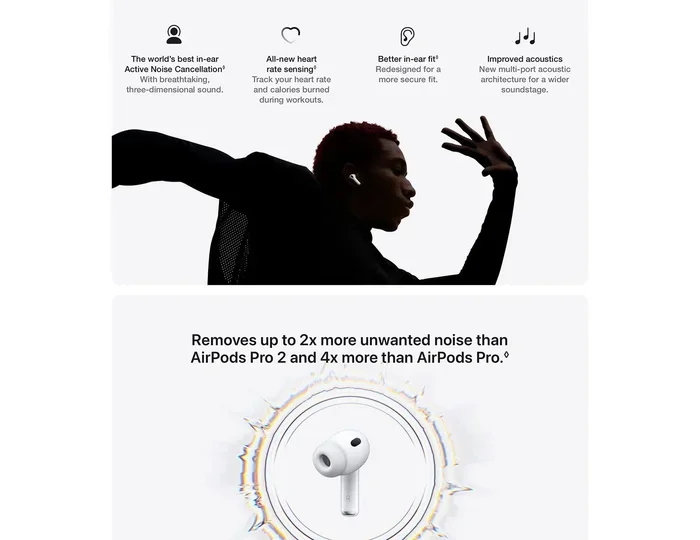
Featured image for AirPods noise cancellation feature
Image source: m.media-amazon.com
Not all AirPods offer noise cancelling. Apple’s Active Noise Cancellation (ANC) is available on AirPods Pro (all generations), AirPods Max, and AirPods 4 (with ANC). Standard AirPods (1st through 3rd generation) and AirPods 4 (base model) only feature passive noise isolation through their physical seal and design. Understanding which model you own is essential to knowing what kind of noise control you have access to.
Imagine this: you’re on a crowded subway, and the screech of metal on metal, the chatter of strangers, and the rumble of the train are all blending into one giant wall of noise. You pop in your earbuds, press a button, and suddenly, the chaos fades into a calm bubble of silence. That’s the magic of noise cancelling technology. But if you own AirPods, you might be wondering: do AirPods do noise cancelling, and is yours one of the lucky models that does?
Here’s the short answer: yes, some AirPods do noise cancelling, but not all of them. Apple has been strategic about which models get this premium feature. Think of it like ordering a coffee. You can get a basic cup of joe, or you can upgrade to a fancy latte with all the bells and whistles. Standard AirPods are your basic coffee. AirPods Pro and AirPods Max are the lattes with extra foam and flavor.
In this comprehensive guide, we’ll break down exactly which AirPods have noise cancelling, how the technology actually works (in plain English, no engineering degree required), and how to get the most out of this feature. Whether you’re a daily commuter, a focused remote worker, or someone who just wants to enjoy music without distractions, you’ll learn everything you need to know.
Key Takeaways
- Not All AirPods Have ANC: Only AirPods Pro, AirPods Max, and AirPods 4 (ANC version) feature Active Noise Cancellation. Standard AirPods rely on passive noise isolation only.
- ANC Uses Microphones: Active Noise Cancellation works by detecting outside sound waves and creating “anti-noise” sound waves to cancel them out before you hear them.
- Two ANC Modes: Most ANC AirPods offer Active Noise Cancellation mode (block sound) and Transparency mode (let sound in) for different listening environments.
- Battery Impact: Using ANC drains the battery faster. Expect roughly 4-6 hours per charge with ANC on, versus 5-7 hours with it off (depending on model).
- Fit Matters: Proper ear tip fit dramatically improves both ANC performance and passive noise isolation. Test all included ear tip sizes.
- Adaptive Audio (Newer Models): AirPods Pro 2 and AirPods 4 (ANC) feature Adaptive Audio that automatically blends ANC and Transparency based on your surroundings.
- Not Magic: ANC works best on consistent, low-frequency sounds (airplane engines, AC hum) rather than sudden, high-frequency noises (screaming, clattering dishes).
📑 Table of Contents
- Which AirPods Have Noise Cancelling? The Complete Breakdown
- How Does AirPods Noise Cancelling Actually Work?
- Active Noise Cancellation vs. Passive Noise Isolation: What’s the Difference?
- Which AirPods Have the Best Noise Cancelling?
- How to Use Noise Cancelling on Your AirPods
- Tips to Maximize AirPods Noise Cancelling Performance
- Common Misconceptions About AirPods Noise Cancelling
- Real-World Scenarios: When AirPods Noise Cancelling Shines
- The Future of AirPods Noise Cancelling
- Final Verdict: Do AirPods Do Noise Cancelling?
Which AirPods Have Noise Cancelling? The Complete Breakdown
Let’s cut right to the chase. When someone asks, “do AirPods do noise cancelling?” the answer depends entirely on which AirPods you’re holding. Apple has made this a feature reserved for specific models, and it’s important to know what you’re working with.
AirPods With Active Noise Cancellation
These are the AirPods that actually cancel noise using advanced technology:
- AirPods Pro (1st Generation): Released in October 2019, these were the first in-ear AirPods with ANC. They introduced silicone ear tips for a better seal.
- AirPods Pro (2nd Generation): Launched in September 2022, these improved on the original with better noise cancellation, the H2 chip, and Adaptive Transparency mode.
- AirPods Pro (2nd Generation) with USB-C: Released in September 2023, same features as the Lightning version but with a USB-C charging case.
- AirPods 4 with Active Noise Cancellation: Released in September 2024, this is the first non-Pro AirPods model to offer ANC, though it’s a slightly stripped-down version.
- AirPods Max: Apple’s over-ear headphones released in December 2020, featuring premium ANC with eight microphones dedicated to noise cancellation.
AirPods Without Active Noise Cancellation
These models do not have true noise cancelling technology, though they offer some passive noise reduction through their design:
- AirPods (1st Generation): Released December 2016. No ANC.
- AirPods (2nd Generation): Released March 2019. No ANC.
- AirPods (3rd Generation): Released October 2021. No ANC, though the contoured design offers slightly better passive isolation than earlier models.
- AirPods 4 (Base Model): Released September 2024. No ANC. This is the entry-level version of the AirPods 4 lineup.
Did You Know? The phrase “Do AirPods do noise cancelling?” is one of the most searched AirPod-related questions online, with thousands of monthly searches. Many users buy AirPods thinking they have ANC, only to discover their specific model doesn’t.
How Does AirPods Noise Cancelling Actually Work?
If you’ve ever wondered what’s happening inside those tiny white earbuds when you flip on noise cancelling, you’re in for a treat. The science is actually pretty cool, and once you understand it, you’ll appreciate the technology even more.
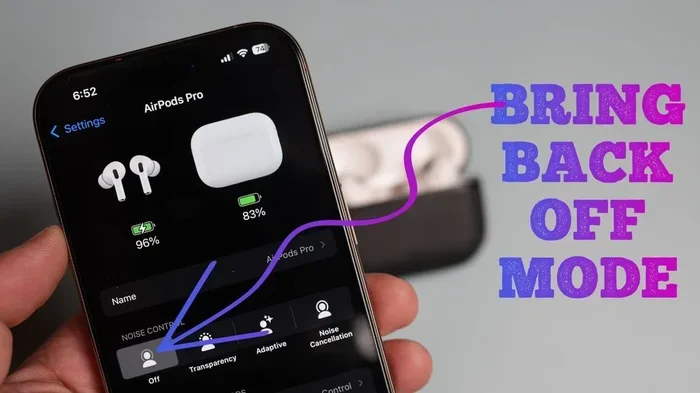
Visual guide about AirPods noise cancellation feature
Image source: appsntips.com
The Magic of Anti-Noise
Imagine you’re standing at the edge of a pool, and you push a wave toward the wall. That wave bounces back, right? Now imagine pushing two identical waves at the exact same time from opposite directions. They’d meet in the middle and cancel each other out. That’s essentially how Active Noise Cancellation works, except with sound waves instead of water.
Here’s the play-by-play:
- Step 1: Listen to the Noise. Tiny microphones on the outside of your AirPods continuously listen to the sounds around you, like the hum of an airplane engine or the drone of an air conditioner.
- Step 2: Create Anti-Noise. The H1 or H2 chip inside your AirPods processes that sound in real-time and creates a sound wave that’s the exact opposite. Think of it as a mirror image, flipped upside down.
- Step 3: Play It Back. Your AirPods play this “anti-noise” through the speaker at the exact same time the real noise would reach your ear. When the two waves meet, they cancel each other out.
- Step 4: Enjoy the Silence. What you perceive is dramatically reduced noise, allowing you to hear your music, podcast, or silence more clearly.
What About Transparency Mode?
Apple didn’t stop at just blocking noise. They added a clever opposite feature called Transparency Mode. While ANC creates anti-noise to cancel sound, Transparency Mode uses the same microphones to let outside sound in. It’s like opening a window in a soundproof room.
This is incredibly useful for:
- Hearing flight announcements at the airport
- Having a quick conversation without removing your AirPods
- Staying aware of traffic while walking in a city
- Listening for your coffee order at a busy cafe
Did You Know? Apple’s H2 chip (in AirPods Pro 2) processes noise cancellation 48,000 times per second. That’s faster than you can blink your eye!
Active Noise Cancellation vs. Passive Noise Isolation: What’s the Difference?
This is a crucial distinction that often confuses people. When researching whether AirPods do noise cancelling, you’ll encounter both terms, and they are not the same thing.
Passive Noise Isolation: The Physical Barrier
Passive noise isolation is what you get from any earbud or headphone just by wearing it. It’s the physical blocking of sound waves by the material of the device. Think of it like putting your hands over your ears. You’re not actively cancelling the sound, you’re just physically in the way.
Standard AirPods (1st, 2nd, 3rd gen, and AirPods 4 base model) rely entirely on passive noise isolation. They use their hard plastic design to block some sound, but because they don’t create a tight seal in your ear, a lot of noise leaks in. It’s like wearing a baseball cap in the rain. You’ll stay drier than without it, but you’re still going to get wet.
AirPods Pro models use silicone ear tips that create a much better seal, improving passive isolation significantly. It’s the difference between a baseball cap and a rain jacket.
Active Noise Cancellation: The Smart Technology
Active Noise Cancellation, as we discussed earlier, uses microphones, processors, and speakers to actively fight noise. This is the premium feature that truly transforms your listening experience, especially in noisy environments.
Here’s a comparison to make it crystal clear:
- Passive Isolation: Like closing a window to block street noise. Some sound still gets through.
- Active Noise Cancellation: Like having a magic force field that actively destroys sound waves before they reach your ears.
When combined, as they are in AirPods Pro, the effect is powerful. The passive isolation blocks high-frequency sounds and reduces overall volume, while ANC tackles the low-frequency rumble. Together, they create a sanctuary of quiet.
Which AirPods Have the Best Noise Cancelling?
Not all ANC is created equal. If you’re shopping specifically for noise cancelling capabilities, here’s how the models stack up in 2024-2025.
AirPods Max: The Premium Champion
Despite being released in 2020, AirPods Max still offer some of the best noise cancellation Apple has ever produced. With nine microphones (eight dedicated to ANC), a larger physical form factor that covers your entire ear, and premium materials, they outperform all in-ear models. They’re ideal for frequent flyers and office workers who need intense focus.
The tradeoff? They’re heavy (384 grams), expensive ($549), and the battery only lasts about 20 hours with ANC on.
AirPods Pro (2nd Generation): The Sweet Spot
For most people, AirPods Pro 2 offer the best balance of noise cancellation, portability, and price. Apple claims they’re “up to 2x more effective” at noise cancellation than the first generation, thanks to the H2 chip and improved acoustic design.
These are ideal for:
- Daily commuters on trains and buses
- Remote workers in noisy households
- Fitness enthusiasts who want to block gym noise
- Frequent travelers
AirPods 4 with ANC: The Budget Option
The AirPods 4 with ANC, released in September 2024, brought active noise cancellation to a non-Pro model for the first time. However, it’s not quite as powerful as the AirPods Pro 2. According to Apple, it offers effective noise cancellation but lacks some of the adaptive smart features.
It’s a great entry point if you want ANC but don’t want to spend Pro-level money.
How to Use Noise Cancelling on Your AirPods
Got an ANC-capable pair? Great. Here’s how to actually use the feature, because it’s not always obvious.
Method 1: The Force Sensor (AirPods Pro)
On AirPods Pro, you’ll find a small flat indent on the stem of each earbud. This is called the Force Sensor. To control noise modes:
- Press and hold the stem for about two seconds to toggle between Active Noise Cancellation and Transparency Mode.
- You’ll hear a soft chime when the mode changes.
Method 2: The Digital Crown (AirPods Max)
On AirPods Max, the Digital Crown (the round button on top of the right ear cup) controls noise modes:
- Press and hold the Digital Crown to switch between ANC and Transparency Mode.
Method 3: Control Center on iPhone or iPad
This is the easiest method for adjusting on the fly:
- Swipe down from the top-right corner of your screen to open Control Center.
- Press and hold the volume slider.
- Tap the “Noise Control” icon at the bottom left.
- Choose between Noise Cancellation, Transparency, or Off.
Method 4: Settings App
For more detailed control, dive into your Settings app:
- Go to Settings > Bluetooth and tap the “i” next to your AirPods.
- Scroll down to “Noise Control” section.
- Toggle between modes or customize which modes appear in Control Center.
Pro Tip: Customize Your Controls
Want to switch between two specific modes instead of cycling through all of them? In Settings, you can choose which noise control modes the press-and-hold gesture activates. For example, you can set it to only toggle between ANC and Transparency, skipping “Off.”
Tips to Maximize AirPods Noise Cancelling Performance
Even the best ANC technology is only as good as the fit and setup. Here’s how to get the most out of your AirPods.
Get the Right Ear Tip Fit
This is the single most important factor. If your AirPods Pro don’t fit properly, ANC won’t work well because outside noise leaks in through the gaps. Apple includes four sizes of silicone tips (XS, S, M, L) with AirPods Pro 2.
To find your perfect fit:
- Try each size and see which feels most secure and comfortable.
- Use the Ear Tip Fit Test in Settings > Bluetooth > [Your AirPods] > Ear Tip Fit Test.
- The test plays a few seconds of music and uses the microphones to determine if your tips are creating a good seal.
Keep Your AirPods Clean
Dirt, earwax, and debris can block the microphones and affect ANC performance. Clean your AirPods weekly using a soft, dry, lint-free cloth. For stubborn grime on the silicone tips, remove them and wash with water (let them dry completely before reattaching).
Update Your Firmware
Apple regularly releases firmware updates that can improve noise cancellation algorithms. To ensure you have the latest version:
- Place your AirPods in their case and connect them to power.
- Keep them near your iPhone with Wi-Fi enabled.
- Updates install automatically in the background.
Use Adaptive Audio (AirPods Pro 2 and AirPods 4 ANC)
If you have AirPods Pro 2 or AirPods 4 with ANC, turn on Adaptive Audio in Settings. This intelligent feature automatically adjusts between ANC and Transparency based on your environment. Walking into a loud cafe? It cranks up ANC. Someone starts talking to you? It shifts to Transparency.
It’s like having a smart assistant who manages your noise levels for you.
Manage Battery Life
ANC drains battery faster. If you’re running low and don’t need noise cancellation, switch it off. Battery tips:
- AirPods Pro 2: Up to 6 hours with ANC on, up to 7 hours with ANC off.
- AirPods Max: Up to 20 hours with ANC on.
- AirPods 4 with ANC: Up to 4 hours with ANC on, up to 5 hours with ANC off.
Common Misconceptions About AirPods Noise Cancelling
Let’s clear up some confusion that often comes up when people ask, “do AirPods do noise cancelling?”
Myth 1: All AirPods Block Noise the Same Way
False. There’s a massive difference between a $129 pair of AirPods 4 and a $249 pair of AirPods Pro 2 in terms of noise control. The Pro models use silicone tips, dedicated ANC chips, and advanced algorithms that base models simply don’t have.
Myth 2: Noise Cancelling Makes You Completely Deaf to the World
False. Even with ANC on, you’ll still hear very loud or sudden noises like sirens, alarms, or someone shouting directly in your ear. ANC works best on consistent, low-frequency sounds. Think airplane engines, HVAC systems, and the steady rumble of a train, not crying babies or barking dogs.
Myth 3: Transparency Mode Means No Noise Reduction
Mostly false. Transparency Mode does use your AirPods’ microphones to amplify outside sounds, but it still provides some passive isolation through the physical ear tip seal. You’ll hear the world more clearly than with ANC, but not exactly as if you had nothing in your ears.
Myth 4: Higher Volume Improves Noise Cancelling
False. ANC works independently of volume. In fact, the whole point of ANC is that you can listen at lower volumes in noisy environments, which is better for your hearing health.
Myth 5: AirPods Noise Cancelling Is Just as Good as Premium Headphones
It depends on the comparison. AirPods Max compete with the best over-ear ANC headphones from Sony and Bose. AirPods Pro 2 are excellent for in-ear earbuds but slightly behind some dedicated audiophile options. Standard AirPods aren’t even in the running since they don’t have ANC.
Real-World Scenarios: When AirPods Noise Cancelling Shines
Let’s paint a picture of how ANC actually improves daily life.
The Frequent Flyer’s Best Friend
Airplane cabins produce a constant drone at around 60-80 decibels. Without ANC, you’d need to crank your music to dangerous levels just to hear it over the engine noise. With AirPods Pro 2 or AirPods Max, that drone fades away, letting you enjoy movies, music, or even just silence at a comfortable volume.
The Open Office Survival Kit
Working from home with a noisy family? In an open office with chatty coworkers? ANC creates a personal focus zone. It’s not perfect (voices are harder to cancel than engine noise), but it dramatically reduces distractions.
The Commuter’s Companion
On a subway or bus, ANC tackles the low-frequency rumble while the passive seal blocks chatty passengers. You arrive at your destination calmer and less mentally exhausted.
The Student’s Study Buddy
Dorm rooms are noisy. Libraries aren’t always silent. ANC helps create that “cone of focus” you need for deep work or studying.
The Future of AirPods Noise Cancelling
Apple continues to invest heavily in this technology. Based on industry trends and Apple’s patent filings, here’s what we might see in coming years:
- Better adaptive algorithms that learn your preferences and environments.
- Health monitoring features integrated with ANC, like using noise exposure data to protect your hearing.
- Improved Transparency Mode that can selectively amplify certain frequencies (like a friend’s voice) while still blocking background noise.
- More models with ANC, potentially bringing the feature to even base-level AirPods.
- Enhanced spatial audio integration that works alongside ANC for an even more immersive experience.
Did You Know? According to the World Health Organization, noise pollution affects over 100 million people in the United States alone, and prolonged exposure can lead to hearing loss, stress, and sleep disturbances. Noise cancelling technology isn’t just a luxury, it’s a health tool.
Final Verdict: Do AirPods Do Noise Cancelling?
So, do AirPods do noise cancelling? Yes, but the answer comes with an asterisk. Only specific models offer true Active Noise Cancellation: AirPods Pro (1st and 2nd generation), AirPods 4 with ANC, and AirPods Max. The standard AirPods models rely on passive noise isolation, which provides some noise reduction but doesn’t actively cancel sound waves.
If noise cancelling is a priority for you, here’s the quick recommendation:
- Best Overall: AirPods Pro 2 (2nd Generation) for their balance of effectiveness, portability, and price.
- Best Premium: AirPods Max for the most powerful ANC, ideal for home or office use.
- Best Budget: AirPods 4 with ANC for an entry-level option that still delivers the core feature.
- Not Recommended for ANC: AirPods 1, 2, 3, or AirPods 4 (base model).
Remember, even the best noise cancelling AirPods need a proper fit and occasional cleaning to perform at their peak. Take the time to find your perfect ear tip size, keep your AirPods updated, and use the right noise mode for each situation.
Whether you’re trying to focus in a chaotic environment, enjoy music at safer volumes, or simply find a moment of calm in your busy day, AirPods with noise cancelling can be a game-changer. Now that you know exactly which models have it and how to use it effectively, you’re ready to make the most of this incredible technology.
Frequently Asked Questions
Do all AirPods have noise cancelling?
No, not all AirPods have Active Noise Cancellation. Only AirPods Pro (1st and 2nd generation), AirPods 4 with ANC, and AirPods Max feature this technology. Standard AirPods (1st through 3rd generation) and the base AirPods 4 only offer passive noise isolation through their physical design.
How do I turn noise cancelling on and off?
You can control noise cancelling in several ways. On AirPods Pro, press and hold the force sensor on the stem. On AirPods Max, press and hold the Digital Crown. Alternatively, open Control Center on your iPhone, press and hold the volume slider, and tap the Noise Control icon to switch between modes.
Does AirPods noise cancelling work without music playing?
Yes, you can use Active Noise Cancellation without playing any audio. This is great for moments when you simply want quiet, like during a flight, in a noisy office, or while trying to sleep in a loud environment. The feature works independently of music playback.
How much battery does noise cancelling use?
Active Noise Cancellation does use additional battery power. On AirPods Pro 2, you get up to 6 hours with ANC on compared to 7 hours with it off. AirPods Max offer about 20 hours with ANC on. The difference is noticeable but not dramatic, and the trade-off is worth it for most users.
Can noise cancelling damage my hearing?
No, Active Noise Cancellation is actually better for your hearing health than not using it. Without ANC, people often crank up the volume in noisy environments to dangerous levels. With ANC, you can listen at lower, safer volumes because the background noise is reduced. Just remember to keep volume at reasonable levels (below 80 dB).
What’s the difference between Noise Cancelling and Transparency Mode?
Noise Cancelling uses microphones and anti-noise sound waves to block outside sounds. Transparency Mode does the opposite. It uses the same microphones to let outside sounds in, so you can hear your surroundings naturally without removing your AirPods. Both modes are useful in different situations.